aptitude command in Linux with examples (original) (raw)
Last Updated : 11 Jul, 2025
The aptitude command in Linux provides a user-friendly interface to interact with the machine's package manager. It functions similarly to a control panel, like in Windows, allowing you to install, upgrade, and remove packages. The command can be used in either a visual interface or directly via the command line, similar to the apt-get command.
**aptitude command in Linux package system opens up a highly built-in interface to interact with the package manager of the machine. It is the _control panel of programs and packages in Windows. You can _install, _upgrade and _remove your packages using this well-built interface. Also, the actions can be performed using the command-line(similar to apt-get command) or the visual interface.
**Installation aptitude
**1. For Non-Root Users:
**2. For Root Users:
**Syntax
aptitude [options] ...

After running the command, the terminal will open up the interactive interface.

**Important Usage of aptitude command:
**Command-line Actions
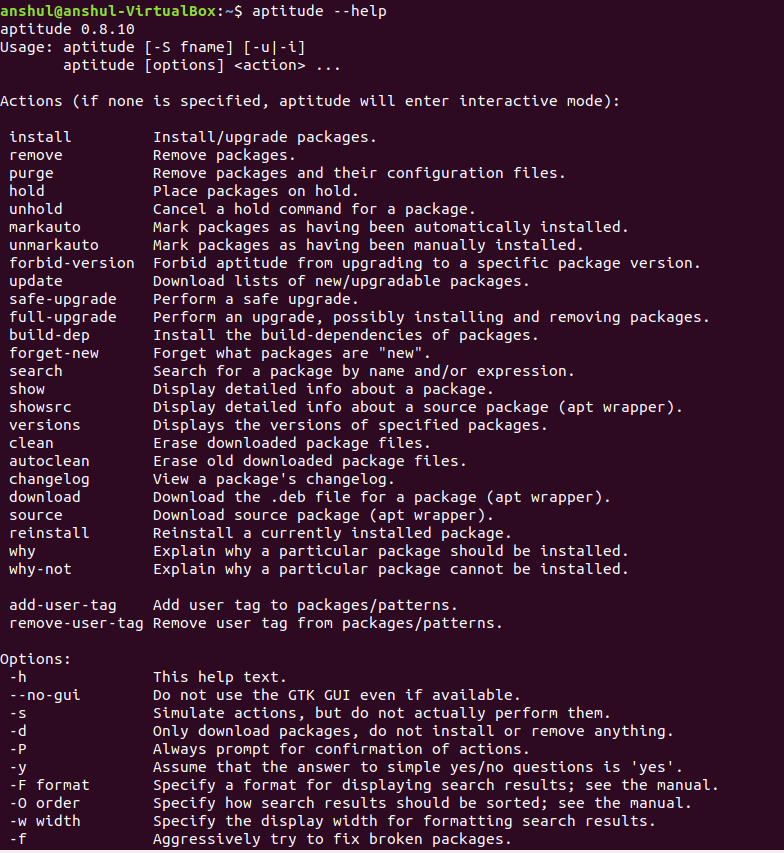
If none is specified then aptitude command will enter into the interactive mode and following actions can be performed using the command-line interface.
- **install: To install or upgrade the packages.
**Syntax:
aptitude install package_name - **remove: To remove the packages.
**Syntax:
aptitude remove package_name - **purge: To remove the packages and their configuration files. This will remove the package along with all its associated configurations, data files, and details.
**Syntax:
aptitude purge package_name - **hold: To place the packages on hold by canceling any active installation, upgrade, or removal, and prevent this package from being automatically upgraded in the future as well.
**Syntax:
aptitude hold package_name - **unhold: Cancel a hold command for a package.
- **markauto: To mark packages as having been automatically installed.
- **unmarkauto: To mark packages as having been manually installed.
- **forbid-version: To forbid aptitude from upgrading to a specific package version.
- **update: To download the lists of new or upgradable packages.
- **safe-upgrade: To perform a safe upgrade.
- **full-upgrade: To perform an upgrade, possibly installing and removing packages and also to install packages which safe-upgrade cannot do.
**Syntax:
aptitude full-upgrade - **build-dep: To install the build-dependencies of packages.
- **forget-new: To forget what packages are "new".
- **search: This is used to search for a package by name and/or expression.
- **show: To display detailed info about a package.
**Syntax:
aptitude show package
**Example:
- **showsrc: To display detailed info about a source package (apt wrapper).
- **versions: To display the versions of specified packages.
- **clean: To erase downloaded package files.
- **autoclean: To erase old downloaded package files.
**Syntax:
aptitude autoclean
**Example:
- **changelog: To view a package's changelog.
- **download: To download the _.deb file for a package (apt wrapper).
- **source: To download source package (apt wrapper).
- **reinstall: To reinstall a currently installed package.
- **why: To get the explanation why a particular package should be installed.
- **why-not: To get the explanation why a particular package cannot be installed.
- **add-user-tag: To add user tag to packages/patterns.
- **remove-user-tag: To remove user tag from packages/patterns.
Commonly used aptitude command options
| Options | Description |
|---|---|
| -D, --show-deps | It is used for the commands which are used to install or remove the packages. |
| -f | Used to fix the dependencies of the broken packages. |
| -d, --download-only | Used to download the packages to the package cache if required. But this option will not install or remove anything. |
| -h, --help | It will display a help message and exit. |
Conclusion
The aptitude command is a versatile tool for managing packages in Linux. With both interactive and command-line modes, it allows for a wide range of package management tasks, from installation to updates, and even dependency fixing. If you prefer a visual interface or prefer the command line, aptitude offers extensive functionality for users of all levels.