Help and Documentation Commands in Linux (original) (raw)
Last Updated : 7 Jan, 2026
Help and Documentation Commands in Linux are used to get detailed information about commands, their usage, available options, and functionality. These commands make it easier for users to understand how different tools work in Linux and help troubleshoot errors effectively.
- Used to view detailed manuals and documentation of commands.
- Helps understand command usage, syntax, and options.
- Useful for beginners as well as system administrators.
- Essential for learning and troubleshooting in Linux environments.
Below is a list of important help and documentation commands that help users access command details easily in Linux.
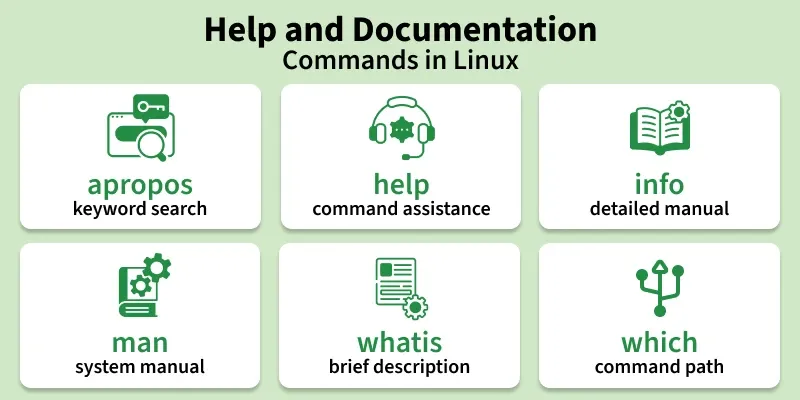
Help and Documentation Commands in Linux
1. apropos
The apropos command is used to search the manual pages (man pages) for a specific keyword. It displays related commands and brief descriptions.
- Searches manual database for matching commands
- Useful when the exact command name is unknown
- Helps explore related commands
- Displays short descriptions with names
**Syntax:
apropos keyword
**Example:
apropos clear
**Output:
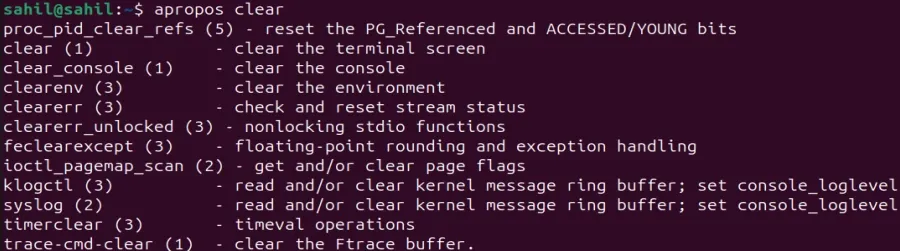
apropos clear
2. help
The help command is used to display information about built-in shell commands. It shows a short description and available options.
- Provides help for shell built-ins only
- Displays usage format and options
- Fast and simple to use
- Useful for Bash scripting learners
**Syntax:
help command_name
**Example:
help cd
**Output:
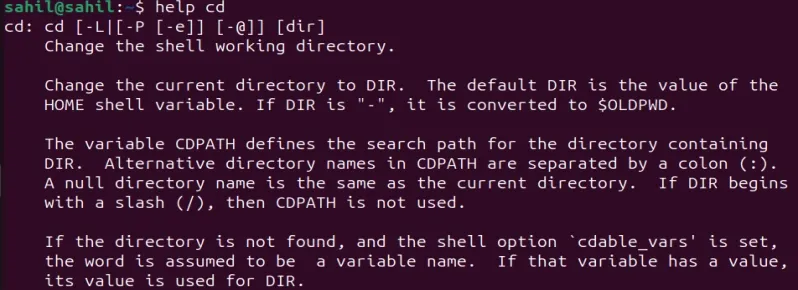
help cd
3. info
The info command displays detailed documentation about commands in a structured and scrollable format. It often contains more detailed explanations than man.
- Shows detailed command documentation
- Divides information into sections and nodes
- Easier navigation than manual pages
- Useful for learning commands deeply
**Syntax:
info command_name
**Example:
info ls
**Output:
4. man
The man command is used to display the manual pages of a command. It provides complete documentation including description, options, syntax, and examples.
- Shows complete manual of a command
- Divided into multiple sections
- Most commonly used help command
- Useful for all users from beginners to experts
**Syntax:
man command_name
**Example:
man mkdir
**Output:
5. whatis
The whatis command is used to display a short one-line description of a command. It gives a quick idea of what a command does.
- Shows brief description
- Very fast and simple
- Useful for quick understanding
- Reads information from man database
**Syntax:
whatis command_name
**Example:
whatis pwd
**Output:

whatis pwd
6. which
The which command is used to locate the executable file path of a command. It shows where the command is stored in the system.
- Displays command executable path
- Helps identify command location
- Useful for debugging PATH issues
- Supports multiple command search
**Syntax:
which command_name
**Example:
which cat
**Output:

which cat