Linux File System (original) (raw)
Last Updated : 13 May, 2026
The Linux File System is a structured method of storing and organizing data on a Linux machine. It arranges files in a hierarchical directory format starting from the root directory /.
- All files and directories in Linux originate from a single root directory /.
- It follows a hierarchical tree structure, making navigation simple and logical.
- Different directories like /home, /etc, /bin, and /var serve specific system purposes.
- Linux supports multiple file system types like ext4, XFS, Btrfs, each offering different features.
Linux File System Structure
The Linux file system architecture is organized into three important layers, each responsible for different functionalities. These layers work together to provide smooth file access, storage, and management.
1. Logical File System
- Acts as the interface between user applications and the file system.
- Handles key operations like open, read, write, and close.
- Provides security checks, such as permissions and file access control.
- Ensures applications interact with files in a simple and consistent way, without worrying about storage details.
2. Virtual File System (VFS)
- Provides a common interface for different file systems (ext4, XFS, FAT32, NTFS, etc.).
- Allows Linux to use multiple file system types at the same time.
- Acts as an abstraction layer, hiding the internal complexities of each file system.
- Makes file operations uniform and compatible, regardless of the underlying file system format.
3. Physical File System
- Directly interacts with the hardware and disk storage.
- Manages data blocks, inodes, and physical memory allocation.
- Responsible for writing data to the disk and retrieving it efficiently.
- Ensures reliable storage, error handling, and low-level data management.
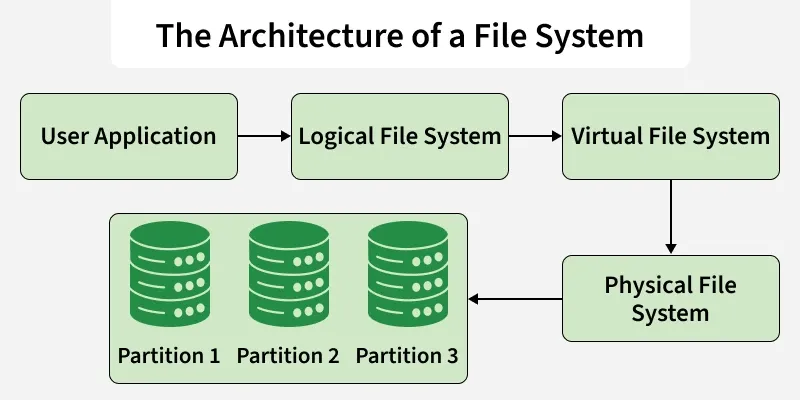
Architecture
Characteristics of a File System
A file system defines the structure, rules, and methods for how data is organized, stored, accessed, and managed on a storage device.
1. Space Management
- Determines how data is placed on storage using blocks, allocation methods, and fragmentation control.
- Ensures efficient use of space by managing free blocks, allocation tables, and storage optimization techniques.
2. Filename
- Imposes rules on filename length, allowed characters, and case sensitivity.
- Ensures consistent file naming to avoid conflicts and maintain compatibility across systems.
3. Directory
- Organizes files in a linear or hierarchical structure for easy navigation.
- Maintains an index/table to track files inside directories and subdirectories efficiently.
4. Metadata
- Stores essential file information such as size, permissions, timestamps, and type.
- Helps the system manage files by keeping track of attributes required for access and modification.
5. Utilities
- Provides operations like creating, deleting, copying, moving, renaming, and backing up files.
- Supports advanced functions such as recovery tools and access control management.
6. Design
- Each file system has limitations on maximum file size, number of files, and storage capacity.
- Influenced by internal architecture, affecting performance, reliability, and scalability.
**Advanced File System Features
**1. Journaling
Journaling file systems maintain a special log called a journal that records file system changes before they are permanently written to disk. This helps restore data in case of unexpected shutdowns or crashes.
How Journaling Works
- Changes are first logged in the journal.
- Then they are written to the actual disk.
- Finally, they are marked as completed.
**Journaling Modes
Journaling can operate in three different modes, each offering a balance between speed and data safety:
**1. Journal Mode (Highest Safety)
- Logs both file data and metadata.
- Most reliable but slowest due to heavy logging.
**2. Ordered Mode (Balanced)
- Logs metadata only, but ensures file data is written before metadata.
- Provides a good balance of performance and safety.
**3. Writeback Mode (Fastest)
- Logs metadata only without enforcing write order.
- Fastest mode but least safe and more prone to data corruption.
**2. Versioning
Versioning file systems keep track of previous versions of a file, allowing users to recover older copies when needed.
**Key Points:
- Stores earlier states of files based on commits, time intervals (minute/hour), or system events.
- Useful for backup, history tracking, and accidental deletion recovery.
**3. Inode
An inode (index node) is a data structure that stores important information about files and directories.
**Inode Contains:
- File size, permissions, and ownership details.
- Storage location (pointers to actual data blocks on disk).
Inodes act as the internal identity of files in Linux file systems.
File System Implementations
Here are some linux file systems:
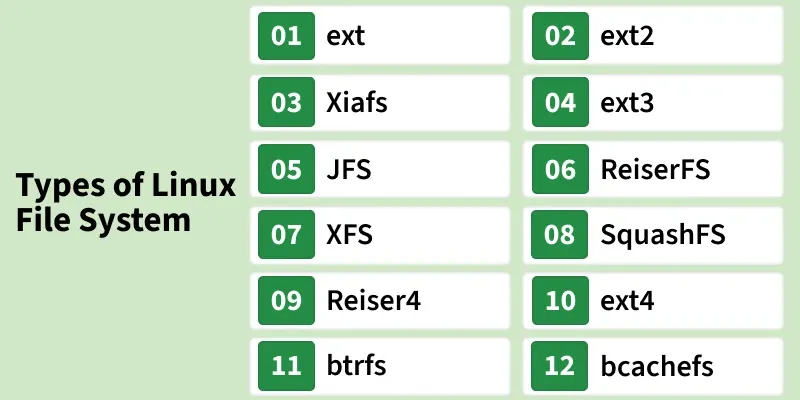
File System Implementations
**Note: _Cluster and distributed file systems will not be included for simplicity.
1. ext (Extended File System)
- Introduced in 1992 as the first file system created specifically for Linux.
- Marked the beginning of the ext family, laying the foundation for ext2, ext3, and ext4.
2. ext2
- Developed in 1993 as a non-journaling file system.
- Improved timestamp handling and file attribute management compared to ext.
- Lacks journaling, making boot-time recovery slower after improper shutdowns.
3. Xiafs
- Created in 1993 as an alternative to ext2.
- Had limited features and poor scalability, making it less reliable.
- Eventually discontinued and no longer used in modern systems.
4. ext3
- Introduced in 1999, adding journaling for better reliability and faster crash recovery.
- Supports online file system resizing and uses HTree indexing for large directories.
- Eliminates lengthy boot-time checks that were common with ext2.
5. JFS (Journaled File System)
- Originally developed by IBM in 1990, later open-sourced for Linux.
- Known for stable performance under varying workloads.
- Usage declined after ext4 emerged with better performance and compatibility.
6. ReiserFS
- Introduced in 2001 with advanced features like tail packing to reduce internal fragmentation.
- Uses B+ Trees, enabling fast directory lookups and updates.
- Was default in SUSE Linux (until 6.4) before being replaced by ext3.
7. XFS
- A 64-bit journaling file system ported to Linux in 2001.
- Supports snapshots, sparse files, online defragmentation, and large storage capacity.
- Excellent for parallel I/O operations, now default in several Linux distributions.
8. SquashFS
- Introduced in 2002 as a compressed, read-only file system.
- Used mainly in embedded systems where low storage overhead is required.
9. Reiser4
- Developed in 2004 as the successor to ReiserFS.
- Offers improved performance and design but lacks wide adoption.
- Not officially supported in most major Linux distributions.
10. ext4
- Released in 2006 as a journaling file system with backward compatibility to ext2/ext3.
- Supports large files, metadata checksumming, persistent pre-allocation, and unlimited subdirectories.
- Default file system in many Linux distributions; also readable by Windows and macOS.
11. btrfs (B-tree / Better FS)
- Introduced in 2007 with modern features like snapshots, drive pooling, data scrubbing, and self-healing.
- Supports online defragmentation and advanced storage management.
- Default file system for Fedora Workstation.
12. bcachefs
- Announced in 2015 as a high-performance copy-on-write file system.
- Includes full filesystem encryption, native compression, snapshots, and 64-bit checksumming.
- Designed as a potential successor to btrfs and ext4.
13. Others (NTFS, exFAT, etc.)
- Linux supports file systems from other OSes like NTFS (Windows) and exFAT.
- These offer good compatibility but lack Unix-style permissions and metadata features.
- Primarily used for cross-platform data exchange.
File Systems Comparison
Given below is a comparative overview of different file systems based on their storage limits, supported features, and structural capabilities.
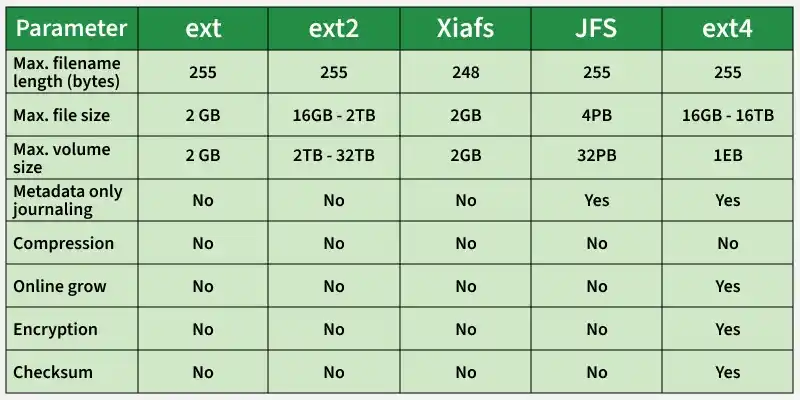
File Systems Comparison
1. Maximum Filename Length
- Most Linux file systems support a maximum filename length of 255 bytes/characters
- ReiserFS supports up to 4032 characters
- Btrfs supports up to 3976 characters
- Xiafs supports slightly smaller filenames (248 bytes)
Allowable Characters in Directory Entries
- All file systems allow any character except NUL (\0)
- Some file systems also disallow / (slash) as it is used as a directory separator
- Modern file systems support Unicode characters
- Filenames are generally case-sensitive
Maximum Pathname Length
- For most file systems, the maximum pathname length is undefined
- The limit depends on system configuration and kernel constraints
Maximum File Size
- Older file systems support smaller files (e.g., 2 GB in ext)
- ext2, ext3, ext4 support 16 GB to several TB
- XFS supports files up to 8 EiB
- JFS supports files up to 4 PB
- Btrfs supports files up to 16 EB
- Reiser4 supports extremely large files (8 EB)
Maximum Volume (Filesystem) Size
- Older file systems support volumes up to 2 GB
- ext2/ext3 support 2 TB to 32 TB
- XFS supports up to 8 EB
- JFS supports up to 32 PB
- Btrfs supports volumes up to 16 EB
Maximum Number of Files
- Many traditional file systems do not define a fixed maximum
- ext4 supports up to 2³² files
- Btrfs supports up to 2⁶⁴ files
Metadata Journaling
- ext3, ext4, JFS, XFS support metadata journaling
- Journaling helps in faster recovery after crashes
- ext and ext2 do not support journaling
- Reiser4 supports journaling, while Btrfs uses advanced metadata handling
Compression Support
- Most traditional file systems do not support compression
- Reiser4 and Btrfs support file compression
- Compression helps save disk space
Block Sub-allocation
- Improves space efficiency by allocating smaller blocks
- Supported by JFS, XFS, Reiser4, and Btrfs
- Not supported by older file systems like ext and ext2
Online File System Growth
- Allows resizing the filesystem without unmounting
- Supported by ext3, ext4, XFS, JFS, Reiser4, and Btrfs
- Not supported by older file systems
Encryption Support
- Most traditional file systems do not support encryption
- Btrfs and ext4 support encryption
- Encryption protects data from unauthorized access
Checksum Support
- Checksums help detect data corruption
- Btrfs provides full checksum support
- XFS and ext4 provide partial checksum support
- Older file systems do not support checksums
ext4 in the Linux File System
The ext4 (Fourth Extended File System) was designed with full backward compatibility to ext3 and ext2. It builds upon their strengths while introducing major enhancements in performance, scalability, reliability, and storage flexibility.
- **Large File System Support: ext4 can handle significantly larger files and volumes compared to its predecessors, making it suitable for modern storage demands.
- **Extents for Efficient Storage: It uses extents (continuous physical blocks) instead of block mapping, improving large file performance and reducing fragmentation.
- **Persistent Pre-Allocation: Guarantees storage allocation in advance, ensuring contiguous space and consistent performance especially useful for media files and databases.
- **Delayed Allocation: ext4 delays block allocation until data is flushed to disk. This improves performance and reduces fragmentation by allocating blocks more efficiently.
- **Unlimited Subdirectories (HTree Indexing): Uses HTree-based indexing, enabling the creation of unlimited subdirectories with fast lookup times.
- **Journal Checksumming: Adds checksums to the journal, allowing the file system to detect invalid or corrupted entries after a crash, improving reliability.
- **Enhanced Timestamps: Includes creation-time stamps and supports nanosecond-level precision for improved granularity.
- **Transparent Encryption: Supports filesystem-level encryption, improving data confidentiality without external tools.
- **Lazy Initialization: Cleans inode tables in the background, reducing the time required to initialize or expand the file system.
- **Default Write Barriers: Ensures proper ordering of metadata writes to protect against corruption during sudden power loss.
- **In-Development Features: Some enhancements like metadata checksumming, quota improvements, and larger allocation blocks are still being refined for broader stability.
**Example: Suppose our use case is to set up a server that stores and serves large multimedia files (videos, audio files, etc.). In this scenario, we need a file system optimized for high-speed data transfer and efficient handling of large files.
The XFS file system is a suitable choice because it is optimized for large files, supports high throughput, and performs exceptionally well in media-heavy environments.
Steps to Set Up and Use XFS
Step 1: Install XFS Utilities
Install the required tools for managing the XFS file system:
sudo apt install xfsprogs

Installing xfsprogs
Step 2: Create a Partition
Create or choose a partition (e.g., /dev/sda1) where XFS will be applied.
You can use tools like:
- fdisk
- parted
to create/manage the partition.
Step 3: Format the Partition as XFS
Format the partition using the XFS file system:
sudo mkfs.xfs /dev/sda1 -f

Format the partition
- -f is used to force the formatting and avoid warnings.
Step 4: Mount the XFS Partition
Mount the formatted XFS partition to a directory:
sudo mount /dev/sda1 /mnt/jayesh_xfs_partition

mounting of XFS partition
- You may create your own mount directory using:
sudo mkdir /mnt/my_xfs_data
Step 5: Verify the Mount
Check whether the XFS partition is mounted successfully:
df -h

Successful mount
- This will confirm the mount point, file system type, and usage.