Linux File Hierarchy Structure (original) (raw)
Last Updated : 4 Jun, 2026
The Linux File Hierarchy Structure or the Filesystem Hierarchy Standard (FHS) defines the directory structure and directory contents in Unix-like operating systems. It is maintained by the Linux Foundation.
- In the FHS, all files and directories appear under the root directory /, even if they are stored on different physical or virtual devices
- Some of these directories only exist on a particular system if certain subsystems, such as the X Window System, are installed
- Most of these directories exist in all UNIX operating systems and are generally used in much the same way
- However, the descriptions here are those used specifically for the FHS and are not considered authoritative for platforms other than Linux
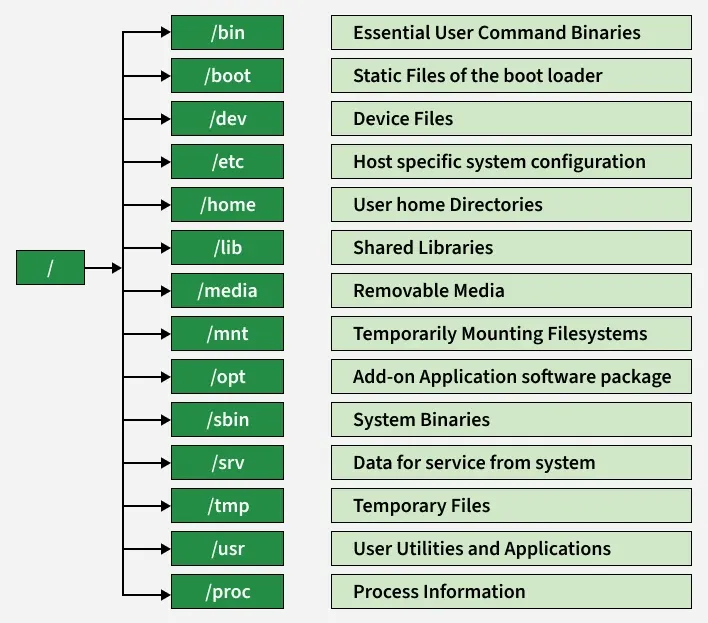
1. / (Root)
At the top of every Linux file system is the root directory represented by a forward slash /. It’s the base point, and no directory exists above it.
- If you look at the file system graphically, you’ll see all other directories branching from this root directory
- Only the root user has permission to modify contents inside this directory.
- Regular users cannot make changes here. For example, if you attempt to create a file in / as a non-root user, you’ll encounter a "Permission Denied" error

root-linux-directory
2. /bin
The /bin directory contains essential commands and binaries needed by all users, including cp, ls, ssh, and kill. These commands are universally available across user types.
- Contains binary executables
- Common linux commands you need to use in single-user modes are located under this directory
- Commands used by all the users of the system are located here e.g. ps, ls, ping, grep, cp

bin-linux-directory
3. /boot
This directory stores all files required for booting the system. It includes the GRUB bootloader configuration and essential kernel files that are loaded during startup.
- Kernel initrd, vmlinux, grub files are located under /boot
- **Example: initrd.img-2.6.32-24-generic, vmlinuz-2.6.32-24-generic

boot-linux-directory
4. /dev
Device files in Linux are stored in the /dev directory. These are special files that act as interfaces between hardware and software. Device files are of two types: block devices (e.g., hard drives) and character devices (e.g., microphones and speakers). Examples include /dev/sda1 for disk partitions.
- These include terminal devices, USB, or any device attached to the system
- **Example: /dev/tty1, /dev/usbmon0

dev-linux-directory
5. /etc
Short for "Editable Text Configuration," /etc contains configuration files for system applications, users, services, and tools or it contains the Host-specific system-wide configuration files. For example, user details like UID and local addresses are defined here.
- This also contains startup and shutdown shell scripts used to start/stop individual programs
- **Example: /etc/resolv.conf, /etc/logrotate.conf

etc-linux-directory
6. /home
Every non-root user has a personal directory inside /home. For example, if your username is anshu, your personal directory would be /home/anshu. Each user can create, delete, or modify files only in their own home directory and access of another user's home depends on security configuration.
- Home directories for all users to store their personal files, containing saved files, personal settings, etc
- **Example: /home/kishlay, /home/kv

home-linux-directory

home-linux-directory
7. /lib
Applications require shared libraries to run, which are stored in /lib. These include dynamic libraries needed during runtime. For example, Apache server libraries are available here.
- Library filenames are either ld* or lib*.so.*
- **Example: ld-2.11.1.so, libncurses.so.5.7

lib-linux-directory
8. /media
Devices like USBs, CDs, and pen drives are mounted under /media. For example, when a CD-ROM is inserted (appeared in FHS-2.3), its details will appear here.
- Temporary mount directory for removable devices
- **Examples: /media/cdrom for CD-ROM; /media/floppy for floppy drives; /media/cdrecorder for CD writer

media-linux-directory
9. /mnt
When external drives are connected, they are temporarily mounted in /mnt. This is where their contents become accessible to the system.
- Temporary mount directory where sysadmins can mount filesystems

mnt-linux-directory
10. /opt
Third-party software and packages not part of the default system installation are stored in /opt. It includes their configuration and data files.
- Contains add-on applications from individual vendors
- Add-on applications should be installed under either /opt/ or /opt/subdirectory

opt-linux-directory.
11. /sbin
This directory holds administrative binaries like iptables, firewall management tools, fsck, init, route etc. These binaries are primarily for system administrators and typically require root privileges to execute.
- Just like /bin, /sbin also contains binary executables
- The linux commands located under this directory are used typically by system administrators, for system maintenance purposes
- **Example: iptables, reboot, fdisk, ifconfig, swapon

sbin-linux-directory
12. /srv
Site-specific data served by this system, such as data and scripts for web servers, data offered by FTP servers, and repositories for version control systems.
- srv stands for service
- Contains server specific services related data
- **Example: /srv/cvs contains CVS related data

srv-linux-directory
13. /tmp
Programs create temporary files during execution, and these are stored in /tmp. These files are deleted automatically after the program finishes or when the system is restarted.
- Directory that contains temporary files created by system and users
- Files under this directory are deleted when the system is rebooted

tmp-linux-directory
14. /usr
Secondary hierarchy for read-only user data; contains the majority of (multi-)user utilities and applications.
- Contains binaries, libraries, documentation, and source-code for second level programs
- /usr/bin contains binary files for user programs. If you can’t find a user binary under /bin, look under /usr/bin. For example: at, awk, cc, less, scp
- /usr/sbin contains binary files for system administrators. If you can’t find a system binary under /sbin, look under /usr/sbin. **For example: atd, cron, sshd, useradd, userdel
- /usr/lib contains libraries for /usr/bin and /usr/sbin
- /usr/local contains user programs that you install from source. For example, when you install apache from source, it goes under /usr/local/apache2
- /usr/src holds the Linux kernel sources, header-files and documentation.
15. /proc
The /proc directory provides detailed information about system processes. Each process is assigned a unique ID and represented as a directory inside /proc. For example, /proc/meminfo gives real-time data about memory usage including total, free, buffer, and cache statistics.
- Contains information about system processes
- This is a pseudo filesystem that contains information about running processes. For example: /proc/{pid} directory contains information about the process with that particular pid
- This is a virtual filesystem with text information about system resources. For example: /proc/uptime