Nexpose Vulnerability Analysis Tools (original) (raw)
Last Updated : 23 Jul, 2025
In the realm of cybersecurity, ensuring the integrity and security of systems is paramount. With the continuous evolution of threats, it's imperative for professionals to utilize robust tools for vulnerability analysis. Among the myriad options available, Nexpose stands out as a powerful vulnerability assessment solution. When integrated with the renowned Kali Linux distribution, it becomes a formidable combination for identifying and mitigating security risks. This article delves into the intricacies of Nexpose vulnerability analysis tools on Kali Linux, covering its features, installation, configuration, and practical usage.
**Understanding Nexpose Vulnerability Analysis Tools
Nexpose, developed by Rapid7, is a widely acclaimed vulnerability management solution designed to help organizations identify, assess, and remediate security weaknesses across their IT infrastructure. It employs advanced scanning techniques to uncover vulnerabilities, misconfigurations, and potential threats within networks, applications, and endpoints. With its comprehensive database of vulnerabilities and intuitive interface, Nexpose empowers security professionals to prioritize and address critical issues efficiently.
**Key Features of Nexpose
- **Extensive Vulnerability Coverage: Nexpose boasts a vast database of vulnerabilities, encompassing operating systems, applications, network devices, and more. It leverages industry-standard feeds and threat intelligence to stay current with emerging threats.
- **Prioritization and Risk Scoring: Nexpose helps you prioritize remediation efforts by assigning risk scores to identified vulnerabilities. These scores consider exploitability, potential impact, and asset criticality, guiding you toward the most pressing issues.
- **Compliance Reporting: Nexpose generates reports aligned with various compliance frameworks, such as PCI DSS, HIPAA, and GDPR, simplifying regulatory adherence.
- **Automation and Scheduling: Nexpose can be automated to run regular scans, ensuring continuous vulnerability assessment and reducing manual intervention.
- **Integrations: Nexpose integrates with numerous security tools and frameworks, including Metasploit and Tenable.io, streamlining your workflows.
- **Intuitive Interface: Nexpose presents a user-friendly interface, making it accessible to users with varying levels of technical expertise.
**Nexpose Vulnerability Analysis Tools
Below, we will explain the step-by-step Installation Installation Process & Implementation of nexpose vulnerability analysis tools.
**Step 1: Setting Permissions Using chmod
To make a file work, you need to do a few things in Linux. Use a command called chmod to change the file's permissions to make it executable. Just type in "chmod +x" and then the file name, which in this case is Rapid7Setup-Linux64.bin.
chmod +x Rapid7Setup-Linux64.bin

**Step 2: Installation Steps
Follow these steps:
- Click on "Next" as shown in the picture above.
- It will then ask you to agree to the terms. Click "Accept" and then click "Next."
- This will allow you to continue with the installation process.

Step 3: Configuring Database Port (Default (5432))
- The setup will prompt you to specify the port for the database that Nexpose will utilize.
- The default port is set to 5432. If you do not need to modify it, proceed by clicking on "Next."
.png)
**Step 4: User Information Setup
- Fill in the required information, including First Name, Last Name, Company, User Name, and Password.
- Once all necessary information is provided, click on "Next" to proceed with the installation.
.png)
**Step 5: Unchecking Installation Box to Avoid Issues
- A checkbox may be presented, usually labeled as "Start Nexpose immediately after installation."
- **Important: Do not check this box, as it may lead to potential issues during installation.
- Leave the box unchecked and proceed with the installation
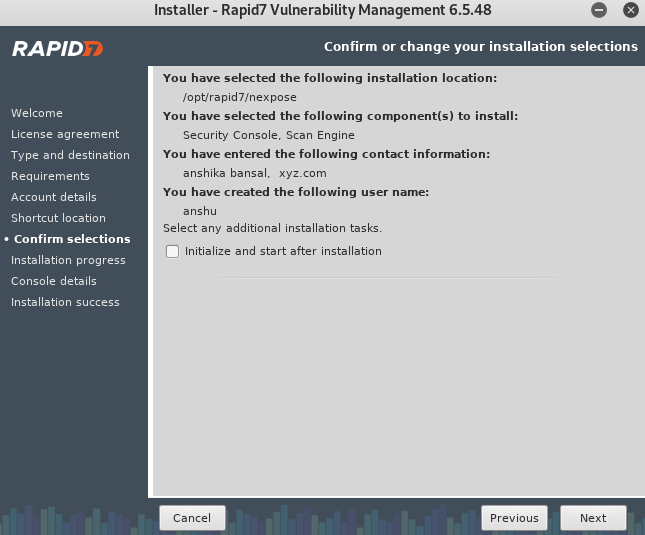
**Step 6: Complete Installation
- Once the installation process is complete, a confirmation message will be displayed.
- Click on "Finish" to finalize the installation process.

Advantages of Nexpose Vulnerability Analysis Tools
Below, we are discussing the uses of nexpose vulnerability analysis tools, those are following.
- Vulnerability Identification
- Risk Prioritization
- Reporting and Remediation
**Vulnerability Identification
Nexpose uses automated scans to find and list vulnerabilities in a company's IT setup. This includes weaknesses in systems, networks, and applications.
.png)
**Risk Prioritization
The solution assigns risk rankings to detected vulnerabilities, allowing security teams to prioritize repair actions based on their severity and possible impact.
-(1).jpg)
**Reporting and Remediation
The program creates extensive vulnerability reports, which provide insights into the environment's security posture. These reports are critical for making decisions and communicating with stakeholders. Nexpose also makes recommendations on appropriate remediation procedures.
Example:
**Vulnerability Scanner Nexpose: To run any executable, type./ followed by the filename nsc. sh. It may take some time to run this command for the first time. The utility has successfully loaded, as shown in the screenshot below. It tells us that we can get there by using the URL **https://localhost:3780:
.png)
Conclusion
Nexpose, created by Rapid7, is a powerful tool for analyzing vulnerabilities. It stands out for its ability to identify and handle security weaknesses, prioritize risks, and provide detailed reports. Nexpose helps organizations maintain strong security by being scalable, user-friendly, and capable of integration. This makes it valuable for both small and large businesses to effectively address and reducing security risks.