rmdir Command in Linux With Examples (original) (raw)
Last Updated : 29 Oct, 2025
The rmdir command in Linux is used to safely remove empty directories from the filesystem.
- Specifically designed to delete only empty directories.
- Unlike the
rmcommand, it cannot delete files or non-empty directories. - Ensures data safety by verifying that the directory is empty before deletion.
- Helps maintain a clean and organized directory structure.
- Commonly used for system cleanup and managing temporary or unused folders.
Example 1: Remove a single empty directory:
rmdir test
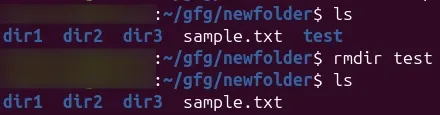
Example 2: Remove multiple empty directories:
rmdir dir1 dir2 dir3
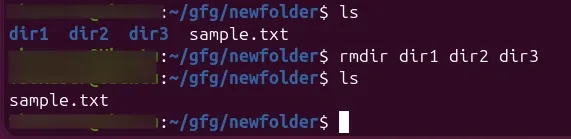
- Here we will remove LINUX, INFO, and DETAIL directories through the following command:
rmdir LINUX INFO DETAIL

Options of rmdir Command
The following are the options of rmdir command:
Syntax:
The basic syntax of the rmdir command is:
rmdir [option]... [directory]...
Here, '[directory]...' refers to one or more directories you wish to remove:
Example 1: The '-p' Option
You can use the -p option with the rmdir command to delete a directory, including all the subdirectories:
rmdir -p mydir1/mydir2/mydir3/...../mydirN
- For example, we will delete the LINUX directory, including all its all ancestors, through the following command:
rmdir -p LINUX/mydir1/mydir2/mydir3

Example 2: The '-v' Option
If you want the terminal to display the message after removing the directory, you can use the -v option with the rmdir command:
rmdir -v dir1 dir2 dir3
Let's now delete the LINUX, INFO, and DETAIL directories and display the message after their successful removal:
rmdir -v LINUX INFO DETAIL

Example 3: Remove Multiple Directories With the Same Expression
You can delete multiple directories if they have the same expressions by using the *** in the rmdir command. For example, let's remove all those directories which contain LINUX in their name:
ls rmdir -v LINUX*

In the above command, we have used the **ls command to list all the available directories. Moreover, we executed the rmdir command '**-v' option and * to delete all those directories which contain the same expression.
Example 4: The '--ignore-fail-on-non-empty' Option
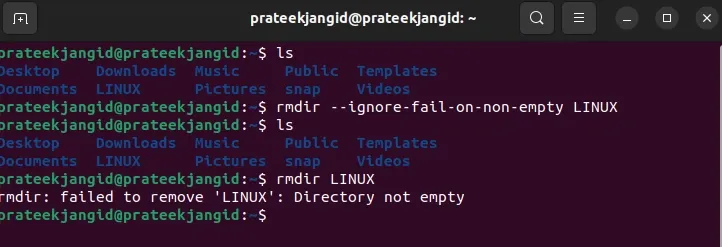
- Sometimes you get the following error while removing a directory through the rmdir command:
rmdir
So, in this case, you can use the **--ignore-fail-on-non-empty to ignore the occurrences due to the non-empty directories. For instance, let's remove the LINUX directory that contains sub-directories:
rmdir --ignore-fail-on-non-empty LINUX
**rmdir command is similar to the rm command, but rmdir only removes empty directories. So first, we will use the help flag to list down all the available options for the rmdir command:
rmdir --help

| **Option | **Description |
|---|---|
| --ignore-fail-on-non-empty | It prevents the errors if the directory is not empty. |
| -p or --parents | It will removes the directory and its parent directories if they are empty. |
| -v or --verbose | It helps in displaying the message for each directory that is removed. |
| --help | It will displays the helpful information and exits. |
| --version | It displays version information and exits. |
Trouble shooting Issues with rmdir Command
The following are the some of the trouble shooting issues regarding with rmdir command:
**1. Directory Not Empty Error
- **Issue:
rmdirfails with an error if the directory is not empty. - **Solution: It ensuring that the directory should be empty before attempting to remove it. You can use
rm -rcommand if you need to delete non-empty directories.
**2. Permission Denied
- **Issue: Insufficient permissions to remove the directory.
- **Solution: Firstly check and modify the directory permissions or use
sudo rmdirfor having the necessary administrative privileges.
**3. Directory Not Found
- **Issue: Specified directory does not exist or the path is incorrect.
- **Solution: Verify whether the directory path that is mentioned is existing or not.
**4. Using '--ignore-fail-on-non-empty'
- **Issue:
rmdirreturns errors when directories are not empty. - **Solution: Try to usse the
--ignore-fail-on-non-emptyoption to suppress errors for non-empty directories, although it won't remove them.