knearest neighbor algorithm using Sklearn Python (original) (raw)
Last Updated : 23 Mar, 2026
K-Nearest Neighbors (KNN) works by identifying the 'k' nearest data points called as neighbors to a given input and predicting its class or value based on the majority class or the average of its neighbors. In this article we will implement it using Python's Scikit-Learn library.
1. **Generating and Visualizing the 2D Data
- We will import libraries like pandas, matplotlib, seaborn and scikit learn.
- The make_moons() function generates a 2D dataset that forms two interleaving half circles.
- This kind of data is non-linearly separable and perfect for showing how k-NN handles such cases. Python `
from sklearn.datasets import make_moons import matplotlib.pyplot as plt import seaborn as sns import pandas as pd
Create synthetic 2D data
X, y = make_moons(n_samples=300, noise=0.3, random_state=42)
Create a DataFrame for plotting
df = pd.DataFrame(X, columns=["Feature 1", "Feature 2"]) df['Target'] = y
Visualize the 2D data
plt.figure(figsize=(8, 6)) sns.scatterplot(data=df, x="Feature 1", y="Feature 2", hue="Target", palette="Set1") plt.title("2D Classification Data (make_moons)") plt.grid(True) plt.show()
`
**Output:
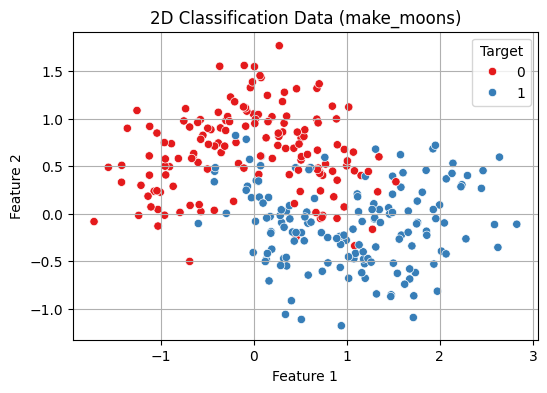
2D Classification Data Visualisation
2. **Train-Test Split and Normalization
- **train_test_split() splits the data into 70% training and 30% testing.
- **random_state=42 ensures reproducibility.
- **stratify=y maintains the same class distribution in both training and test sets which is important for balanced evaluation.
- **StandardScaler() standardizes the features by removing the mean and scaling to unit variance (z-score normalization).
- This is important for distance-based algorithms like k-NN as it ensures all features contribute equally to distance calculations. Python `
from sklearn.model_selection import train_test_split from sklearn.preprocessing import StandardScaler
Split into train and test
X_train, X_test, y_train, y_test = train_test_split( X_scaled, y, test_size=0.3, random_state=42, stratify=y )
Normalize the features
scaler = StandardScaler() X_scaled = scaler.fit_transform(X)
`
3. **Fit the k-NN Model and Evaluate
- This creates a k-Nearest Neighbors (k-NN) classifier with k = 5 meaning it considers the 5 nearest neighbors for making predictions.
- **fit(X_train, y_train) trains the model on the training data.
- **predict(X_test) generates predictions for the test data.
- **accuracy_score() compares the predicted labels (y_pred) with the true labels (y_test) and calculates the accuracy i.e the proportion of correct predictions. Python `
from sklearn.neighbors import KNeighborsClassifier from sklearn.metrics import accuracy_score
Train a k-NN classifier
knn = KNeighborsClassifier(n_neighbors=5) knn.fit(X_train, y_train)
Predict and evaluate
y_pred = knn.predict(X_test) print(f"Test Accuracy (k=5): {accuracy_score(y_test, y_pred):.2f}")
`
**Output:
Test Accuracy (k=5): 0.87
4. **Cross-Validation to Choose Best k
Choosing the optimal k-value is critical before building the model for balancing the model's performance.
- A **smaller k value makes the model sensitive to noise, leading to overfitting (complex models).
- A **larger k value results in smoother boundaries, reducing model complexity but possibly underfitting.
This code performs model selection for the k value in the k-NN algorithm using 5-fold cross-validation:
- It tests values of k from 1 to 20.
- For each k, a new k-NN model is trained and validated using **cross_val_score which automatically splits the dataset into 5 folds, trains on 4 and evaluates on 1, cycling through all folds.
- The mean accuracy of each fold is stored in **cv_scores.
- A line plot shows how accuracy varies with k helping visualize the optimal choice.
- The best_k is the value of k that gives the highest mean cross-validated accuracy. Python `
from sklearn.model_selection import cross_val_score import numpy as np
Range of k values to try
k_range = range(1, 21) cv_scores = []
Evaluate each k using 5-fold cross-validation
for k in k_range: knn = KNeighborsClassifier(n_neighbors=k) scores = cross_val_score(knn, X_scaled, y, cv=5, scoring='accuracy') cv_scores.append(scores.mean())
Plot accuracy vs. k
plt.figure(figsize=(8, 5)) plt.plot(k_range, cv_scores, marker='o') plt.title("k-NN Cross-Validation Accuracy vs k") plt.xlabel("Number of Neighbors: k") plt.ylabel("Cross-Validated Accuracy") plt.grid(True) plt.show()
Best k
best_k = k_range[np.argmax(cv_scores)] print(f"Best k from cross-validation: {best_k}")
`
**Output:
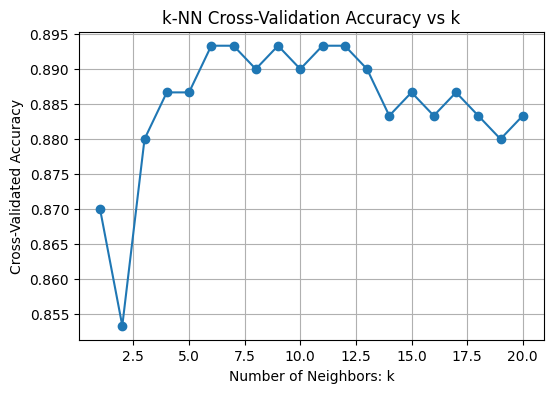
Choosing Best k
Best k from cross-validation: 6
5. **Training with Best k
- The model is trained on the training set with the optimized k (Here k = 6).
- The trained model then predicts labels for the unseen test set to evaluate its real-world performance. Python `
Train final model with best k
best_knn = KNeighborsClassifier(n_neighbors=best_k) best_knn.fit(X_train, y_train)
Predict on test data
y_pred = best_knn.predict(X_test)
`
**6. Evaluate Using More Metrics
- Calculate the confusion matrix comparing true labels (y_test) with predictions (y_pred).
- Use **ConfusionMatrixDisplay to visualize the confusion matrix with labeled classes
Print a classification report that includes:
- **Precision: How many predicted positives are actually positive.
- **Recall: How many actual positives were correctly predicted.
- **F1-score: Harmonic mean of precision and recall.
- **Support: Number of true instances per class. Python `
from sklearn.metrics import confusion_matrix, classification_report, ConfusionMatrixDisplay
Confusion Matrix
cm = confusion_matrix(y_test, y_pred) disp = ConfusionMatrixDisplay(confusion_matrix=cm, display_labels=["Class 0", "Class 1"]) disp.plot(cmap="Blues") plt.title(f"Confusion Matrix (k={best_k})") plt.grid(False) plt.show()
Detailed classification report
print("Classification Report:") print(classification_report(y_test, y_pred, target_names=["Class 0", "Class 1"]))
`
**Output:
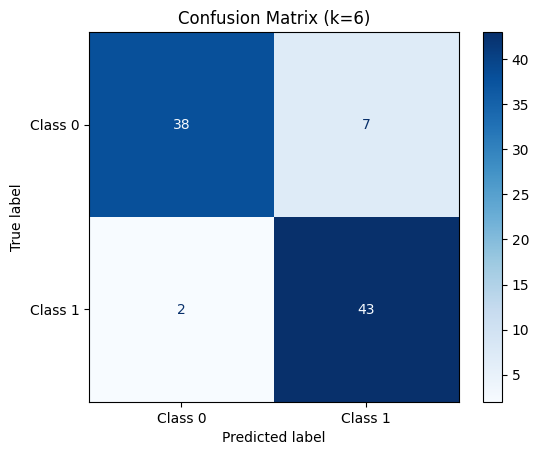
Confusion Matrix for k = 6
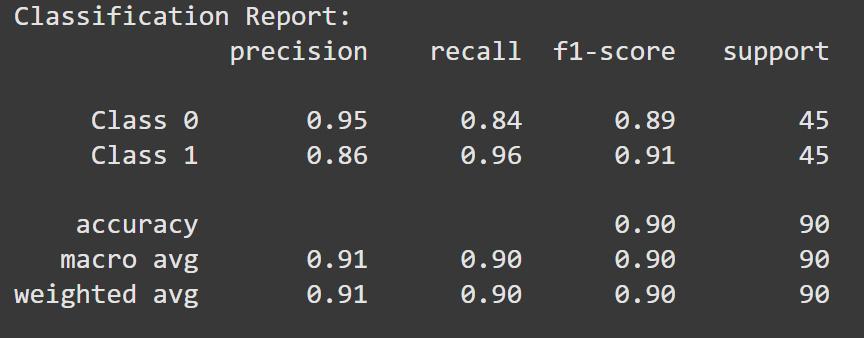
Classification Report
7. **Visualize Decision Boundary with Best k
- Create a 2D mesh grid (xx, yy) covering the feature space.
- Use the trained model (best_knn) to predict class labels for each grid point.
- Reshape predictions to match the grid and plot decision regions using contourf.
- Overlay the original data points using sns.scatterplot to compare true classes with model predictions.
This helps visualize how the model separates classes for the chosen value of k.
Python `
Create mesh grid
x_min, x_max = X_scaled[:, 0].min() - 1, X_scaled[:, 0].max() + 1 y_min, y_max = X_scaled[:, 1].min() - 1, X_scaled[:, 1].max() + 1
xx, yy = np.meshgrid( np.linspace(x_min, x_max, 300), np.linspace(y_min, y_max, 300) )
Predict on mesh grid with best k
Z = best_knn.predict(np.c_[xx.ravel(), yy.ravel()]) Z = Z.reshape(xx.shape)
Plot decision boundary
plt.figure(figsize=(8, 6)) plt.contourf(xx, yy, Z, cmap=plt.cm.coolwarm, alpha=0.3) sns.scatterplot(x=X_scaled[:, 0], y=X_scaled[:, 1], hue=y, palette="Set1", edgecolor='k') plt.title(f"Decision Boundary with Best k = {best_k}") plt.xlabel("Feature 1 (scaled)") plt.ylabel("Feature 2 (scaled)") plt.grid(True) plt.show()
`
**Output:
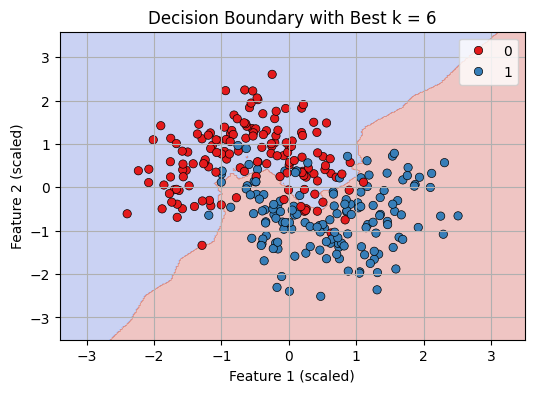
Decision Boundary with best K = 6
We can see that our KNN model is working fine in classifying datapoints.
You can download the complete code from here.