Random Forest for Image Classification Using OpenCV (original) (raw)
Last Updated : 7 Aug, 2025
Random Forest is a machine learning algorithm that uses the collective decision-making of multiple decision trees to make accurate predictions in both classification and regression tasks. OpenCV is an established open-source library for computer vision and machine learning and it provides tools for extracting and analyzing patterns from visual data. Integration of Random Forest with OpenCV aims to accurately classify images. This approach is helpful for analyzing complex medical images, such as those used for diagnosing diseases, because it makes the evaluation process more consistent and improves the confidence and accuracy of the results.
Step-by-Step Implementation
Used samples can be downloaded from GitHub using the link.
It can be extracted in the environment by the command:
!unzip /content/drawings.zip -d drawing
Let's see the implementation of a Random Forest to classify images using OpenCV,
Step 1: Importing the necessary libraries
- **RandomForestClassifier: Trains the classification model.
- **accuracy score: Measures prediction accuracy.
- **os: Handles file and directory operations.
- **matplotlib.pyplot: For image visualization.
- **hog: Extracts HOG features.
- **random: For shuffling images.
- **cv2: OpenCV for image loading and preprocessing. Python `
from sklearn.ensemble import RandomForestClassifier from sklearn.metrics import accuracy_score import os import matplotlib.pyplot as plt from skimage.feature import hog import random import cv2
`
Step 2: Define a HOG Feature Extractor
- Converts an image patch into a feature vector by analyzing gradient orientations.
- HOG helps abstract the shape and texture, robust to lighting/scale changes. Python `
def extract_hog_features(image): hog_features = hog( image, orientations=9, pixels_per_cell=(8, 8), cells_per_block=(2, 2), visualize=False ) return hog_features
`
Step 3: Load Images and Extract Features
- Reads each image, resizes (for uniformity & speed), converts to grayscale (reduce computation) and extracts HOG features.
- Each image is now a compact feature vector; labels are stored for classification. Python `
def load_and_extract_features(directory): X, y = [], [] for label in os.listdir(directory): label_dir = os.path.join(directory, label) for filename in os.listdir(label_dir): image_path = os.path.join(label_dir, filename) img = cv2.imread(image_path) img_resized = cv2.resize(img, (128, 128)) img_gray = cv2.cvtColor(img_resized, cv2.COLOR_BGR2GRAY) hog_features = extract_hog_features(img_gray) X.append(hog_features) y.append(label) return X, y
`
Step 4: Train a Random Forest Classifer
- Builds an ensemble of decision trees.
- Deeper trees (higher max_depth) may overfit; 5 is a good starting point. Python `
spiral_train_X, spiral_train_y = load_and_extract_features( '/content/drawings/spiral/training') wave_train_X, wave_train_y = load_and_extract_features( '/content/drawings/wave/training')
spiral_rf_classifier = train_random_forest(spiral_train_X, spiral_train_y) wave_rf_classifier = train_random_forest(wave_train_X, wave_train_y)
`
Step 5: Model Testing and Evaluation
- Loads and transforms test set for evaluation.
- Compares predictions vs actuals for accuracy measurement. Python `
spiral_test_X, spiral_test_y = load_and_extract_features( '/content/drawings/spiral/testing') wave_test_X, wave_test_y = load_and_extract_features( '/content/drawings/wave/testing')
spiral_predictions = spiral_rf_classifier.predict(spiral_test_X) wave_predictions = wave_rf_classifier.predict(wave_test_X)
spiral_accuracy = accuracy_score(spiral_test_y, spiral_predictions) wave_accuracy = accuracy_score(wave_test_y, wave_predictions)
print("Spiral Classification Accuracy:", spiral_accuracy) print("Wave Classification Accuracy:", wave_accuracy)
`
**Output:
Spiral Classification Accuracy: 0.8
Wave Classification Accuracy: 0.6333333333333333
Step 6: Visualize the Confusion Matrix
- The confusion matrix compares the actual class labels from our test data with the predicted labels from our model, providing insight into both accurate and misclassified cases for each category.
- This targeted approach ensures the confusion matrix accurately reflects model performance for the dataset currently under evaluation, allowing for focused analysis and improvement. Python `
from sklearn.metrics import ConfusionMatrixDisplay, confusion_matrix import matplotlib.pyplot as plt
cm = confusion_matrix(spiral_test_y, spiral_predictions) disp = ConfusionMatrixDisplay(confusion_matrix=cm) disp.plot(cmap=plt.cm.Blues) plt.show()
`
**Output:
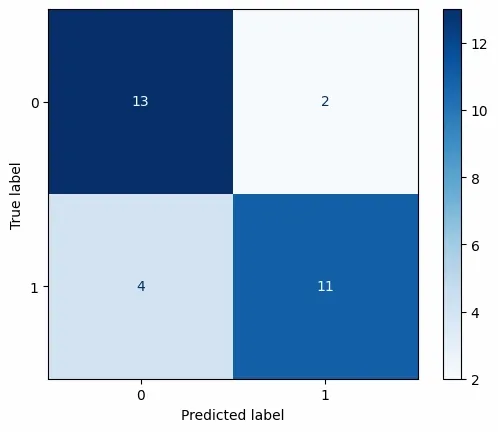
Confusion Matrix
Step 7: Visualize the Dataset and Results
Python `
def display_images(directory, num_images=5): fig, axes = plt.subplots(2, num_images, figsize=(15, 5)) fig.suptitle(f"Images from {directory.split('/')[-1]}", fontsize=16)
for i, label in enumerate(os.listdir(directory)):
    label_dir = os.path.join(directory, label)
    image_files = os.listdir(label_dir)
    random.shuffle(image_files)
    for j in range(num_images):
        image_path = os.path.join(label_dir, image_files[j])
        img = cv2.imread(image_path)
        axes[i, j].imshow(cv2.cvtColor(img, cv2.COLOR_BGR2RGB))
        axes[i, j].set_title(f"{label} Image {j+1}")
        axes[i, j].axis('off')
plt.tight_layout()
plt.show()
display_images('/content/drawings/spiral/training') display_images('/content/drawings/wave/training')
display_images('/content/drawings/spiral/testing') display_images('/content/drawings/wave/testing')
`
**Training:
**Testing:
Applications of Random Forest with OpenCV
- **Medical Image Analysis and Diagnostics: Automatic detection of diseases (like Parkinson’s) from specialized image tests, e.g., analyzing spiral and wave drawings, X-rays, histopathology slides or retinal scans for early diagnosis.
- **Handwriting and Digit Recognition: Classifying handwritten digits from scanned documents, forms or postal codes (e.g., MNIST dataset), useful in banking, education tech and postal services.
- **Currency and Document Authentication: Detecting counterfeit notes and validating important documents by analyzing security features and visual patterns in high-resolution scans or photographs.
- **Industrial Quality Control: Identifying defects, foreign objects or inconsistencies in products on assembly lines by analyzing product images for automated inspection systems.
- **Facial and Biometric Identification: Recognizing individuals or verifying identity from photographs or video frames, supporting secure access or law enforcement applications.
Advantages of Using Random Forest
- **Reduces Overfitting: Aggregation across many trees balances individual model quirks.
- **Handles Complex Features: Well suited for high-dimensional representations from HOG or similar extractors.
- **Provides Feature Importance: Offers interpretable insights about which input features drive predictions.
- **Effective on Small and Medium Datasets: Especially when deep learning might be overkill or slow to train.
Disadvantages of Using Random Forest
- **Resource Intensive: Large ensembles on big datasets can consume significant memory and computation time.
- **Interpretability: While more transparent than neural networks, still less intuitive than single decision trees.
- **Imbalanced Classes: Model performance can degrade if one class significantly outweighs another without adjustments (such as class weighting or resampling).
- **Scaling to Very Large Image Sets: Not as scalable as modern deep learning architectures for millions of images or raw pixel data.