What is SageMaker in AWS? (original) (raw)
Last Updated : 3 Jun, 2026
Amazon SageMaker is a cloud service from AWS that makes it easier to create and use machine learning models. It helps developers and data scientists train models, test them, and deploy them without worrying about setting up or managing servers.
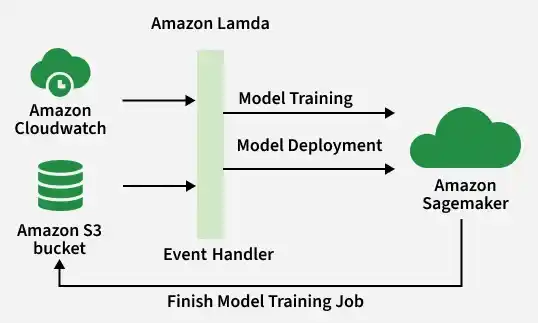
Normally, building machine learning systems requires a lot of technical setup and infrastructure management. SageMaker simplifies this process by providing all the required tools in one place, from preparing data to monitoring how the model performs after deployment
Core Architecture
SageMaker mainly works in three simple steps: Build, Train, and Deploy. You can use these steps together or separately based on your needs.
1. Build (SageMaker Studio & Notebooks)
This stage is used to create, test, and manage machine learning projects.
- **SageMaker Studio: A web-based workspace where you can write code, prepare data, train models, and manage all ML tasks in one place.
- **Notebook Instances: Ready-to-use cloud computers with JupyterLab installed, where you can quickly start coding, testing, and exploring data.
2. Train (Training Jobs)
This stage is where the machine learning model learns from the data.
- **On-Demand Infrastructure: When you start a training job, SageMaker automatically creates powerful cloud servers, take the data from Amazon S3, runs the training code, saves the trained model back to S3, and then shuts down the servers automatically after the work is done.
- **Cost Efficiency: You only pay for the time the training servers are running, which helps reduce costs.
3. Deploy (Inference Endpoints)
This stage is used to make the trained mode available for the real-world use.
- **Model Hosting: SageMaker takes the trained model from Amazon S3 and hosts it on cloud servers using a secure API endpoint.
- Applications or websites can send data to the model and get predictions instantly in real time.
AWS SageMaker Workflow
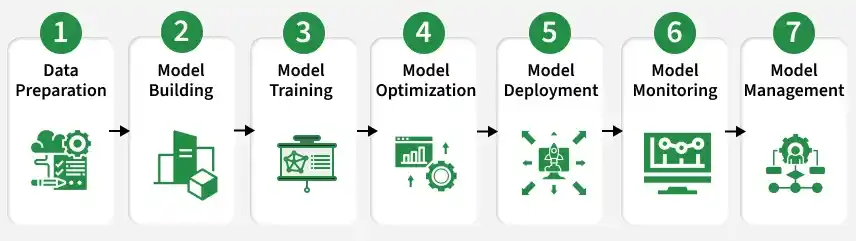
- **Data Preparation: In this step, the data is collected, cleaned, and organized so it can be used for training the machine learning model.
- **Model Building: After preparing the data, the machine learning model is created. SageMaker provides ready-made algorithms, or you can use your own custom code.
- **Model Training: The model is then trained using the prepared data. SageMaker can use powerful cloud servers and even multiple machines together to train the model faster.
- **Model Optimization: Once training is complete, the model is improved for better accuracy and performance by adjusting settings such as hyperparameters.
- **Model Deployment: After optimization, the model is deployed so real applications can use it. SageMaker can deploy models to services like EC2, Lambda, or API endpoints.
- **Model Monitoring: Once the model is deployed, the next step is to monitor its performance in real time. SageMaker provides built-in monitoring tools that track the model's performance metrics and detect anomalies.
- **Model Management: Finally, once the model is in production, it's important to manage it over time. This includes tasks such as updating the model with new data, retraining the model periodically, and ensuring that it remains performant over time.
Ways to Deploy Models in SageMaker
One of the most important decisions in SageMaker is choosing the right way to deploy your machine learning model based on your application’s needs, traffic, and cost requirements.
| **Option | **Best For | **How it Works | **Pricing |
|---|---|---|---|
| **Real-Time Inference | Applications that need fast responses | Keeps servers always running to give instant predictions | Pay per running instance |
| **Serverless Inference | Apps with occasional or unpredictable traffic | Automatically starts when requests come and stops when idle | Pay only per request |
| **Asynchronous Inference | Large files or long processing tasks | Requests are queued and processed in the background | Pay while instances are running |
| **Batch Transform | Processing large amounts of data together | Processes all data at once and saves results to S3 | Pay only during processing time |
Machine learning in AWS SageMaker
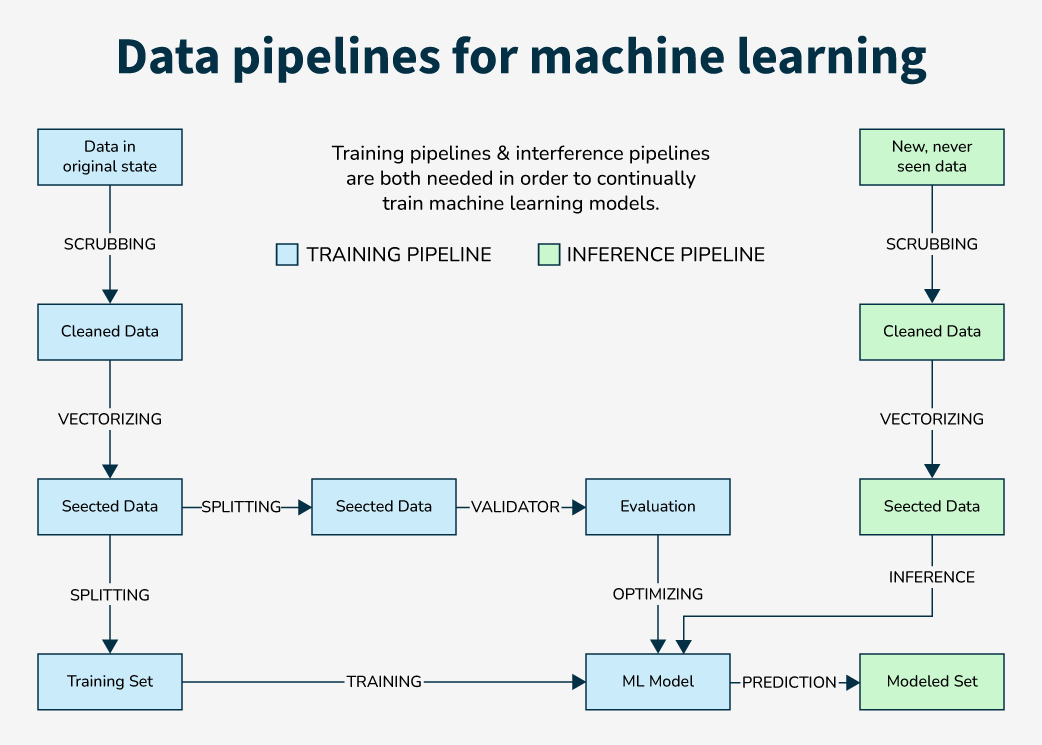
Building machine learning systems usually requires expert knowledge and costly infrastructure. SageMaker makes this easier by providing built-in tools that automate many tasks, reduce manual effort, and lower hardware costs. Using SageMaker, organizations can quickly build, train, host, and deploy machine learning models at large scale through AWS cloud services.
It includes:
- **Training stage: the model learns from data by finding patterns and relationships.
- **Inference stage: the trained model uses those learned patterns to make predictions on new data.
After the model is trained and improved, developers can turn it into APIs that can be used in websites, mobile apps, and other software services.
Key Features & Capabilities
- **SageMaker Pipelines: A built-in CI/CD tool for machine learning that automates the complete workflow, including data preparation, training, testing, and model deployment.
- **SageMaker JumpStart: Provides pre-trained machine learning and foundation models like Llama 2, BERT, and Stable Diffusion, which can be deployed quickly without training from scratch.
- **SageMaker Ground Truth: A data labeling service that helps create high-quality training datasets by allowing human workers to label images, text, and other data.
- **Model Monitor: Continuously monitors deployed models in real time and alerts users if model performance drops or if incoming data changes over time.
Use Cases
- **Predictive Maintenance: Analyze sensor data from manufacturing equipment to predict failures before they happen.
- **Fraud Detection: Real-time scoring of credit card transactions to block fraudulent activity.
- **Personalization: Recommendation engines for retail or media streaming services.
- **Generative AI: Hosting Large Language Models (LLMs) for content generation or chatbots.
Advantages
- **Faster time-to-market: Helps developers quickly build, train, and deploy machine learning models, so products and services can be launched faster.
- **Built-in Algorithms and Frameworks: Supports popular ML frameworks like TensorFlow and PyTorch, making machine learning development easier.
- **Automatic Model Tuning: Automatically adjusts model settings (hyperparameters) to improve performance and accuracy.
- **Ground Truth Labeling Service: Helps users label training data quickly and accurately for better model training.
- **Reinforcement Learning Support: Makes it easier to create and train reinforcement learning models.
- **Elastic Inference: Adds GPU power only when needed, helping reduce costs.
- **Built-in Model Monitoring: Continuously checks model performance in production and alerts users if problems occur.
Disadvantages
- **Complexity: Machine learning can still be difficult, and using SageMaker properly may require good technical knowledge and experience.
- **Vendor Lock-In: SageMaker is closely connected with AWS services, which can make it harder to move to another cloud platform later.
- **Cost: Large machine learning projects can become expensive because powerful cloud resources are needed for training and deployment.
- **Limited Customization: Built-in tools may not fit every project, so some users may need to create custom solutions.
- **Learning Curve: Beginners in machine learning or AWS may need time and training to understand and use SageMaker effectively.
- **Limited Support for Some Use Cases: Certain advanced or specialized machine learning tasks may not be fully supported.
Pricing Model
SageMaker pricing is complex because it involves multiple components:
- **Compute (Instances): You pay hourly for the EC2 instances used in Notebooks, Training Jobs, and Real-Time Endpoints. Tip: Use Spot Instances for Training Jobs to save up to 90%.
- **Storage: You pay for the EBS volumes attached to your instances and the S3 storage for model artifacts.
- **Data Transfer: Standard AWS data transfer rates apply.
- **Inference: For Serverless Inference, you pay per request.