Introduction to API Endpoint (original) (raw)
Last Updated : 2 Mar, 2026
An API point of entry is a specific URL (identifier of a resource or functionality that is available to the API user) that stands for the resource or functionality provided by an API (Application Programming Interface). It acts as the interface filter where requests or information to/from a client(user interacted app like web or mobile application) are received and forwarded to the server that's hosting the API.
- In the hands-on, a particular API endpoint assigns the place to which the requests are to be sent to do certain functions or select certain data.
- Each endpoint usually is the representation of the set of operations or some specific operations that can be implemented through the API.
Components of API Endpoint
API endpoints consist of several key components that define how clients communicate with a server. These components help in structuring requests and generating appropriate responses.
1. Endpoint Definition
Every API endpoint represents a specific resource or functionality provided by the API, allowing clients to interact with it.
- It defines what operation or data the endpoint provides.
- Developers can identify available endpoints through API documentation.
2. HTTP Requests
Clients only interact with the API endpoints by using the HTTP (Hypertext Transfer Protocol) request-response model. The most common HTTP methods used are:
- **GET: Retrieves data from the server without modifying any existing resource.
- **POST: Sends new data to the server to create a new resource.
- **PUT: Updates or replaces an existing resource with new data.
- **DELETE: Removes a specified resource from the server.
3. URL Structure
Each API endpoint is accessed through a unique URL that enables clients to communicate with the API. This URL helps identify the server and the specific resource being requested.
- **Base URL: The base URL represents the main API server where requests are sent.
- **Path: The path specifies the exact endpoint that defines the requested resource or action.
4. Request Parameters
API endpoints often require additional data to process requests. This data helps the server understand what action needs to be performed.
- **Query Parameters: Sent in the URL to filter or search data (e.g., /users?role=admin).
- **Path Parameters: Used in the URL to identify a specific resource (e.g., /users/101).
- **Request Body: Sent with POST or PUT requests to provide data for creating or updating resources.
5. Response
After receiving a request, the server processes it and sends back a response to the client. This response communicates the result of the requested operation.
- **Status Code: Indicates whether the request was successful or encountered an issue (e.g., 200 OK, 404 Not Found).
- **Response Data: Contains the requested information or confirmation of the action performed.
- **Error Message: Provides details when the request cannot be completed successfully.
Working of API Endpoints
API endpoints act as communication points between a client and a server. They allow applications to request or send data using standard web protocols.
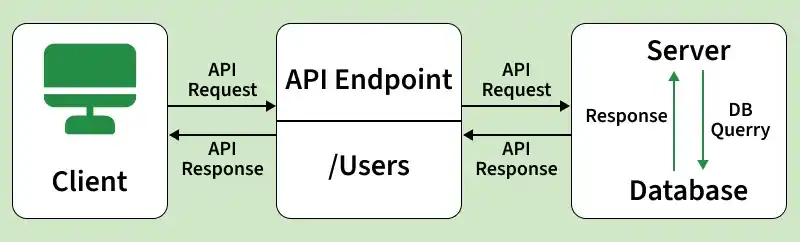
The working of an API endpoint follows a structured flow:
- **Client Sends Request: The client (such as a browser or mobile app) sends an HTTP request to a specific API endpoint using methods like GET, POST, PUT, or DELETE.
- **Endpoint Receives Request: The API endpoint identifies the requested resource (e.g., /users) and forwards the request to the appropriate server logic.
- **Server Processes Request: The server performs the required operation such as fetching, creating, updating, or deleting data.
- **Database Interaction: If required, the server communicates with the database to retrieve or modify data.
- **Response is Generated: After processing, the server prepares a response including a status code and requested data or confirmation.
- **Response Sent Back: The generated response is returned to the client through the API endpoint.
REST endpoint Vs GraphQL endpoint
| REST endpoint | GraphQL endpoint |
|---|---|
| REST API endpoints have dynamic and unspecified data structure. The server decides what data will be returned. | GraphQL uses a strongly typed schema where all data types are defined in advance in the schema. |
| Client calls multiple endpoints to get data. This may cause over-fetching or under-fetching. | Client requests exactly the data it needs in a single query. No over-fetching. |
| Uses HTTP methods like GET, POST, PUT, PATCH, DELETE for different operations. | Uses Mutations to modify data along with Queries in GraphQL. |
| Returns fixed data format (usually JSON or XML). Client has less control. | Returns JSON based on query structure. Client controls response shape. |
| Uses HTTP caching easily because each endpoint has fixed URL. | Harder to cache because each query can be different. |
| Uses versioning like /api/v1 or /api/v2 to maintain compatibility. | No strict versioning needed. Fields can be deprecated gradually. |
| Multiple endpoints for different resources. | Single endpoint for all queries and mutations. |
| Business logic handled at different endpoints. | Supports flexible queries and subscriptions for real-time updates. |
Using Postman for API Development and Testing
Postman is a powerful tool that supports the complete API lifecycle by helping developers design, build, test, and monitor API endpoints efficiently.
1. Designing API Endpoints
Postman helps developers design API endpoints before actual implementation.
- **Mock Servers: Postman provides an opportunity to create mock servers that consist of APIs according to your specifications. Thus, you can prototype the API behavior before the actual implementation and, at the same time, help you with optimal endpoint designs.
- **API Documentation: Using Postman makes it possible to ascertain the interactivity of your API documentation from your specifications. The documentation therefore acts as a guide for developers who will be using the API endpoints you provide as a reference for using them to build their applications.
2. Developing API Endpoints
Postman provides tools to build and configure API requests efficiently.
- **Request Builder: Postman offers a user-friendly environment with which users can compose, design, as well as send http API requests directly from their browsers. You may define the following with ease: headers, parameters, body entities and deterrence factors.
- **Environment Variables: Postman provides an environment for variables implementation to ensure you can define variables for various environments, e.g. development, staging and production. That way, you can test the endpoints of your APIs across a variety of environments.
3. Testing API Endpoints
Postman allows developers to validate API functionality through testing.
- **Automated Testing: With the help of Postman tests developers can create automated tests and run on the API endpoints using the internal framework. You can write tests in Js to ensure the response status codes, headers and body content.
- **Assertions: Postman offers a bank of inbuilt assertions aimed at some of the popular test scenarios like the checking of response's certain values and header validation.
- **Collection Runner: Collection Runner in Postman allows you to run a sequence or parallel tests to execute all the APIs of your endpoint to be able to perform such testing.
- **Monitoring: With Postman you can monitor every endpoint with APIs unveiling the traffic peaks and heartbreaking downtimes and can stay ready for instant correction. You can run test versions from time to time (for example, daily or weekly monitor runs) and get notifications when any problems occur.
4. Debugging API Endpoints
Postman assists in identifying and resolving API issues.
- **Console Logging: Postman's console logging function makes it possible for you to keep track of all the request payloads and response headers of your work. It also records the number of execution steps as well as their times. This will help you make sure the endpoints are working well and also detect any issues with your API endpoints.
- **Response Time Visualization: The graphical visualization made it possible for you to address response times for your API requests, and thus see areas where you can improve endpoint performance.
Best Practices for Designing and Developing API Endpoints
Designing effective API endpoints requires following best practices that ensure clarity, security, scalability, and consistent communication between clients and servers.
- **API Endpoints: Format responses and requests for different media types (e.g., JSON, XML).
- **Authentication and Authorization: Utilize API keys or OAuth tokens for access control.
- **RESTful Principles: Follow HTTP methods (GET, POST, PUT, DELETE) and organize endpoints around resources.
- **URL Design: Use clear and intuitive URLs, organizing endpoints hierarchically for resource representation.
- **Versioning: Implement versioning in URLs, headers, or query parameters to manage changes without disrupting existing clients.
- **Naming Conventions: Maintain uniform and descriptive naming for URLs, resource identifiers, and request/response properties.
- **HTTP Status Codes and Headers: Apply appropriate status codes and headers for effective communication.
- **Pagination and Filtering: Optimize performance by implementing pagination and filtering mechanisms.
- **Security Considerations: Ensure endpoint security with HTTPS, API keys, OAuth tokens, or JWT.
- **Documentation: Provide comprehensive documentation detailing endpoint descriptions, request formats, sample requests, and error handling instructions.
- **Testing and Monitoring: Conduct thorough testing and monitoring to ensure functionality, identify performance issues, and resolve them in real-time.