Line Graph (original) (raw)
Last Updated : 23 Jul, 2025
Line graph also known as a line chart or line plot is a tool used for data visualization . It is a type of graph that represents the data in a pictorial form** which makes the raw data more easily understandable. In a line graph data points are connected with a straight-line and data points are represented either with points or wedges. Some other examples of graphs are **bar graphs, **histograms, **pie charts****, line graphs,** etc.
A **line graph or line chart is a graphical representation of the data that displays the relationship between two or more variables concerning time. It is made by connecting data points with straight-line segments.
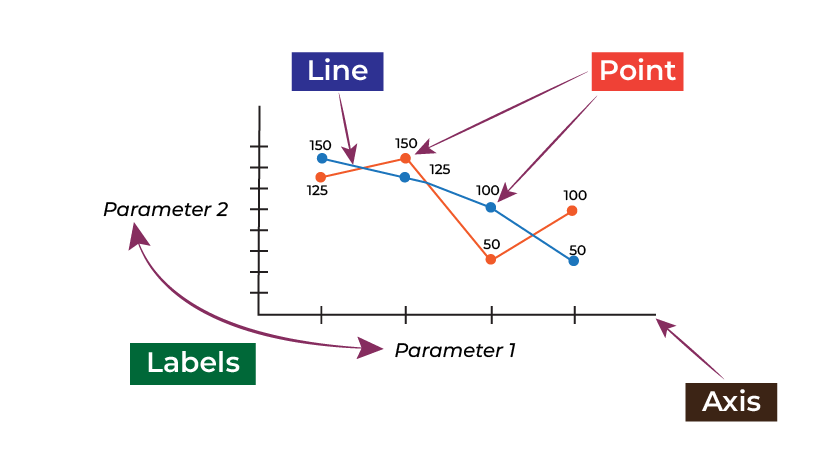
Line Graph
Parts of Line Graph
Parts of the line graph include the following:
- **Title: It is nothing but the title of the graph drawn.
- **Axes: The line graph contains two axes i.e. X-axis and Y-axis.
- **Labels: The name given to the x-axis and y-axis.
- **Line: It is the line segment that is used to connect two or more data points.
- **Point: It is nothing but a point given at each segment.
Learn more about **Point, Lines, and Plane.
How to Draw and Read a Line Graph?
Drawing a line Graph
To make a line graph we need to use the following steps:
- **Determine the variables: The first and foremost step is to identify the variables you want to plot on the X-axis and Y-axis.
- **Choose appropriate scales: Based on your data, determine the appropriate scale.
- **Plot the points: Plot the individual data points on the graph according to the given data.
- **Connect the points: After plotting the points, you have to connect those points with a line.
- **Label the axes: Add labels to the X-axis and Y-axis. You can also include the unit of measurement.
- **Add Title: After completing the graph you should provide a suitable title.
**Reading a Line Graph
To read a line graph you need to follow the below given steps:
- **Understand the axes: First, you need to understand the X-axis and Y-axis of the graph.
- **Estimate the scale: Look at the values marked along each axis to determine the scale.
- **Estimate the values of data points: Look at the data points on the graph to estimate the values on the graph.
- **Analyze the pattern: Identify the pattern and analyze it.
- **Conclude: Based on the above step find conclusions.
**Example: Draw a line graph for the given data
| No. of Days | **1 | **2 | **3 | **4 |
|---|---|---|---|---|
| Absentees | **5 | **10 | **15 | **10 |
**Answer:
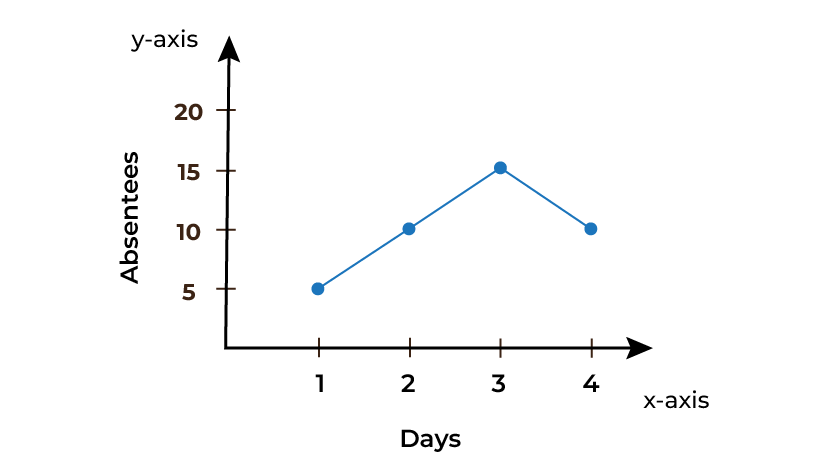
Line Graph between Days and No. of Absentees
The above diagram shows a line graph between No. of days and the number of absentees.
Types of Line Graph
Let us discuss the types of line graphs:
- **Simple Line Graph
- **Multiple Line Graph
- **Compound Line Graph
**Simple Line Graph
It is the most common type of line graph in which a single line represents the relationship between two variables over time. The above diagram is an example of a basic line graph.
**Multiple Line Graph
It is the type of line graph in which we can represent two or more lines in a single graph and they can either belong to the same categories or different which makes it easy to make comparisons between them. Multiple line graphs also include a double line graph or we can say that a double line graph is also a multiple line graph.
An example of multiple graphs is shown below:
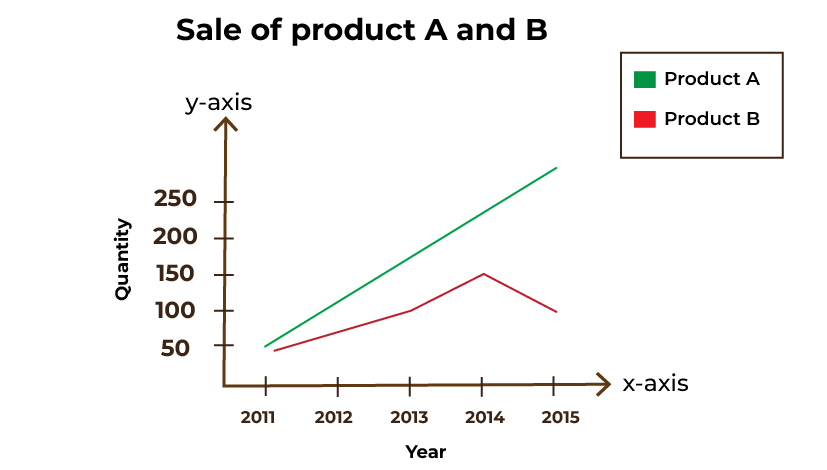
Line Graph between Quantity and Year
In the above graph sale of product A and B is shown in the same graph.
**Compound Line Graph
It is a type of line graph in which multiple lines or data are combined into a single graph showing different categories or variables. The main aim of a compound line graph is to represent or display the relationship between different variables on a single graph.
A Compound Line graph example is shown below:
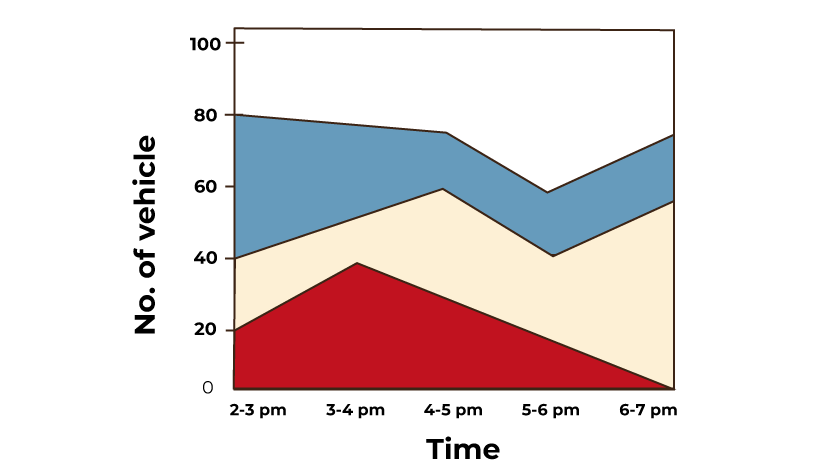
Line Graph between Time and No. Of Vehicles
Advantages of Line Graph
Some of the advantages of using line graph are listed below:
- It helps to visualize the data.
- It provides a clear overview of the data.
- It becomes easy to make predictions using a line graph.
- It helps to compare the data more easily.
**Note: Line graph is not suitable to show non linear relationship or complex data
**Articles related to Line Graph:
Solved Examples on Line Graph
**Examples 1: Draw a line graph for the given data.
| Time | 6 AM | 10 AM | 2 PM | 6 PM |
|---|---|---|---|---|
| Temperature (in oC) | 35 | 45 | 50 | 40 |
**Solution:
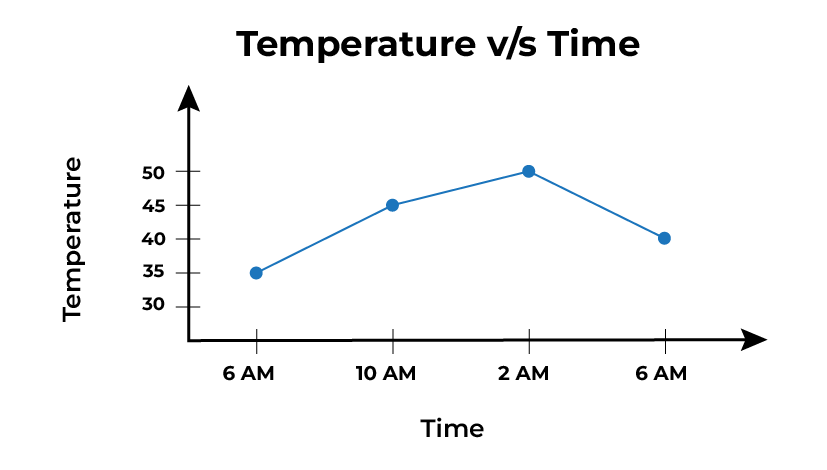
Line Graph: Temperature vs Time
**Examples 2: Draw a line graph from the given data and answer the following questions.
| Product A | 150 | 125 | 100 | 50 |
|---|---|---|---|---|
| Product B | 125 | 150 | 50 | 100 |
****(a) In the above graph find in which year the sale of product A is maximum.**
****(b)** **Find in which year the sale of product B is the minimum.
****(c) Find in which year the sale of products A and B is the same.**
**Solution:
Line Graph for Sale of Product A and B over the years
(a) In 2011, the sale of product A is maximum.
(b) In 2013, the sale of Product B is minimum.
(c) There is no year in which the sale of Product A and B is the same.

**Examples 3: Draw a compound line graph for the given data.
| | Samsung | Apple | One Plus | Vivo | | | --------- | ----- | -------- | ---- | -- | | Quarter 1 | 7 | 12 | 9 | 17 | | Quarter 2 | 32 | 21 | 20 | 25 | | Quarter 3 | 52 | 60 | 65 | 70 |
**Solution:

Line Graph representing number of Mobile Phones sold in each Quarters
**Examples 4: Draw a line graph for the given data
| Distance | 20 | 30 | 35 | 45 |
|---|---|---|---|---|
| Time | 5 | 10 | 15 | 20 |
**Solution:

**Examples 5: Draw a line graph for the given data.
| Input | 1 | 2 | 4 | 5 | 7 |
|---|---|---|---|---|---|
| Output | 2 | 5 | 11 | 14 | 20 |
**Solution:
