Configure RoleBased Access Control in MongoDB (original) (raw)
Last Updated : 20 Apr, 2026
MongoDB secures database access using authentication mechanisms and role-based access control (RBAC) to ensure only authorized users can access and modify data.
- Authentication verifies user identities before allowing database access.
- RBAC defines privileges using resource documents (database/collection scope) within roles, rather than directly assigning access at the collection level.
- SCRAM-SHA-256 is the default username–password authentication mechanism.
- MongoDB also supports X.509 certificates, LDAP, and Kerberos for authentication.
Role-Based Access Control (RBAC)
MongoDB uses RBAC to authorize authenticated users with specific permissions on databases and collections, ensuring controlled access to resources.
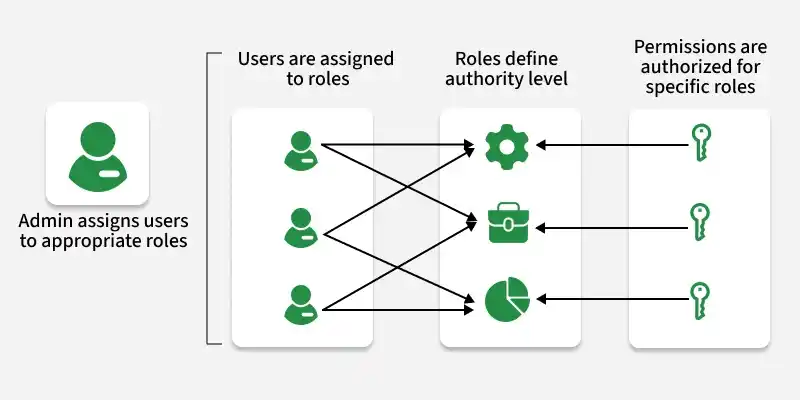
Understanding RBAC in MongoDB
- MongoDB authorization is based on RBAC.
- Access privileges are determined by the roles assigned to users.
- Roles define the actions users can perform and the resources they can access.
- MongoDB provides built-in roles for common administrative and operational tasks.
- RBAC supports fine-grained access control, including custom roles with specific permissions.
- Roles can be assigned at the database level or collection level.
- MongoDB supports role inheritance, where roles can include other roles.
- Users can be assigned multiple roles across databases and collections.
- RBAC supports privilege separation, separating administrative tasks from application data access.
Built-In Roles in MongoDB
MongoDB provides several built-in roles to cater to different administrative and operational tasks. Some of the key built-in roles include:
Database Administration Roles
- **dbAdmin: Performs database-level administrative tasks, including managing collections and indexes.
- **userAdmin: Creates, deletes, and manages users and role assignments within a specific database.
- **clusterAdmin: Manages cluster-wide administration such as shards, replica sets, monitoring, backups, and restores.
- **backup: Allows creating backups of databases for data protection and recovery.
Cluster Administration Roles
- **clusterBackup: This role grants privileges to create backups of the entire cluster, including all databases and collections.
- **clusterRestore: Users with this role can restore backups to the entire cluster, replacing existing data.
- **clusterAdmin: Grants full cluster-level administration, including management, monitoring, backup, and restore operations.
- **clusterMonitor: Provides read-only access to cluster-wide metrics and status (replica sets and sharded clusters).
Backup and Restoration Roles
- **backup: Authorizes users to create backups of databases.
- **restore: Enables users to restore databases from backups.
Superuser Roles:
- **root: Grants superuser access to perform any action on any resource.
Creating a User-Defined Role
Define custom roles to grant fine-grained permissions for specific actions and resources in MongoDB.
**1. Define the role
Decide the permissions the role should have, such as read or write access to specific databases or collections.
use myDatabase
db.createRole({
role: "customRole",
privileges: [
{ resource: { db: "myDatabase", collection: "" }, actions: ["find", "insert"] }
],
roles: []
})
**2. Assign the Role
Assign the role to a user using the db.grantRolesToUser() method. For example:
db.grantRolesToUser("myUser", ["customRole"])
Modify Access for an Existing User
To modify access for an existing user in MongoDB Here's a step-by-step explanation with examples:
**1. List Existing Roles
Use db.getUser() to view the roles assigned to the user.
db.getUser("myUser")
**2. Modify Roles
Use db.grantRolesToUser() to add roles and db.revokeRolesFromUser() to remove roles.
db.grantRolesToUser("myUser", ["customRole"])
**3. Verify Changes
Verify the updates by listing the user’s roles again.
db.revokeRolesFromUser("myUser", ["customRole"])
Connect to MongoDB with Appropriate Privileges
Connect to MongoDB using a user account with the required roles to ensure authorized access to databases and operations.
**1. Start MongoDB Shell
Start the MongoDB shell by running the following command in your terminal:
mongo -u "adminUser" -p "strongPassword" --authenticationDatabase "admin"
**2. Authenticate
(If not already authenticated) authenticate with a user that has the required privileges:
use admin;
db.auth("adminUser", "strongPassword");
**3. Connect to Database
Switch to the desired database using the use command.
use myDatabase
**4. Verify Access
Verify permissions by performing an operation such as querying documents:
db.collection.find();