MongoDB Database, Collection, and Document (original) (raw)
Last Updated : 5 May, 2026
MongoDB is a NoSQL database that stores data in a flexible structure. A database is like a container for data, a collection is a group of related records, and a document is a single record stored in JSON-like format.
- MongoDB can have many databases on one server, each separate from the others.
- It creates three default databases: admin, local, and config (used internally).
- A new database is made automatically when you insert data into it or switch using use .

View Database
To see how many databases are present in your MongoDB server, write the following statement in the mongo shell:
show dbs
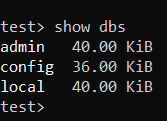
Here, we freshly started MongoDB, so we do not have a database except for these three default databases, i.e., admin, config, and local.
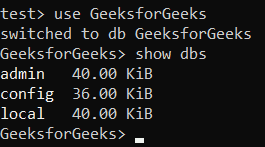
The use GeeksforGeeks command creates and switches to a database, but it does not appear in the database list until at least one document is inserted.
Naming Restriction for Database
Before creating a database we should first learn about the naming restrictions for databases:
- Database names must be case-sensitive.
- The names cannot contain special characters such as /, ., $, *, |, etc.
- MongoDB database names cannot contain null characters(in windows, Unix, and Linux systems).
- MongoDB database names cannot be empty and must contain less than 64 characters.
For windows user, MongoDB database names cannot contain any of these following characters:
/. "$*:|?
For Unix and Linux users, MongoDB database names cannot contain any of these following characters:
/. "$
**Example:
use LibraryDB # Switch to the LibraryDB database
Collection in MongoDB
A Collection in MongoDB is similar to a table in relational databases. It holds a group of documents and is a part of a database. Collections provide structure to data, but like the rest of MongoDB, they are schema-flexible.
- **Schema-flexible: MongoDB collections can store documents with different structures, and documents in the same collection don’t need to follow a uniform schema.
- **Multiple Collections: A database can have multiple collections, each holding different types of documents.
Naming Restrictions for Collection
Before creating a collection we should first learn about the naming restrictions for collections:
- Collection name must start with an underscore(`_`) or a letter (a-z or A-Z)
- Collection names must not start with a number, contain $, null characters, or begin with the reserved system. prefix.
- The maximum length of the collection name is 120 bytes(including the database name, dot separator, and the collection name).
**Example:
db.books.insertOne({ title: "Learn MongoDB", author: "Jane Doe", year: 2023 })
Creating collection
After creating database now we create a collection to store documents. The collection is created using the following syntax:
db.collection_name.insertOne({..})
Here, insertOne() function is used to store single data in the specified collection. And in the curly braces {} we store our data or in other words, it is a document.
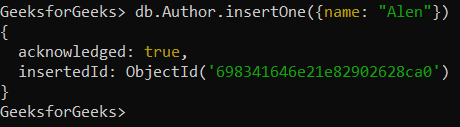
- Creates the Author collection.
- Inserts a document using insertOne().
- { name: "Alen" } is a document with name as the field.
- MongoDB confirms insertion with acknowledged: true.
- A unique _id is automatically generated (custom IDs are allowed).
Document in MongoDB
MongoDB stores data as BSON documents, a binary form of JSON that supports additional data types.
- Data is stored as BSON (Binary JSON) documents.
- BSON supports more data types than JSON.
- Documents use field–value (key–value) pairs.
- Field values can be of any BSON-supported type.
**Syntax:
{
field1: value1
field2: value2
....
fieldN: valueN
}
**Document Structure
A document in MongoDB is a flexible data structure made up of field-value pairs. For instance:
{
title: "MongoDB Basics",
author: "John Doe",
year: 2025
}
Naming restriction for Document Fields
Before moving further first you should learn about the naming restrictions for fields:
- Fields in documents must be named with strings
- The _id field is a reserved primary key that must be unique, immutable, and cannot be an array.
- The field name cannot contain null characters.
- The top-level field names should not start with a dollar sign($).
Document Size
- Maximum BSON document size: 16MB, preventing excessive RAM or bandwidth usage.
- For larger data, MongoDB provides GridFS.
- Documents can contain duplicate fields.
- Field order in MongoDB documents is preserved as inserted. The _id field is not required to be the first field. Renaming fields may affect their order.
_id Field in MongoDB
Every document must have a unique _id field, acting like a primary key.
- **Automatic ObjectId: If _id is not provided, MongoDB generates a unique ObjectId.
- **Custom _id: Users can assign a custom unique value for _id.
Example with ObjectId

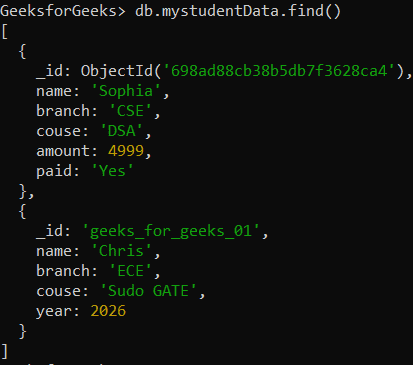
The name, branch, course, and paid fields are strings, the amount field is an integer, and the _id field is system-generated.
Example with Custom _id

- The _id field is explicitly created by the user.
- Always paste the data inside the function before closing the parenthesis.
- Closing the parenthesis early results in a syntax error.
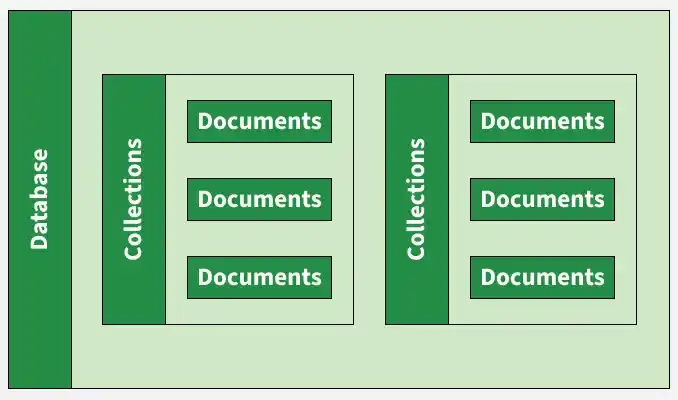
Differences Between Databases, Collections, and Documents
MongoDB organizes data hierarchically into databases, collections, and documents, each serving a distinct purpose.
- **Database: A container for collections, providing structure and logical isolation for data.
- **Collection: A group of documents within a database, similar to a table in relational databases.
- **Document: A single data record within a collection, stored as a BSON object.
Creating a Database, Collection, and Document
Here’s how you can create a database, collection, and document in MongoDB step by step:
1. Create or Switch to a Database
use LibraryDB
2. Create a Collection and Insert a Document
db.books.insertOne({
title: "MongoDB for Beginners",
author: "Alice Johnson",
year: 2023
})
3. Verify the Insertion
db.books.find()
This will display the document stored in the books collection within the LibraryDB database.
**Note: MongoDB automatically creates a unique index on the _id field for every collection. This index helps MongoDB quickly find documents based on their unique identifier.