MongoDB Field Update Operators (original) (raw)
Last Updated : 5 May, 2026
MongoDB field update operators modify specific fields in documents without replacing the entire document, enabling efficient and atomic updates.
- Update specific fields without rewriting whole documents.
- Perform atomic operations to ensure data consistency.
- Improve performance and operational efficiency.
- Simplify partial updates within documents.
Features of Field Update Operators
They support precise, in-place modifications during update operations.
- **Efficiency: Update specific fields without rewriting entire documents.
- **Atomicity: Ensures data integrity by completing operations in full.
- **Flexibility: Modify multiple fields simultaneously or apply operations to nested fields.
Common Field Update Operators in MongoDB
MongoDB provides different types of field update operators to update the values of the fields of the documents that match the specified condition. The following table contains the field update operators:
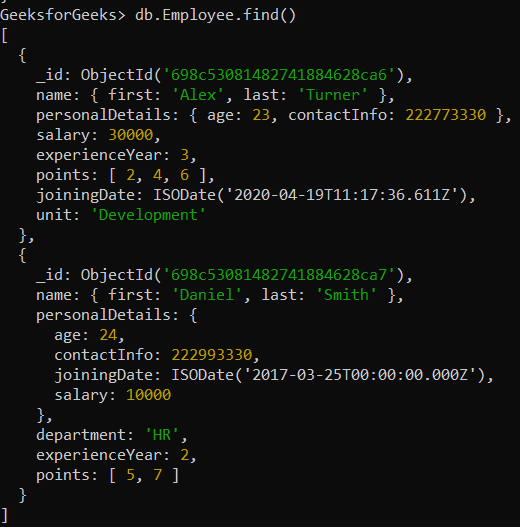
In the following examples, we use a database named GeeksforGeeks and a collection named Employee.
- **Database: GeeksforGeeks
- **Collection: Employee
- **Document: Two documents that contain the details of the employees in the form of field-value pairs.
1. $currentDate Operator
Sets the value of a field to a current date, either as a Date or a Timestamp.
**Example: Update the joiningDate field of an employee document where the first name is "Alex" to the current date.
db.Employee.updateOne(
{ "name.first": "Alex" },
{ $currentDate: { joiningDate: true } }
)
**Output:

2. $inc Operator
Increments the value of the field by the specified amount.
**Example: Increment the salary field by 3000 for an employee whose first name is "Daniel" using $inc Operator in MongoDB.
db.Employee.updateOne(
{ "name.first": "Daniel" },
{ $inc: { "personalDetails.salary": 3000 } }
)
**Output:

3. $max Operator
Updates the field if the specified value is greater than the existing field value.
**Example: Comparing values (or numbers) of the salary fields with the specified value, i.e., 40000. Here, the specified value is greater than the current value. So, $max operator updates the value of the salary field with the help of updateOne() method to 40000.
db.Employee.updateOne(
{ "name.first": "Daniel" },
{ $max: { "personalDetails.salary": 40000 } }
)
**Output:

4. $min Operator
Updates the field only if the specified value is less than the existing field value
**Example: Comparing values (or numbers) of the salary fields with the specified value, i.e, 5000. Here, the specified value is less than the current value. So. $min operator updates the value of the salary field with the help of updateOne() method to 5000.
db.Employee.updateOne(
{ "name.first": "Daniel" },
{ $min: { "personalDetails.salary": 5000 } }
)
**Output:

5. $mul Operator
Multiplies the value of the field by the specified amount.
**Example: Double the salary field for an employee whose first name is "Daniel".
db.Employee.updateOne(
{ "name.first": "Daniel" },
{ $mul: { "personalDetails.salary": 2 } }
)
**Output:

6. $rename Operator
This operator is used to rename a field.
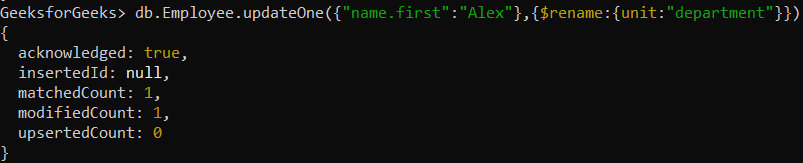
**Example: Renaming the name of department field to unit in the employee’s document whose first name is Alex.
db.Employee.updateOne(
{ "name.first": "Alex" },
{ $rename: { unit: "department" } }
)
**Output:
7. $setOnInsert Operator
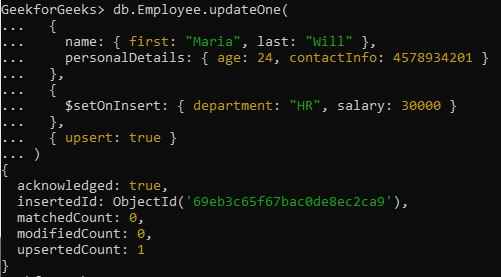
Sets the value of a field if an update results in an insert of a document. It has no effect on update operations that modify existing documents.
**Example: Creating new document in Employee collection with the help of updateOne() method by setting the value of upsert field to true and using $setOnInsert operator assign the values to department and salary fields in the document.
db.Employee.updateOne(
{
name: { first: "Maria", last: "Will" },
personalDetails: { age: 24, contactInfo: 4578934201 }
},
{
$setOnInsert: { department: "HR", salary: 30000 }
},
{ upsert: true }
)
**Output: