MongoDB updateMany() Method (original) (raw)
Last Updated : 14 Apr, 2026
The MongoDB updateMany() method updates all documents that match a filter in a single operation, making bulk updates efficient.
- Supports options like upsert, writeConcern, and collation.
- Can be used in multi-document transactions.
- Accepts aggregation pipelines for complex updates.
- Ensures atomicity per document, maintaining data integrity.
**Syntax
db.collection.updateMany(
,
,
{
upsert: ,
writeConcern: ,
collation: ,
arrayFilters: [ , ... ],
hint: <document|string>
}
)
- **filter: A query that matches the documents to update.
- **update: The modifications to apply. This can include update operators like set,set, set,unset, $inc, etc.
- **upsert (optional): If true, creates a new document if no documents match the filter. The default is false.
- **writeConcern (optional): A document expressing the write concern.
- **collation (optional): Specifies the collation to use for the operation.
- **arrayFilters (optional): Specifies which array elements to update using filter conditions.
- **hint (optional): The index to use for the query.
Behavior of updateMany()
The behavior of updateMany() can be summarized as follows:
- **Bulk Updates: Updates all documents matching a filter in a single operation.
- **Efficient & Reliable: Reduces network overhead and improves performance compared to individual updates.
- **Flexible Options: Supports write concern and collation, ensuring per-document atomicity and locale-specific rules.
- **Atomicity: Ensures that each document is updated atomically.
- **Supports Aggregation Pipelines: Can handle complex updates using aggregation frameworks.
- **Index Optimization: The hint option specifies which index to use for the query.
Examples of updateMany() in MongoDB
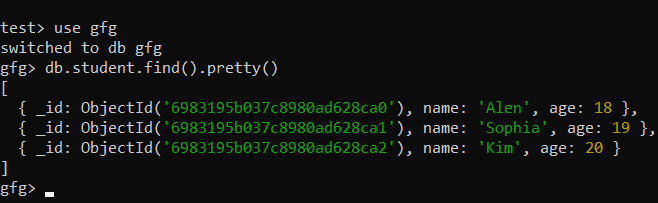
To understand MongoDB updateMany() we need a collection called studentson which we will perform various operations and queries.
Example 1: Update a Single Document
Update the age of the student named "Alen" to 20 using MongoDB updateMany, run the following query:
**Query:
db.student.updateMany({name: "Alen"}, {$set:{age: 20}})
**Output:
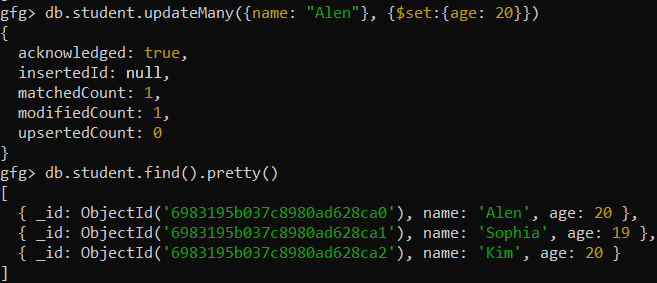
- Even though updateMany is designed for bulk updates, it can also update a single document if the filter matches only one document.
- In this case, only the document where name is "Alen" will be updated.
Example 2: Update Multiple Documents
To set the "eligible" field to "true" for all students whose age is 19, use the following query:
**Query:
db.student.updateMany({age:19},{$set:{eligible: true }})
**Output:
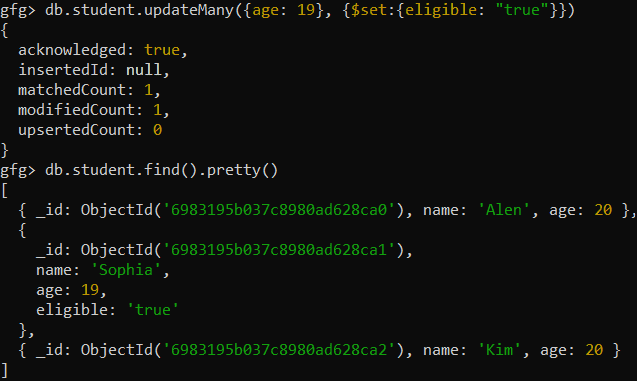
- The updateMany method applies the $set operator to all documents that match the filter { age: 19 }.
- This ensures that every student with an age of 19 will now have an eligible field added (or updated) with the value "true".
- This is an efficient way to update multiple documents in a single operation.
Example 3: Update with Upsert
Let's Update all documents matching the condition to set "eligible" to false and create a new document if no match is found, use the following query:
**Query:
db.student.updateMany({age: 20}, {$set: {eligible: false}}, {upsert: true})
**Output:

- The upsert option ensures that if no documents match the filter { age: 20 }, a new document will be created with the specified values.
- This combines update and insert operations efficiently.
Example 4: Update with Write Concern
To update the age of all students aged 19 to 22 with a write concern that requires majority acknowledgment, use the following query:
**Query:
db.student.updateMany({age: 19 }, { $set: {age: 22 } }, { writeConcern: { w: "majority", wtimeout: 5000 }})
**Output:
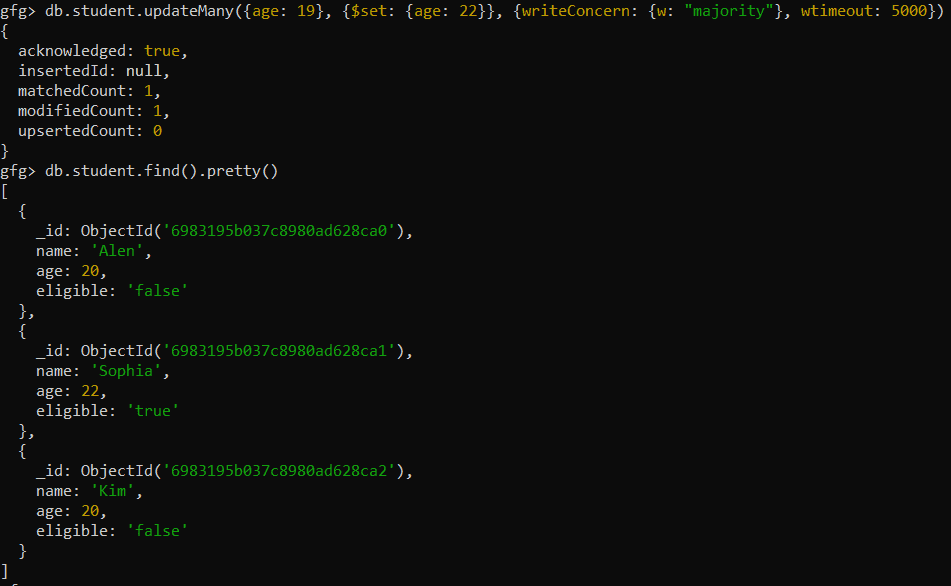
- The writeConcern option specifies the level of acknowledgment required for the write operation.
- w: "majority" ensures that the update is acknowledged by the majority of replica set members, providing reliability.
- The wtimeout option sets a timeout of 5000 milliseconds to prevent indefinite waiting for acknowledgment.
Example 5: Update with Collation
To update the age of all students aged 20 to 26 with a write concern and collation settings for locale-specific rules, use the following query:
**Query:
db.student.updateMany({ age: 20 }, { $set: { age: 26 } }, { writeConcern: { w: "majority", wtimeout: 5000 }, collation: { locale: "en", strength: 2 }})
**Output:
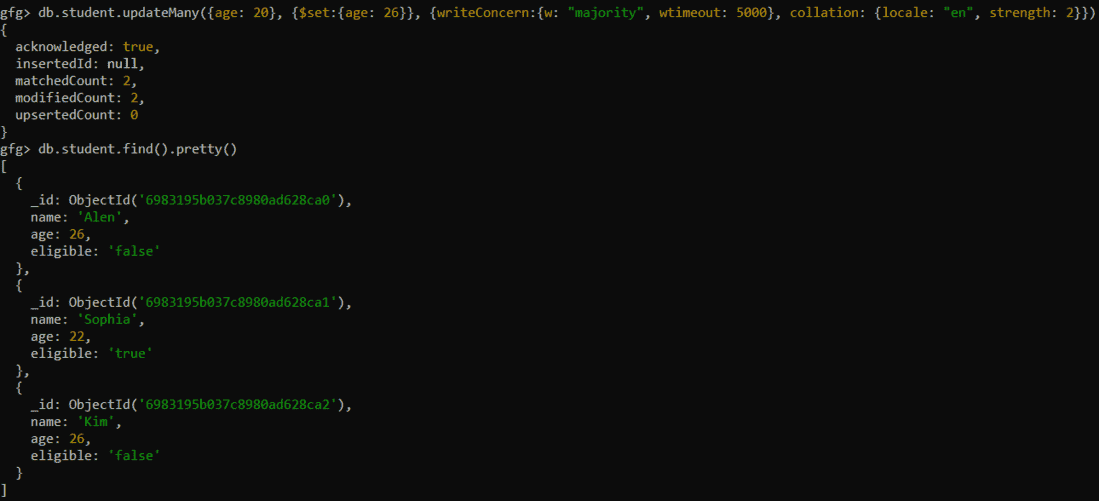
- This query updates all documents where age is 20, changing it to 26, while adhering to the specified collation and acknowledgment rules.
- This ensures that updates are handled according to locale-specific settings.