Shard Keys in MongoDB (original) (raw)
Last Updated : 5 May, 2026
Shard keys are central to MongoDB sharding, as they control how data is split and distributed across shards to improve scalability and performance in a sharded cluster.
- A shard key is a field or combination of fields used to distribute data across shards.
- Sharding spreads data across multiple machines to support horizontal scaling.
- Data is divided into chunks and assigned to shards based on shard key values.
- The choice of shard key directly affects overall cluster performance and data distribution.
Importance of Shard Keys
Here are some important points of Shard Keys:
- **Scalability: Enables horizontal scaling by distributing data across shards.
- **Query Efficiency: Improves query performance by routing queries to relevant shards.
- **Load Balancing: Prevents hotspots by distributing workload evenly across the cluster.
Shard Key Specification
The specification of a shard key is one of the most important decisions when designing a MongoDB sharded cluster. It involves choosing one or more fields that will determine how the data is partitioned.
- **Single or Compound Key: A shard key can be a single field or a combination of fields, allowing flexible data distribution strategies.
- **Cardinality: High-cardinality shard keys help distribute data evenly across shards, while low cardinality can create hotspots.
- **Indexing: MongoDB automatically creates an index on the shard key, enabling efficient and targeted query routing.
- **Read/Write Performance: Choosing the right shard key improves read and write performance by directing operations to specific shards instead of broadcasting across the cluster.
Changing a Document’s Shard Key Value
In some cases, updating a document’s shard key value requires adhering to MongoDB’s constraints and procedures to preserve data integrity, consistency, and correct chunk placement across the cluster.
1. Shard Key Indexes
- Shard keys play a critical role in indexing for MongoDB's performance optimization.
- Shard key indexes significantly enhance the overall performance of a sharded cluster.
- They enable efficient query routing and execution within the cluster.
2. Choosing a Shard Key
- Selecting a shard key is a crucial decision in MongoDB's sharding strategy.
- A well-chosen shard key can reduce hotspots, ensure even data distribution, and enhance query performance.
- The process of selecting an ideal shard key for our application will be explained in detail in our upcoming post.
3. Shard Key Cardinality
- Shard key cardinality is crucial for improving MongoDB's sharding speed.
- Cardinality refers to the uniqueness of values in a shard key.
- Data distribution and query routing in MongoDB are influenced by shard key cardinality.
- Understanding shard key cardinality is essential for optimizing MongoDB's scalability.
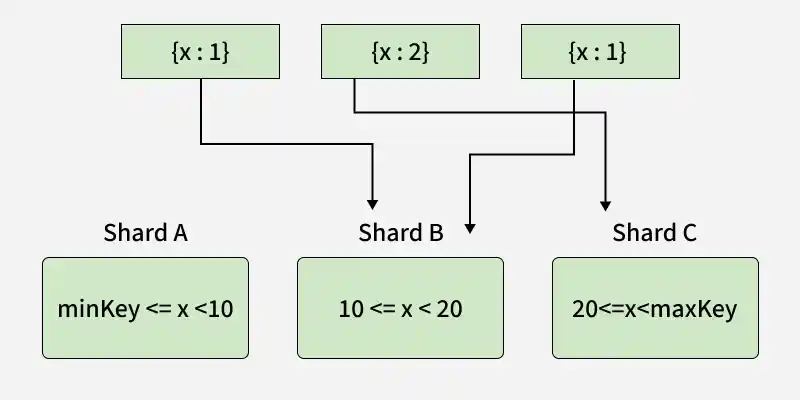
The diagram shows a sharded cluster using field X as the shard key. When X has low cardinality, most inserts go to the same shard range, causing uneven data distribution (hotspots).
Shard Key Cardinality
4. Shard Key Frequency
- The frequency of shard key values directly impacts data distribution and query performance.
- High-frequency values can create hotspots on specific shards.
- Evaluating shard key frequency helps optimize sharding strategies and load balance.
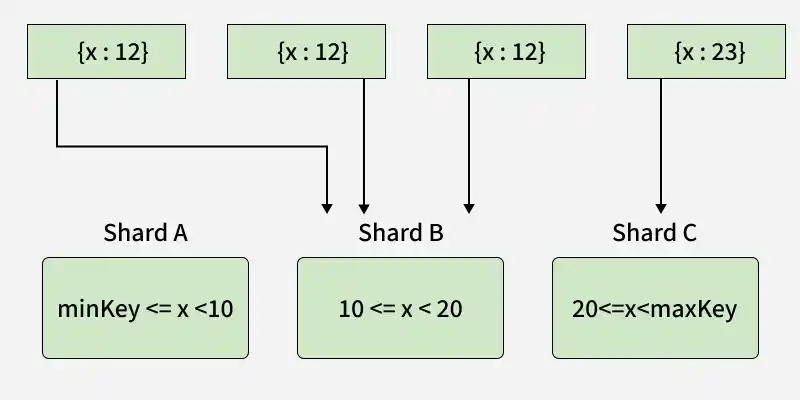
The diagram shows that high-frequency shard key values for field X cause insert operations to concentrate on specific shards, creating hotspots.
Shard Key Frequency
Implementing Shard Keys
Let's consider an example to illustrate the concept of shard keys in MongoDB:
Step 1: Create a Collection and Define a Shard Key
db.createCollection("users");
db.users.createIndex({ "username": 1 });
- Creates a users collection in the database.
- Defines a shard key index on the username field in ascending order (1).
- Uses username values to distribute documents across shards.
- Helps balance data and query load across the cluster.
Step 2: Enable Sharding on the Database
sh.enableSharding("testDB");
- Activates sharding for the testDB database.
- Allows collections in testDB to be sharded.
Step 3: Shard the Collection
sh.shardCollection("testDB.users", { "username": 1 });
- Shards the users collection using the previously defined shard key on username.
- Distributes users data across shards based on username values.
Step 4: Insert Data
db.users.insertOne({ username: "user1", email: "user1@example.com" });
db.users.insertOne({ username: "user2", email: "user2@example.com" });
- Inserts documents into the users collection.
- MongoDB distributes them across shards using the username shard key.
Step 5: Query Data
db.users.find({ username: "user1" });
- Queries the users collection using the shard key (username).
- MongoDB routes the query to the correct shard for efficient retrieval.