MySQL CREATE INDEX Statement (original) (raw)
Last Updated : 23 Jul, 2025
MySQL is an open-source **relational database management system that uses Structured Query Language (**SQL) to manage and manipulate data. The CREATE INDEX statement is an important tool for enhancing database performance. By creating indexes, MySQL can quickly locate and retrieve relevant data, reducing the need for full table scans and minimizing response times.
In this article, we will explore how to use the CREATE INDEX statement with practical examples to optimize query performance and improve the efficiency of data retrieval operations.
MySQL CREATE INDEX Statement
The MySQL **CREATE INDEX statement is a DDL (Data Definition Language) statement used to create **indexes on tables. It allows developers to **optimize query performance by specifying which columns should be indexed. The index is a **data structure that provides a quick lookup mechanism for faster data retrieval.
Need for Indexing in MySQL
- **Efficient Data Retrieval: Indexing allows the database engine to quickly locate and retrieve data, significantly speeding up query execution.
- **Improved Query Performance: Indexed columns enhance the performance of SELECT, JOIN, and WHERE clauses by providing a faster search path.
- **Ensuring Uniqueness: Unique indexes ensure that the values in specified columns are unique, preventing duplicate entries and maintaining data integrity.
- **Optimized Sorting and Grouping: Indexes improve the efficiency of sorting (
ORDER BY) and grouping (GROUP BY) operations by organizing data in a structured manner. - **Reduced Full Table Scans: By minimizing the need for full table scans, indexes reduce the load on the database and decrease response times, especially for large tables.
Creating an Index in MySQL
Indexes can be created at the time of table creation or added later using the CREATE INDEX statement. This helps optimize query performance by allowing MySQL to quickly locate and retrieve data.
Creating a Table with an Index
Indexes can be specified during table creation. The following example creates a table named '**table _index' with an index on columns '**column 2' and '**column 3'.
CREATE TABLE p_index (
column1 INT PRIMARY KEY,
column2 INT NOT NULL,
column3 INT NOT NULL,
column4 VARCHAR(20),
INDEX (column2, column3)
);
Adding an Index to an Existing Table
If you want to add an index to an existing table, you can use the **CREATE INDEX**statement. The syntax for adding an index is:
CREATE INDEX index_name
ON table_name (column_names);
index_name: The name of the index.table_name: The name of the table to which the index belongs.column_names: The list of columns to be indexed.
Example: Adding an Index to a Column
To add a new index on the column4 column in the **table ** _index**table, you can use the following SQL statement:
CREATE INDEX index_1
ON table_index (column4);
Example of MySQL CREATE INDEX
By this example, we will try to understand, how **CREATE INDEX helps in quickly retrieve the data.
we will create index on this **products table:

products table
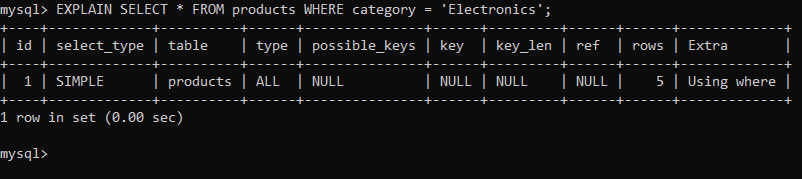
Before creating a Index, we will **analyze the query execution plan for a query filtering by the category column. This will show a full table scan, that indicate that MySQL is examining all rows in the table.
EXPLAIN SELECT * FROM products WHERE category = 'Electronics';
Analyzing Query Before Creating of Index
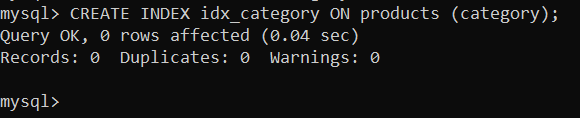
Now, we will create a index on a **category column by using this query:
CREATE INDEX idx_category ON products (category);
Creating Index
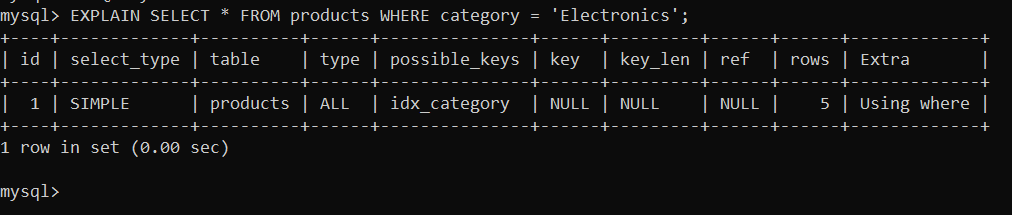
**After creating a Index, we will **analyze the query execution plan for a query filtering by the category column. The output showing that the query is using the **idx_category index, resulting in a more efficient query execution plan.
EXPLAIN SELECT * FROM products WHERE category = 'Electronics';
Analyzing Query After Creating Index
To **Drop index, we will use this query:
DROP INDEX idx_category ON products;

Drop Index
Conclusion
In conclusion, MySQL **CREATE INDEX is tool for **optimizing database performance by improving query speed and efficiency. By selecting and defining **indexes on the appropriate column you can improve the efficiency of data retrieval operations. Indexing allows MySQL to quickly **locate and **retrieve relevant data by reducing the need for full table scans and minimizing response times CREATE INDEX is a DDL (Data Definition Language) statement that is used to create indexes on tables.