Building a RuleBased Chatbot with Natural Language Processing (original) (raw)
Last Updated : 4 May, 2026
A rule-based chatbot follows a set of predefined rules or patterns to match user input and generate an appropriate response. The chatbot can’t understand or process input beyond these rules and relies on exact matches making it ideal for handling repetitive tasks or specific queries.
- **Pattern Matching: The chatbot compares the user’s input with predefined patterns and selects a matching response.
- **Predictable Responses: Since the chatbot operates based on a defined set of rules it provides predictable and consistent responses.
- **Limited Flexibility: Rule-based chatbots are not designed to handle complex conversations or evolve over time like AI-based chatbots. They work best for situations where user input can be anticipated.
Steps to Implement Rule Based Chatbot
1. **Installing Necessary Libraries
First we need to install the NLTK library which will help us with text processing tasks such as tokenization and part-of-speech tagging.
You can install the NLTK library using the following command:
pip install nltk
2. **Importing Required Libraries
Once the libraries are installed, the next step is to import the necessary Python modules.
- **re: Used for regular expressions which help in matching patterns in user input.
- **Chat: A class from NLTK used to build rule-based chatbots.
- **reflections: A dictionary to map pronouns. For example, "I" → "you" making conversations more natural. Python `
import nltk import re from nltk.chat.util import Chat, reflections
`
**3. Downloading NLTK Datasets
Before proceeding we need to download specific NLTK datasets required for tokenization and part-of-speech (PoS) tagging.
- **punkt: Used for tokenization which breaking down text into words or sentences.
- **averaged_perceptron_tagger: PoS tagger helps to identify the grammatical parts of speech in a sentence. Python `
nltk.download('punkt') nltk.download('averaged_perceptron_tagger')
`
**Output:

NLTK Dataset
4. Defining Patterns and Responses
Rule-based chatbot recognize patterns in user input and respond accordingly. Here we will define a list of patterns and respective responses that the chatbot will use to interact with users. These patterns are written using regular expressions which allow the chatbot to match complex user queries and provide relevant responses.
- **Pattern Matching: The regular expressions (RegEx) here match user input. For example r"hi|hello|hey" matches greetings.
- **Responses: Each pattern has an associated list of responses which the chatbot will choose from. Python `
pairs = [ [r"hi|hello|hey", ["Hello! How can I help you today?", "Hi there! How may I assist you?"]], [r"my name is (.)", ["Hello %1! How can I assist you today?"]], [r"(.) your name?", ["I am your friendly chatbot!"]], [r"how are you?", ["I'm just a bot, but I'm doing well. How about you?"]], [r"tell me a joke", ["Why don't skeletons fight each other? They don't have the guts!"]], [r"(.) (help|assist) (.)", ["Sure! How can I assist you with %3?"]], [r"bye|exit", ["Goodbye! Have a great day!", "See you later!"]], [r"(.*)", ["I'm sorry, I didn't understand that. Could you rephrase?", "Could you please elaborate?"]] ]
`
**5. Defining the Chatbot Class
Now, let’s create a class to handle the chatbot’s functionality. This class will use the Chat object from NLTK to match patterns and generate responses.
- **Chat Object: The Chat class is initialized with the patterns and reflections. It handles the matching of patterns to the user input and returns the corresponding response.
- **respond() method: This method takes user input and matches it with predefined patterns and returns the chatbot’s response. Python `
class RuleBasedChatbot: def init(self, pairs): self.chat = Chat(pairs, reflections)
def respond(self, user_input):
    return self.chat.respond(user_input)
`
**6. Interacting with the Chatbot
Here we create a function that allows users to interact with the chatbot. It keeps asking for input until the user types "exit".
- **Input Loop: Continuously prompts the user for input and displays the chatbot’s response until "exit" is typed. Python `
def chat_with_bot(): print("Hello, I am your chatbot! Type 'exit' to end the conversation.") while True: user_input = input("You: ") if user_input.lower() == 'exit': print("Chatbot: Goodbye! Have a nice day!") break response = chatbot.respond(user_input) print(f"Chatbot: {response}")
`
**7. **Initializing the Chatbot
We instantiate the chatbot class and start the chat.
Python `
chatbot = RuleBasedChatbot(pairs) chat_with_bot()
`
**Output:
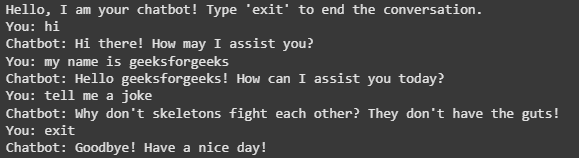
Rule Based Chatbot Working
You can download the source code from here.
This rule-based chatbot uses a set of predefined patterns to recognize user input and provide responses. While it is limited in flexibility it’s a good starting point for simpler, structured conversations. You can extend this chatbot by adding more complex patterns, integrating machine learning models or incorporating advanced NLP techniques for better accuracy and response handling.