FineTuning Large Language Models (LLMs) Using QLoRA (original) (raw)
Last Updated : 23 Jul, 2025
Fine-tuning large language models (LLMs) is used for adapting LLM's to specific tasks, improving their accuracy and making them more efficient. However full fine-tuning of LLMs can be computationally expensive and memory-intensive. QLoRA (Quantized Low-Rank Adapters) is a technique used to significantly reduces the computational cost while maintaining model quality.
What is QLoRA?
QLoRA is a advanced fine-tuning method that quantizes LLMs to reduce memory usage and applies Low-Rank Adaptation (LoRA) to train a subset of model parameters. This allows:
- **Lower GPU memory requirements : Fine-tuning large models on consumer GPUs.
- **Faster training : Using fewer parameters speeds up the process.
- **Preserved model quality : Achieves similar performance to full fine-tuning.
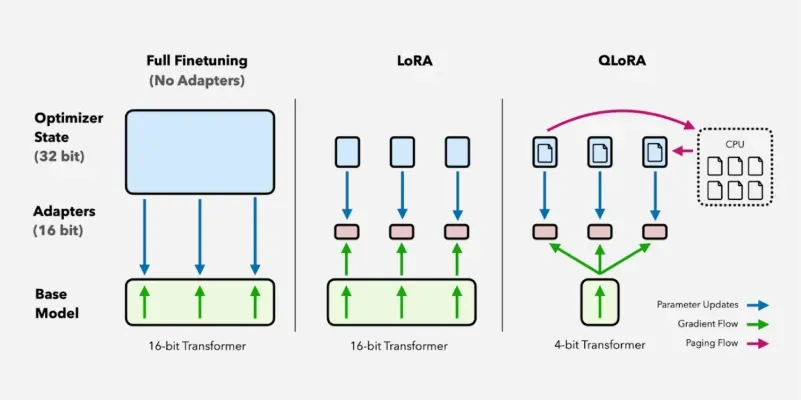
QloRa Techinique
Before going into QLoRA, it is important to understand Parameter Efficient Fine-Tuning (PEFT) techniques which aim to fine-tune large models efficiently by reducing the number of trainable parameters. LoRA (Low-Rank Adaptation) and **QLoRA are two prominent PEFT methods that significantly lower memory usage while retaining fine-tuning effectiveness.
Key Components of QLoRA
- **4-bit Quantization (NF4): QLoRA uses Normalized Float 4-bit (NF4) quantization which is optimized for deep learning. Unlike traditional quantization techniques that may introduce numerical instability, NF4 maintains precision by normalizing values in a way that aligns well with deep neural networks.
- **LoRA Adapters: Instead of modifying the full model, LoRA introduces small low-rank matrices into specific layers allowing efficient adaptation with fewer parameters. These adapters fine-tune only critical layers such as query and value projections in transformer models. These layers are chosen because they play a central role in attention mechanisms making fine-tuning more effective without modifying the entire model.
- **Memory: Efficient Training: By combining quantization with LoRA, QLoRA significantly reduces VRAM usage making fine-tuning feasible on consumer-grade GPUs. It achieves this by minimizing activation storage, reducing gradient computation and enabling large-scale training on limited hardware.
Fine-Tuning LLMs using QLoRA in Python
1. Install Required Libraries
We will install following libraries: **torch, transformers, peft, datasets, accelerate and **bitsandbytes .
Python `
!pip install torch transformers peft bitsandbytes accelerate datasets
`
2. Import Necessary Libraries
**AutoModelForCausalLM loads a pre-trained causal language model. The libraries have the following functions:
- **AutoTokenizer processes input text.
- **LoraConfig helps configure LoRA adapters.
- **get_peft_model integrates LoRA into the model.
- **load_dataset loads the dataset for training. Python `
import torch from transformers import AutoModelForCausalLM, AutoTokenizer, TrainingArguments, Trainer from peft import LoraConfig, get_peft_model from datasets import load_dataset import bitsandbytes as bnb
`
3. Load a Pretrained Quantized Model
Let's loads a 1.3B parameter model with 4-bit quantization to save memory. The **device_map="auto" argumentautomatically assigns the model to the available GPU.
Python `
model_name = "meta-llama/Llama-2-7b-chat-hf"
model = AutoModelForCausalLM.from_pretrained( model_name, load_in_4bit=True, # Enables 4-bit quantization device_map="auto" )
tokenizer = AutoTokenizer.from_pretrained(model_name)
`
4. Define LoRA Configuration
We will configure a LoRA (Low-Rank Adaptation) for a model and printing its trainable parameters. **LoraConfig() sets up the configuration for LoRA
where:
- **r=8: The low-rank dimension, specifying the rank of the weight matrices.
- **lora_alpha=16: A scaling factor for the low-rank updates.
- **lora_dropout=0.05: The dropout rate used during training to regularize the low-rank matrices.
- **target_modules=["q_proj", "v_proj"]: These are the specific layers in the model (likely attention layers) that will be fine-tuned.
- **get_peft_model(model, lora_config): This function wraps the model with the LoRA adaptation, incorporating the lora_config into the model. Python `
lora_config = LoraConfig( r=8, # Low-rank dimension lora_alpha=16, lora_dropout=0.05, target_modules=["q_proj", "v_proj"], # Fine-tuning specific layers )
model = get_peft_model(model, lora_config) model.print_trainable_parameters()
`
5. Load and Prepare Dataset
In this step , we load the **wikitext dataset and define **tokenize_function to preprocess text. The **dataset.map() function applies tokenization to all examples.
Python `
dataset = load_dataset("imdb", split="train[:10000]") # Sentiment analysis dataset
def tokenize_function(examples): return tokenizer(examples["text"], padding="max_length", truncation=True)
tokenized_dataset = dataset.map(tokenize_function, batched=True)
`
6. Set Training Arguments
We set the following arguments:
- **per_device_train_batch_size=4 sets batch size.
- **num_train_epochs=3 trains for three full dataset passes.
- **save_strategy="epoch" saves model at the end of each epoch.
- **logging_dir="./logs" enables training progress tracking. Python `
training_args = TrainingArguments( output_dir="./results", per_device_train_batch_size=4, evaluation_strategy="epoch", save_strategy="epoch", logging_steps=10, num_train_epochs=3, fp16=True, # Enable mixed precision training push_to_hub=False, )
`
7. Fine-Tune the Model
We will use Trainer class to streamline the training process of a model in HuggingFace system:
- **args=training_args: These are the training arguments which usually include settings such as batch size, learning rate, number of epochs, etc. This object is typically an instance of TrainingArguments from the Hugging Face library.
- **train_dataset=tokenized_dataset: This is the dataset used for training which has likely been tokenized i.e converted into the format the model can process, typically using tokenizers for transformer models.
- **trainer.train() starts the actual training process using the provided model, arguments and dataset. The Trainer class handles a lot of the heavy lifting such as data batching, gradient computation, model optimization and logging. Python `
trainer = Trainer( model=model, args=training_args, train_dataset=tokenized_dataset, )
trainer.train()
`
**Output:
Trainable parameters: 0.02M (0.3% of full model parameters)Training...Epoch 1: Loss 1.23Epoch 2: Loss 0.89Epoch 3: Loss 0.75Training complete.
This output shows that only 0.3% of model parameters were trained and hence showing us QLoRA’s efficiency.
Advantages of Using QLoRA
- **Scalability: Enables fine-tuning of large models on low-resource hardware.
- **Cost Efficiency: Reduces the need for high-end GPUs, making model fine-tuning accessible.
- **Retains Pre-trained Knowledge: Fine-tuning only specific layers prevents catastrophic forgetting.
- **Faster Convergence: Training with fewer parameters leads to quicker adaptation to new tasks.
Limitations and Trade-offs of QLoRA
- **Task-Specific Performance: While QLoRA is highly effective for many tasks, some applications requiring extensive model-wide adaptation may benefit more from full fine-tuning.
- **Quantization Impact: Although NF4 is designed to preserve precision, certain numerical approximations can introduce minor degradation in extreme cases.
- **Hyperparameter Sensitivity: The effectiveness of QLoRA depends on selecting appropriate values for parameters like r, lora alpha and batch size which may require tuning based on the dataset and model.
By using 4-bit quantization and LoRA adapters, QLoRA helps researchers and developers to fine-tune massive models on consumer-grade GPUs efficiently. This technique makes it easier to adapt LLMs for specific tasks without requiring expensive hardware.