HTTP Hypertext Transfer Protocol (original) (raw)
Last Updated : 4 Apr, 2026
HTTP stands for Hypertext Transfer Protocol, and it’s the system that allows communication between web browsers (like Google Chrome or Firefox) and web servers.
- HTTP is a set of rules that lets your browser and web server communicate, ensuring websites load correctly.
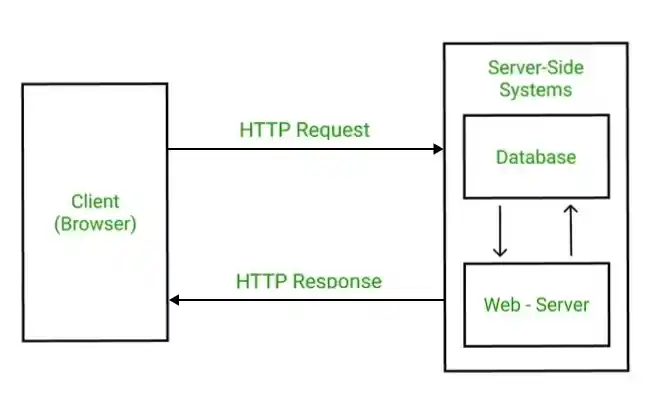
- When you visit a website, your browser uses HTTP to send a request to the server hosting that site, and the server sends back the data needed to display the page.

How HTTP Works: Step-by-Step Process
Here’s how HTTP works when you visit a website:
- **Open Web Browser: First, you open your web browser and type a website URL (e.g.,
www.example.com). - **DNS Lookup: Your browser asks a Domain Name System (DNS) server to find out the IP address associated with that URL. Think of this as looking up the phone number of the website.
- **Send HTTP Request: Once the browser has the website’s IP address, it sends an HTTP **request to the server. The request asks the server for the resources needed to display the page (like text, images, and videos).
- **Server Response: The server processes your request and sends back an HTTP **response. This response contains the requested resources (like HTML, CSS, JavaScript) needed to load the page.
- **Rendering the Web Page: Your browser receives the data from the server and displays the webpage on your screen.
After the page is loaded, the connection between the browser and server is closed. If you request a new page, a new connection will be made.
What is HyperText?
**HyperText is a way of structuring text so that it can contain links (called "hyperlinks") to other documents or resources. When you click on a link in a webpage, you are typically directed to another page or resource on the internet. HTML (HyperText Markup Language) is used to create and format this type of text for web pages.
HTTP is the protocol used to transfer this hypertext between the web browser and the server, allowing you to click links and move around the web.
Understanding HTTP Request and Response
1. HTTP Request
An HTTP request is how your browser asks the server for something. It includes:
- **HTTP Version: The version of HTTP (like HTTP/1.1 or HTTP/2) being used.
- **URL: The specific address of the resource (e.g.,
https://www.example.com/about). - **HTTP Method: The type of action being requested (e.g., GET to retrieve information or POST to send data).
- **HTTP Request Headers: Extra information about the request, like what kind of browser you're using or what kind of content you’re expecting.
- **HTTP Request Body: In some cases, the request will include a body that contains data (e.g., when you submit a form).
2. HTTP Response
An HTTP response is the server’s answer to your request. It includes:
- **HTTP Status Code: A number that tells you if the request was successful or not (e.g., 200 OK means everything is fine, 404 Not Found means the requested page doesn’t exist).
- **Response Headers: Information about the response, like what kind of data is being sent (e.g.,
Content-Type: text/htmlmeans it’s an HTML page). - **Response Body: The content that the server sends back (e.g., HTML code that the browser will use to display the webpage).
What is HTTP Status Code?
**HTTP Status codes are three-digit numbers that servers use to tell your browser what happened with the request you sent. There are different types of status codes:
- Informational (1xx): These codes just give you information (e.g., 100 Continue means the request is still being processed).
- Successful****(2xx)**: These codes tell you everything went fine (e.g., 200 OK means the request was successful).
- Redirection****(3xx)**: These codes tell the browser to take additional action (e.g., 301 Moved Permanently means the requested page has moved to a new address).
- Client Error ****(4xx)**: These codes indicate that there was a problem with your request (e.g., 404 Not Found means the page doesn’t exist).
- Server Error ****(5xx)**: These codes tell you that something went wrong on the server side (e.g., 500 Internal Server Error means the server had an issue processing the request).
Comparing HTTP, HTTP/2, and HTTP/3
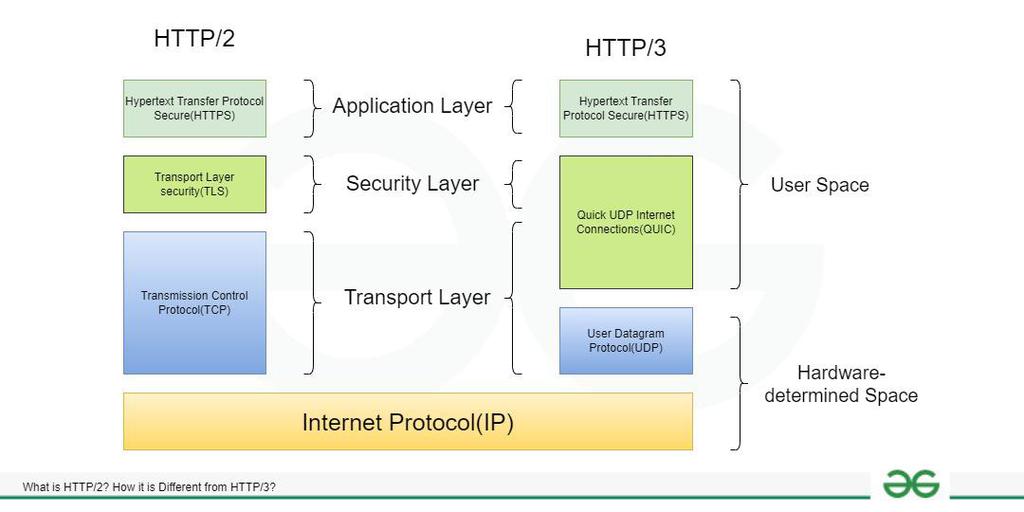
HTTP/2: Improved Performance
HTTP/2 is an improved version of HTTP introduced in 2015. It made several changes to make websites load faster:
- **Multiplexing: Multiple requests can be sent over one connection at the same time, reducing delays.
- **Header Compression: HTTP/2 compresses the data sent in headers to make it smaller and faster.
- **Server Push: This allows the server to send additional resources (like images or scripts) to the browser before the browser even asks for them.
HTTP/3: The Latest Version
HTTP/3, released in 2022, builds on HTTP/2 but with a key improvement: it uses the QUIC protocol instead of TCP. QUIC is faster and more reliable because it:
- Reduces connection setup time.
- Handles data loss better, especially in poor network conditions.
- Offers better security by integrating encryption directly into the protocol.
**History of HTTP
Tim Berners-Lee and his team at CERN get credit for inventing the original HTTP and associated technologies.
- **HTTP version 0.9: This was the first version of HTTP, which was introduced in 1991.
- **HTTP version 1.0: In 1996, RFC 1945 (Request For Comments) was introduced in HTTP version 1.0.
- **HTTP version 1.1: In January 1997, RFC 2068 was introduced in HTTP version 1.1. Improvements and updates to the HTTP version 1.1 standard were released under RFC 2616 in June 1999.
- **HTTP version 2.0: The HTTP version 2.0 specification was published as RFC 7540 on May 14, 2015.
- **HTTP version 3.0: HTTP version 3.0 is based on the previous RFC draft. It is renamed as Hyper-Text Transfer Protocol QUIC which is a transport layer network protocol developed by Google.
Cookies in HTTP
An HTTP cookie (web cookie, browser cookie) is a little piece of data that a server transmits to a user's web browser. When making subsequent queries, the browser may keep the cookie and transmit it back to the same server. An HTTP cookie is typically used, for example, to maintain a user's login state and to determine whether two requests originate from the same browser.Thee stateless HTTP protocol, retains stateful information.
Can DDoS attacks be launched over HTTP?
Remember that because HTTP is a "stateless" protocol, every command executed over it operates independently of every other operation. Each HTTP request opened and terminated a TCP connection according to the original specification.
Multiple HTTP requests can now flow over a persistent TCP connection in HTTP 1.1 and later versions of the protocol, which improves resource use. Large-scale HTTP requests are regarded as application layer or layer 7 attacks in the context of DoS or DDoS attacks, and they can be used to mount an attack on a target device.
**Advantages of HTTP
- Memory usage and CPU usage are low because of fewer simultaneous connections.
- Since there are few TCP connections, network congestion is less.
- Since handshaking is done at the initial connection stage, latency is reduced because there is no further need for handshaking for subsequent requests.
- The error can be reported without closing the connection.
- HTTP allows HTTP pipe-lining of requests or responses.
**Disadvantages of HTTP
- HTTP requires high power to establish communication and transfer data.
- HTTP is less secure because it does not use any encryption method like HTTPS and uses TLS to encrypt regular HTTP requests and responses.
- HTTP is not optimized for cellular phones, and it is too gabby.
- HTTP does not offer a genuine exchange of data because it is less secure.
- The client does not close the connection until it receives complete data from the server; hence, the server needs to wait for data completion and cannot be available for other clients during this time.