Booting and Dual Booting of Operating System (original) (raw)
Last Updated : 8 Dec, 2025
When a computer or any other computing device is in a powerless state, its operating system remains stored in secondary storage like a hard disk or SSD. But, when the computer is started, the operating system must be present in the main memory or RAM of the system in order to perform all the functioning.
What is Booting?
When a computer system is started, it uses a built-in mechanism to load the operating system from secondary storage into the main memory (RAM). This process is essential because the OS must be present in RAM to manage hardware and software operations. This entire operation of loading the OS into memory is known as the booting process.
- Booting is the process that begins when a computer system is powered on.
- It loads the operating system from secondary storage (like HDD or SSD) into RAM.
- The OS must be in the main memory to run and manage system functions.
- This loading mechanism that prepares the system for use is called the booting process.

Booting Process
Types of Booting
There are two **types of booting depending on the number of operating systems installed on the machine/computer, i.e.
**1. Cold or Hard Booting
Cold booting refers to the state in which a computer is switched on after being completely powered off. During this process, the system performs a full power-on self-test (POST), initializes hardware devices, and loads the operating system from storage into RAM.
- Cold booting occurs when a computer is powered on from a fully switched-off state.
- It is also known as performing a cold boot or fresh startup.
- The system carries out POST, initializes hardware, and loads the OS into RAM.
Cold Booting Example,
- Pressing the power button on a computer that is completely turned off.
**2. Soft or Warm Booting
Warm booting, also known as a soft boot or restart, reboots a computer system without completely shutting it down and is usually triggered through an OS restart command or a key combination. It skips some hardware initialization steps since the components are already powered and initialized, offering a quicker restart compared to a full cold boot.
- Warm booting (soft boot/restart) reboots the system without turning it off entirely.
- It is initiated through an operating system restart command or a specific key combination.
- It skips certain hardware initialization steps, making it faster than a cold boot while still essential for system operation.
Warm Booting Example,
- Clicking Restart from the operating system menu (e.g., Windows → Start → Restart) without powering off the computer.
Power on Self Test (POST) Booting
The Power-On Self-Test (POST) is the first check a computer runs when it powers on. It verifies that key hardware like the CPU, RAM, and storage are working properly. If a problem is found, the computer shows an error message or beeps; if not, it proceeds to load the operating system.
- POST is the first diagnostic test that runs when the computer is powered on.
- It checks key hardware components such as the CPU, memory, and storage devices.
- If a hardware issue is found, it displays an error message or beeps to show the problem.
- If no issues are detected, the computer proceeds to load the operating system.
POST is the first diagnostic test that runs when a computer powers on.
It checks hardware like:
- CPU
- RAM
- Storage devices
- Keyboard, display, and other peripherals
If POST detects issues:
It shows an error message, or
- Produces beep codes to indicate the type of error
If POST is successful, the system moves to the next stage: loading the bootloader.
Master Boot Record (MBR)
The Master Boot Record (MBR) is a key part of the boot process, stored at the very beginning of the hard disk. It holds partition details and startup information. When the computer starts, the BIOS or UEFI loads the MBR, which then starts the bootloader, and the bootloader loads the operating system.
- MBR is stored at the start of the hard disk and holds partition and startup information.
- BIOS/UEFI searches for the MBR during system startup.
- The MBR loads the bootloader, which then loads the OS.
- It is an essential part of the computer’s boot process.
The **MBR is a small but essential part of the boot process.
Located at the **first sector of a hard disk
- Contains:
- Partition table
- Bootloader code
During booting:
- BIOS/UEFI looks for a bootable device
- It reads the MBR from that device
- The MBR’s bootloader code runs
- The bootloader loads the operating system
MBR is the starting point of the entire OS loading process.
Process of Booting
When a computer starts, it needs a way to find and load the operating system’s kernel. This is done by a program stored in ROM called the bootstrap loader. The****:** BIOS or UEFI follows a set boot order to look for a device that can start the system. Once found, the bootstrap loader loads the kernel into the main memory, and begins its execution. In some systems, a small Bootstrap loader first loads a more advanced boot program, which then loads the full kernel.
**Example: BIOS (boot input-output system). A modern PC BIOS (Basic Input/Output System) supports booting from various devices. Typically, the BIOS will allow the user to configure a boot order. If the boot order is set to:
- CD Drive
- Hard Disk Drive
- Network
- The bootstrap loader is stored in ROM and is responsible for locating and loading the OS kernel.
- BIOS/UEFI follows a boot order to decide which device to boot from.
- Once the correct device is found, the bootstrap loader loads the kernel into RAM.
- Some systems use a small initial loader to load a more complex boot program before loading the kernel.
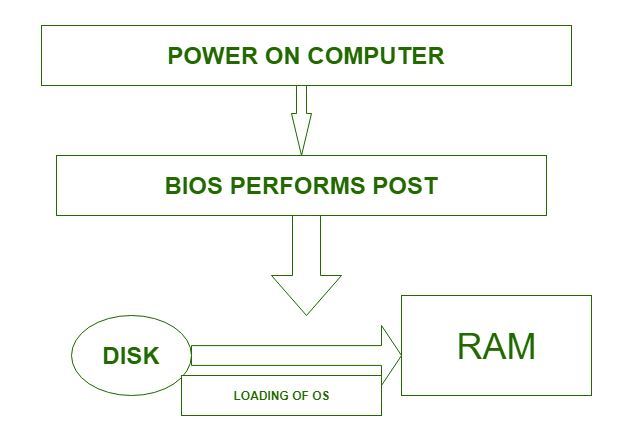
Process of Booting
What is Dual Booting?
When a computer has two or more operating systems installed, it is known as dual booting. In such systems, a special boot loader is used to recognize different file systems and operating systems on the disk. The disk may contain multiple partitions, each holding a different OS. When the computer starts, a boot manager displays a menu that lets the user select which operating system to load.
- Dual booting means having two or more operating systems on the same computer.
- A boot loader manages multiple file systems and operating systems stored on the disk.
- Each operating system can be stored on a different partition.
- At startup, a boot manager shows a menu for the user to choose which OS to boot.
Comparison Between Booting and Dual Booting
| Parameter | Booting | Dual Booting |
|---|---|---|
| **Definition | The process of starting up a computer | The process of installing and running multiple operating systems on a single computer |
| **Purpose | Loads the operating system into memory and initializes the computer | Allows users to choose between different operating systems at startup |
| **Single OS | Only one operating system is installed and runs on the computer | Multiple operating systems are installed on different partitions or drives |
| **Configuration | The computer is configured to boot directly into the installed operating system | The computer is configured with a boot loader to choose between different operating systems |
| **Setup Complexity | Relatively simpler, as there is only one operating system to configure | Requires additional setup and configuration to manage multiple operating systems |
| **Resource Utilization | Utilizes the full resources of the computer for a single operating system | Resources are divided among the installed operating systems, potentially affecting performance |
Dual booting, is a more sophisticated form of booting that involves installing two operating systems on a single computer.