Application Software vs Operating System (original) (raw)
Last Updated : 28 Apr, 2026
Computer can only carry out certain tasks with the help of software, which is a set of guidelines or instructions. Software can be broadly divided into two categories: system software and application software. The primary program on a computer that has direct access to the hardware of the system is called system software. It looks after and keeps an eye on all the other computer processes.
Operating System
An Operating system (OS) is system software that acts as an interface between the user and computer hardware and provides common services for running programs. It manages system resources and performs tasks such as process management, memory allocation, file management, and system security. Operating systems are commonly developed using languages like C, C++, and Assembly, and examples include Microsoft Windows, Linux, Unix, and DOS.
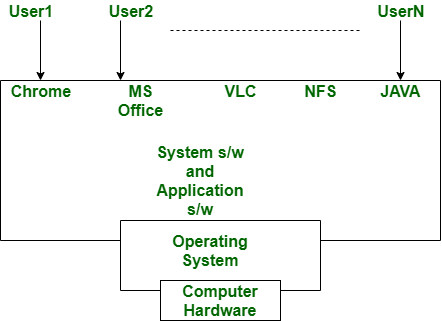 In the above diagram, we can clearly see that the system and application program or software depend upon the operating system, which acts as the interface between the user and the computer hardware.
Types of Operating System
- **Batch operating system: Executes jobs in batches without user interaction. Users submit tasks, which are processed sequentially by the system. It does not support real-time interaction and is mainly used for large, repetitive processing tasks.
- **Time-sharing operating system: Every task has a set amount of time to complete it. The following duty takes over control once the allotted time has elapsed.
- **Distributed operating system: In this scenario, an OS is connected to every computer system. Every computer is connected to a single operating system and has its own memory and CPU. Computers that are connected to the network can access a variety of files that are not physically on them.
- **Network Operating system: In this case, each computer is linked to a shared server and runs its own operating system.
- **Real-time operating systems: These systems are made to finish certain tasks within a given amount of time. They're utilized in airbags, missiles, etc.
Application Software
Application Software is one of the type of software which runs or executes as per user request. High level languages such as java, c, c++, etc. are used to develop the application software. Application software is a specific purpose software which is intended to perform some task grouped together. Without an operating system application software can not be installed. It’s examples are Photoshop, VLC media player, Mozilla Firefox, Opera, Google chrome etc.
Types of Application Software
Below are some types of Application Software.
- **Freeware: This application software is offered for free, as the name implies. Among the freeware programs are Adobe Reader, Yahoo Messenger, LibreOffice, and others.
- **Open source: These programs' source code is accessible to everyone, allowing for modifications and the addition of new features. Examples of open source software include the GIMP and the Apache web server.
- **Shareware: This software has a trial period during which it is free to download; after that, a fee is required to continue using it. Among the shareware applications are Winzip, Adobe Acrobat, Skype, and others.
- **Custom software: Software specifically created for a person or organization is known as custom software. Among the custom software solutions are e-commerce and fintech solutions.
- **Packaged software: Software that is packaged is software that consists of several related apps. The best illustration for this is Microsoft Office. Word, Excel, PowerPoint, Outlook, and other programs are included.
Application Software vs Operating System
| Basis of Comparison | Application Software | Operating System |
|---|---|---|
| Definition | Application software is a program designed to perform specific tasks for the user. | An operating system is system software that manages hardware and software resources and provides services for programs. |
| Purpose | Its main goal is to help users accomplish specific tasks. | Its main goal is to manage hardware resources and control system operations efficiently. |
| Installation | Usually downloaded and installed by users from the internet or other sources. | Generally comes pre-installed on a computer or device. |
| Development Languages | Often developed using languages such as Java, C++, C, or Visual Basic. | Usually developed using low-level languages such as C, C++, and Assembly. |
| Function | Performs specific tasks such as editing documents, playing media, or browsing the internet. | Acts as an interface between the user and hardware and performs tasks such as memory management, process scheduling, and device management. |
| Size | Generally smaller in size and measured in Megabytes (MB). | Usually larger in size and measured in Gigabytes (GB). |
| Execution | Runs only when the user launches the application. | Starts during system boot and runs until the computer is shut down. |
| Dependency | Depends on the operating system to run. | Does not depend on application software; instead, it provides the platform for applications to run. |
| Role in System | Helps users perform specific personal or business tasks. | Manages system resources and coordinates all hardware and software components. |
| Examples | Photoshop, Microsoft Word, VLC Media Player, Google Chrome. | Microsoft Windows, Linux, macOS, Unix, DOS. |