Introduction to Operating System (original) (raw)
Last Updated : 23 Apr, 2026
An operating system acts as an intermediary between the computer hardware and the user. It prevents the user from directly accessing the hardware and manages all system resources.
- It provide an environment in which a user can execute programs conveniently and efficiently.
- Operating system (OS) is a program that runs at all times on a computer.
- It assigns resources such as memory, processors, and input/output devices to processes that need them.
Operating System and User Interaction
Every general-purpose computer consists of hardware, an operating system, system programs and application programs.
- The hardware includes CPU, ALU, memory, I/O devices, peripheral devices and storage devices.
- The system programs include compilers, loaders, editors and the OS itself.
- The application programs are user-level software that perform specific tasks.
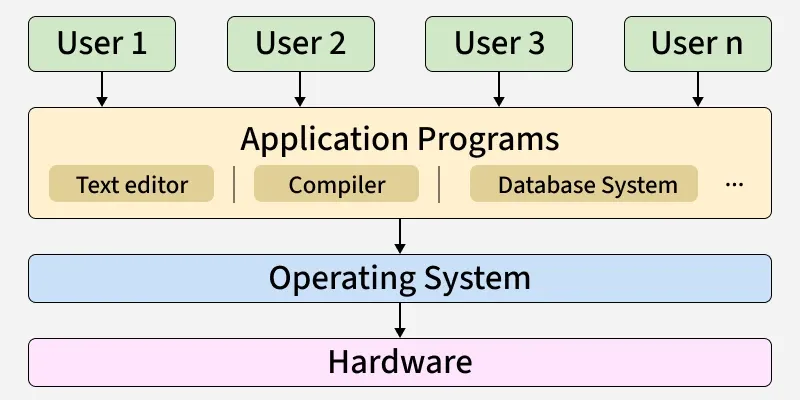
An operating system is always running in the background to manage and coordinate the use of hardware resources among system and application programs for multiple users. The OS itself is not only a user interface. Instead, it provides an interface for user interaction, typically through:
- Command-Line Interface (CLI), (e.g., Bash, PowerShell)
- Graphical User Interface (GUI), (e.g., Windows desktop, macOS Finder)
**Note: At the core of the OS lies the Kernel, which is the primary interface between hardware and software which handles low-level operations such as process management, memory management, file system control and device handling.
Goals of Operating System
An operating system is system software that acts as an interface between the user and computer hardware. It manages system resources and provides a platform for executing programs efficiently.
Primary Goals
The primary goals of an operating system (OS) are to provide an easy to use and convenient environment for executing user programs.
- **User Convenience: It should be easy to use, providing a user-friendly interface and making it simple to interact with the system.
- Program Execution: It facilitates the execution of user programs, providing the necessary environment and services for them to run.
- **Resource Management: The OS manages and allocates the computer's resources, including the CPU, memory, disk storage and input/output devices, to ensure fair utilization.
- **Security: The OS protects the system and user data from unauthorized access, ensuring confidentiality, integrity and availability of information.
Secondary Goals
Secondary goals of an operating system focus on improving overall system performance and stability. They ensure efficient use of resources and make the system reliable and robust.
- **Efficient Resource Utilization: It should aim to maximize the performance and utilization of computer resources like CPU, Memory and I/O devices, ensuring that the system runs smoothly and efficiently.
- **Reliability: It should be robust and reliable, able to handle errors and exceptions gracefully, ensuring that the system continues to operate smoothly. It should be modular in design and easy to debug.
Components of an Operating System
There are two basic components of an Operating System.
- Shell is the outermost layer of the Operating System and handles user interaction. It interprets input for the OS and handles the output from the OS.
- Kernel is the core component of the operating system. The kernel is the primary interface between the Operating system and Hardware.
List of Common Operating Systems
There are multiple types of operating systems each having its own unique features:
- **Windows OS : Developed by Microsoft. Used in personal computing, business environment, gaming.
- **macOS : Developed by Apple. Used for creative industries (design, video editing, music production), Personal computing and Professional environments.
- **Linux : Developed by Linus Torvalds and maintained by the open-source community (Linux Foundation, Red Hat, Canonical, etc.). Used in servers and data centers, development and programming, Personal computing for tech enthusiasts.
- **Unix : Developed originally at AT&T Bell Labs, various commercial and open-source versions available. Used in servers and workstations, Development environments, Research and academic settings
Applications of Operating System
- **Platform for Application Programs: It provides a platform, on top of which, other programs, called application programs can run.
- **Managing Input-Output Unit: Italso allows the computer to manage its own resources such as memory, monitor, keyboard, printer, etc. Management of these resources is required for effective and fair utilization.
- **Multitasking: It manages memory and allows multiple programs to run in their own space and even communicate with each other through shared memory.
- **Manages Memory and Files: It manages the computer’s main memory and secondary storage. Additionally, it allows and deallocates memory to all tasks and applications.
- **Provides Security: It helps to maintain the system and applications safe through the authorization process. Thus, the OS provides security to the system.
For more, refer to Need of Operating Systems.
Why to Choose the Operating System?
There are so many factors to be considered while choosing the best Operating System for our use. These factors are mentioned below.
- **Price Factor: Price is one factor to consider when choosing an operating system, as some OSs are free, like Linux, but there is some more OS that is paid like Windows and macOS.
- **Accessibility Factor: Some Operating Systems are easy to use like macOS and iOS, but some OS are a little bit complex to understand like Linux. So, you must choose the Operating System in which you are more accessible.
- **Compatibility factor: Some Operating Systems support few applications whereas some Operating Systems supports more application. You must choose the OS, which supports the applications which are required by you.
- **Security Factor: Security is an important factor when choosing the correct operating system. Both macOS and Microsoft Windows provide strong security features, and the level of security mainly depends on proper configuration, regular updates, and how the system is used.
**Related Posts
- 32 vs 64-bit Operating Systems
- Functions of OS for more details
- History of Operating Systems for more about history.