Microkernel in Operating Systems (original) (raw)
Last Updated : 11 Jul, 2025
A MicroKernel is an approach to designing an Operating System (OS). The microkernel provides very fundamental services required to run the OS like basic memory management, task scheduling, etc. Microkernels use **Inter-Process Communication (IPC) for communication. In this article, we will discuss Kernels, Microkernel, its architecture, etc.
What is Kernel?
A Kernel is the core part of an operating system that manages system resources. It also acts as a bridge between the application and hardware of the computer. It is one of the first programs loaded on start-up (after the Bootloader).
A Microkernel is one of the classifications of the kernel. Being a kernel it manages all system resources. But in a microkernel, the **user services and **kernel services are implemented in different address spaces. The user services are kept in **user address space, and kernel services are kept under **kernel address space, thus also reducing the size of the kernel and the size of the operating system as well.
 What is a MicroKernel?
Microkernel is a type of Operating System that provides some basic services for an operating system/ These services include memory management, process scheduling, etc. Some other services like Device Drivers, File Systems, etc are managed by user-level processes. User Level Process communicates with Microkernel via message passing. This way of handling the process makes microkernels more modular and more flexible than traditional monolithic kernels.
The main advantage of a microkernel architecture is that it provides a more secure and stable operating system. Since only the most essential services run in kernel space, the attack surface of the operating system is reduced, making it more difficult for an attacker to exploit vulnerabilities. The main disadvantage of microkernel is that message passing between user-level processes can be slower than direct system calls in a monolithic kernel. This can affect the performance of the operating system, especially in high-performance applications.
**Microkernels provide a minimalist approach to operating system design by running only essential services in kernel space, making the OS more modular and secure.
Overall, a microkernel architecture can provide a more secure and flexible operating system, but it may also come with some performance and complexity trade-offs. The choice between a microkernel and a monolithic kernel architecture depends on the specific needs and requirements of the operating system being developed.
**Kernel Mode and User Mode of CPU operation
The CPU can execute certain instructions only when it is in kernel mode. These instructions are called privilege instructions. They allow the implementation of special operations whose execution by the user program could interface with the functioning of the operating system or activity of another user program. For example, instruction for managing memory protection.
- The operating system puts the CPU in kernel mode when it is executing in the kernel so, that kernel can execute some special operation.
- The operating system puts the CPU in user mode when a user program is in execution so, that the user program cannot interface with the operating system program.
- User-level instruction does not require special privileges. Examples are ADD, PUSH, etc.
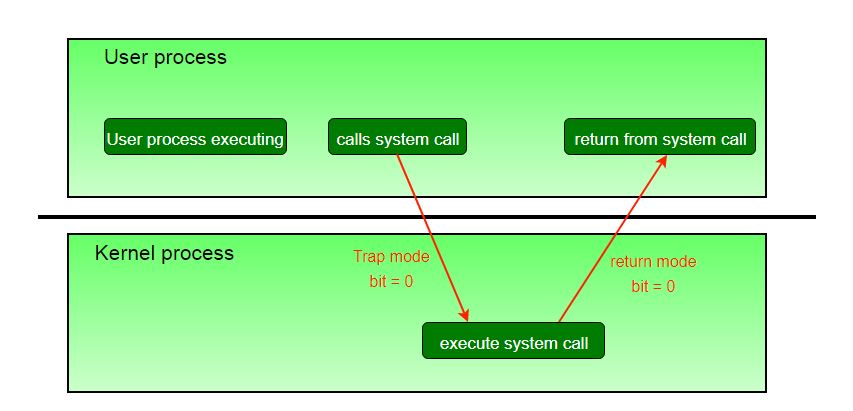
The concept of modes can be extended beyond two, requiring more than a single mode bit CPUs that support virtualization. It uses one of these extra bits to indicate when the virtual machine manager, VMM, is in control of the system. The VMM has more privileges than ordinary user programs, but not so many as the full kernel.
System calls are typically implemented in the form of software interrupts, which causes the hardware's interrupt handler to transfer control over to an appropriate interrupt handler, which is part of the operating system, switching the bit mode to kernel mode in the process. The interrupt handler checks exactly which interrupt was generated, checks additional parameters ( generally passed through registers ) if appropriate, and then calls the appropriate kernel service routine to handle the service requested by the system call.
User programs' attempts to execute illegal instructions ( privileged or non-existent instructions ), or to access forbidden memory areas, also generate software interrupts, which are trapped by the interrupt handler, and control is transferred to the OS, which issues an appropriate error message, possibly dumps data to a log ( core ) file for later analysis, and then terminates the offending program.
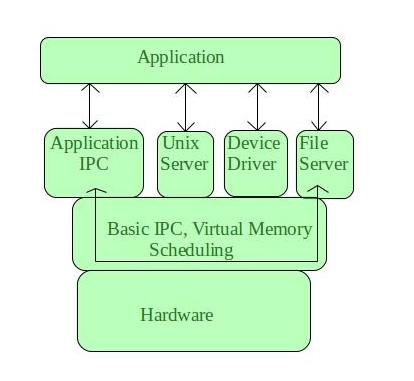
It provides minimal services of process and memory management. The communication between client program/application and services running in user address space is established through message passing, reducing the speed of execution microkernel. The Operating System **remains unaffected as user services and kernel services are isolated so if any user service fails it does not affect kernel service. Thus it adds to one of the advantages of a microkernel. It is easily **extendible i.e. if any new services are to be added they are added to user address space and hence require no modification in kernel space. It is also portable, secure, and reliable. Examples of microkernel-based operating systems include L4, QNX, and MINIX.
**Microkernel Architecture
Since the kernel is the core part of the operating system, so it is meant for handling the most important services only. Thus in this architecture, only the most important services are inside the kernel and the rest of the OS services are present inside the system application program. Thus users are able to interact with those not-so-important services within the system application. And the microkernel is solely responsible for the most important services of the operating system they are named as follows:
Features of Microkernel-Based Operating System
- **Minimal Core : The kernel only manages basic tasks like CPU scheduling, memory management, and inter-process communication. All other services (like device drivers) run in user space, outside the kernel.
- **Modularity : System services are separated into independent modules. This makes it easy to update or replace individual components without affecting the entire system.
- **Stability and Fault Isolation : If a service like a device driver fails, it won’t crash the whole system. Each service runs independently, so the core OS remains stable.
- **Ease of Maintenance : Since services are independent, fixing bugs or adding new features doesn’t require major changes to the kernel itself, making maintenance easier.
**Advantages of Microkernel
- **Modularity: Because the kernel and servers can be developed and maintained independently, the microkernel design allows for greater modularity. This can make adding and removing features and services from the system easier.
- **Performance: Because the kernel only contains the essential functions required to manage the system, the microkernel design can improve performance. This can make the system faster and more efficient.
- **Security: The microkernel design can improve security by reducing the system's attack surface by limiting the functions provided by the kernel. Malicious software may find it more difficult to compromise the system as a result of this.
- **Reliability: Microkernels are less complex than monolithic kernels, which can make them more reliable and less prone to crashes or other issues.
- **Scalability: Microkernels can be easily scaled to support different hardware architectures, making them more versatile.
- **Portability: Microkernels can be ported to different platforms with minimal effort, which makes them useful for embedded systems and other specialized applications.
Disadvantages of a Microkernel
- **Slower Message Passing: Slower message passing between user-level processes can affect performance, especially in high-performance applications.
- **More Complex: Increased complexity due to the modular design can make it more difficult to develop and maintain the operating system .
- **Limited Performance: Limited performance optimization due to separation of kernel and user-level processes.
- **Higher Memory Usage: Higher memory usage compared to a monolithic kernel.
Conclusion
In conclusion, a **microkernel keeps the core of the operating system small and simple, which makes it more secure and stable. Since most functions run outside the kernel, it’s easier to fix or update parts of the system without affecting everything else. A **microkernel focuses on running only the most essential tasks in the core, such as managing memory and CPU, while leaving other services like device drivers and file systems to run outside in user space.