PostgreSQL CREATE SCHEMA (original) (raw)
Last Updated : 15 Jul, 2025
**PostgreSQL provides the CREATE SCHEMA statement to create a new schema in a database. **By creating schemas, users can effectively separate data into **logical groups, making it easier to manage and access information. Schemas also enhance security by controlling **object visibility and **permissions, allowing specific users to access or modify objects within a **particular schema without impacting others
In this article, we will explain PostgreSQL CREATE SCHEMA, a powerful statement that allows us to create a new schema within a **database. Understanding how to create a schema in **PostgreSQL is essential for organizing our **database objects and managing access effectively
PostgreSQL - CREATE SCHEMA
The PostgreSQL **CREATE SCHEMA statement is a powerful command used to create a new schema within a database. A schema serves as a container for organizing database objects like **tables, **views, and **functions, enabling users to maintain a **structured and **secure environment for managing data. This functionality is essential for enhancing **database organization and access control.
**Syntax
CREATE SCHEMA [IF NOT EXISTS] schema_name;
**key terms
- **Schema Name: Specify the name of the schema after the CREATE SCHEMA keywords. The schema name must be unique within the current database.
- **Conditional Creation: Optionally use **IF NOT EXISTS to conditionally create the new schema only if it does not exist. Attempting to create a new schema that already exists without using the IF NOT EXISTS option will result in an error.
- **Note: To execute the CREATE SCHEMA statement, you must have the CREATE privilege in the current database.
Creating a Schema for a User
To create a schema owned by a specific user, use the following syntax:
CREATE SCHEMA [IF NOT EXISTS] AUTHORIZATION user_name;
PostgreSQL CREATE SCHEMA Examples
Now that we have known the basics of creating a schema in **PostgreSQL, let's jump into some examples to better understand the concept.
Example 1: Creating a Basic Schema
The following statement creates a new schema named 'marketing':
CREATE SCHEMA IF NOT EXISTS marketing;
The following statement returns all schemas from the current database:
SELECT
- FROM
pg_catalog.pg_namespace
ORDER BY
nspname;
**Output

PostgreSQL CREATE SCHEMA Example1
**Explanation:
- The '
CREATE SCHEMA IF NOT EXISTS marketing;'statement creates a new schema named '**marketing'**if it does not exist already. - The subsequent query retrieves and displays all schemas in the current database, ordered by their names.
- The output shows that the '**
marketing'schema has been successfully created alongside the default 'public'**schema and any other existing schemas.
**Example 2: Creating a Schema for a User
In this example, we will create a new role named **Raju. To perform this, we first need to create the user using the following statement:
CREATE USER Raju WITH ENCRYPTED PASSWORD 'Postgres123';
Now, create a schema for the user 'Raju':
CREATE SCHEMA AUTHORIZATION Raju;
You can also create a schema and assign ownership to 'Raju':
CREATE SCHEMA IF NOT EXISTS geeksforgeeks AUTHORIZATION Raju;
Query to List All Schemas
The following statement returns all schemas from the current database:
SELECT
- FROM
pg_catalog.pg_namespace
ORDER BY
nspname;
**Output
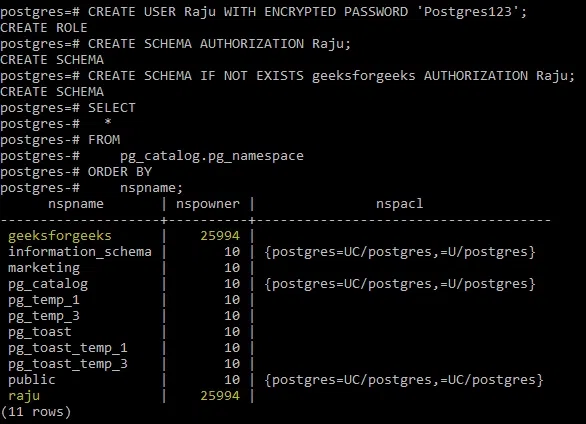
PostgreSQL CREATE SCHEMA Example2
**Explanation:
- In this example, the user '**
Raju'**is first created with an encrypted password. - The '
CREATE SCHEMA AUTHORIZATION Raju;'statement then creates a schema that is owned by 'Raju'. - The '
CREATE SCHEMA IF NOT EXISTS geeksforgeeks AUTHORIZATION Raju;'statement creates another schema named 'geeksforgeeks', also owned by 'Raju', if it does not already exist. - The final query lists all schemas in the current database, showing that both the '**
geeksforgeeks'and 'marketing'**schemas have been successfully created, along with their respective owners.
Important Points About PostgreSQL CREATE SCHEMA Statement
- The user who creates the schema automatically becomes the owner of the schema unless specified otherwise using the
AUTHORIZATIONclause. - Schema names must be unique within the same database. Attempting to create a schema with a duplicate name will result in an error unless the IF NOT EXISTS clause is used.
- Schema names are case-insensitive unless enclosed in double quotes. For example, '**
CREATE SCHEMA Test'is equivalent to 'CREATE SCHEMA test', but 'CREATE SCHEMA "Test"'is treated as a distinct name. - By default, the creator of the schema has all privileges on it. Privileges for other users must be explicitly granted.
Conclusion
In conclusion, mastering the **CREATE SCHEMA syntax in PostgreSQL is crucial for effective PostgreSQL schema management, enabling us to organize our database objects efficiently. By utilizing options like **AUTHORIZATION, we can control ownership and permissions within our schemas.
This knowledge empowers us to structure our database in a way that enhances **performance and **security, ensuring optimal use of resources. Implementing these practices will significantly contribute to better **database organization and **management in our projects.