How to Insert If Not Exists in SQL SERVER? (original) (raw)
Last Updated : 23 Jul, 2025
Adding Data to a table in **SQL Server is a key operation. Data can be inserted into tables using many different scenarios like plain data inserted into a table without checking anything or checking **if data already exists in the target table and only **if the data does not exist then the new data is inserted. There are many methods to check the data if it exists like **IF EXISTS, IF NOT EXISTS, or using the **WHERE clause.
In this article, we will discuss the ****'IF NOT EXISTS'** alternative to check and insert a row of data into a table or to bulk insert data into a table.
Introduction to IF NOT EXISTS in SQL SERVER
I**F NOT EXISTS is a keyword to check for the existence of a specific record in a table with the condition set in the where clause of the query used inside this function. This keyword is used to check for specific data if it exists and if not exist the same data can be inserted in the same table. So this **keyword 'If Not Exist' is helpful to avoid duplication of data in a table and insert unique data only.
There are 3 methods through which we can **Insert data using the NOT EXISTS method. Below are the 3 approaches available in SQL Server.
- **IF NOT EXISTS then INSERT.
- **INSERT ... Where NOT EXISTS.
- **Using MERGE ... INSERT.
We will see in detail these 3 approaches to Inserting data into a table when the data does not exist already.
Ways to Insert If Not Exists in SQL SERVER
Method 1: IF NOT EXISTS then INSERT
**Syntax:
IF NOT EXISTS (Condition with Subquery)
BEGIN
END
**Explanation: IF NOT EXISTS is the keyword to check the existence of data and the condition with subquery is the **SELECT query with **WHERE clause to check the data.
If no data exists for the condition provided in the WHERE clause of the subquery, then data is inserted into the table using the INSERT Query.
Let's create an table named '**Products' is used in the below examples with the create table query, table **Products_Copy also has the same structure as below.
**Query:
CREATE TABLE [dbo].[Products]
(
[ProductID] [int] NOT NULL IDENTITY(1,1),
[ProductName] varchar NULL,
[SupplierID] [tinyint] NULL,
[CategoryID] [tinyint] NULL,
[Unit] varchar NULL,
[Price] [decimal](18, 0) NULL
) ON [PRIMARY]
GO
**Output:
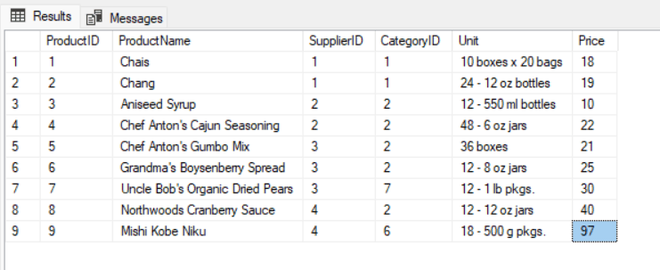
Inital data in Products and Products_Copy Tables
**Explanation: Inital data in the **Products Table and **Products_Copy tables which are used in the examples below:
Example 1: Simple Example of **IF NOT EXISTS Method
Let's Create a script that ensures the **uniqueness of the product name '**Jeera Rice' in the "**Productsnew" table. If there is **no existing entry for 'Jeera Rice', then insert a new record into the table as given in the Query.
**Query:
IF NOT EXISTS(Select ProductName from Productsnew where ProductName='Jeera Rice')
BEGIN
INSERT INTO Productsnew (ProductName,SupplierID,CategoryID,Unit,Price) Values ('Jeera Rice',1,7,'7,5 kg',120)
END
**Output:
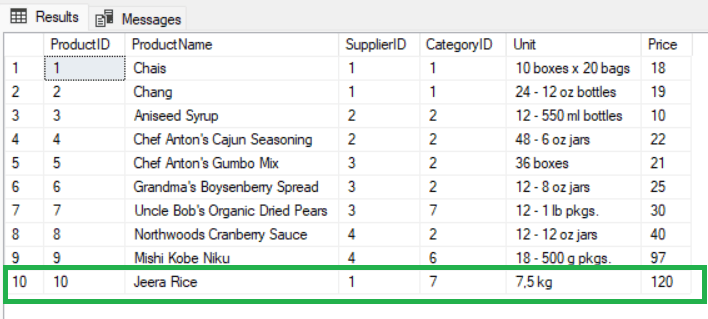
Products tableI F NOT EXISTS - Example 1
**Explanation: In this example the product name is checked in the Products table using the where clause condition **ProductName='Jeera Rice', and since this product does not exists, the data is inserted to the **Products Table.
**Example 2: Using a Stored Procedure
Let's Design a stored procedure named **InsertProducts**that takes parameters for product details - @ ProdName(**Product **Name), @ CatID(**Category **ID), @ Units(**Unit), and @Price (**Price). The procedure should check if a product with the same name (@ ProdName) already exists in the "**Products" table. If it doesn't exist, the procedure should insert a new record into the "**Products" table with the provided details.
**Query:
CREATE PROCEDURE InsertProducts
@ProdName varchar(100),
@CatID int,
@Units varchar(100),
@Price Decimal
AS
BEGIN
IF NOT EXISTS(Select ProductName from Products where ProductName=@ProdName)
BEGIN
INSERT INTO Products (ProductName,CategoryID,Unit,Price) Values (@ProdName,@CatID,@Units,@Price)
END
END
**Explanation: Call the stored procedure with data to check and insert as below.
**Query:
EXEC InsertProducts 'Oats Quaker',2,8,'1 kg',490
**Updated Products Table after inserting data from the above 2 Inserts.
**Output:
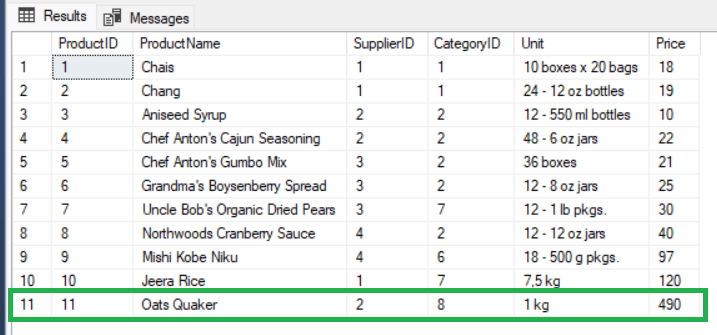
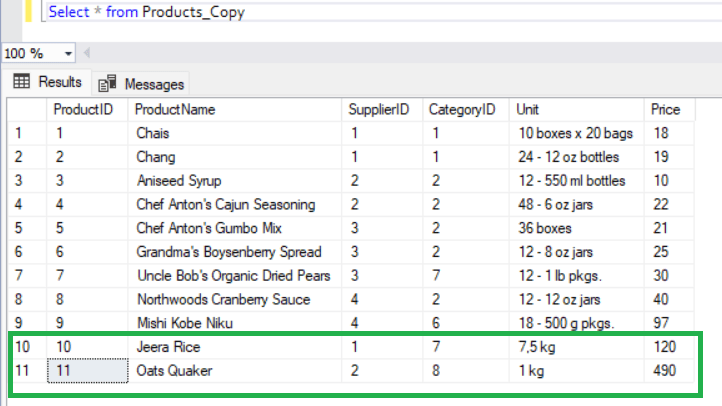
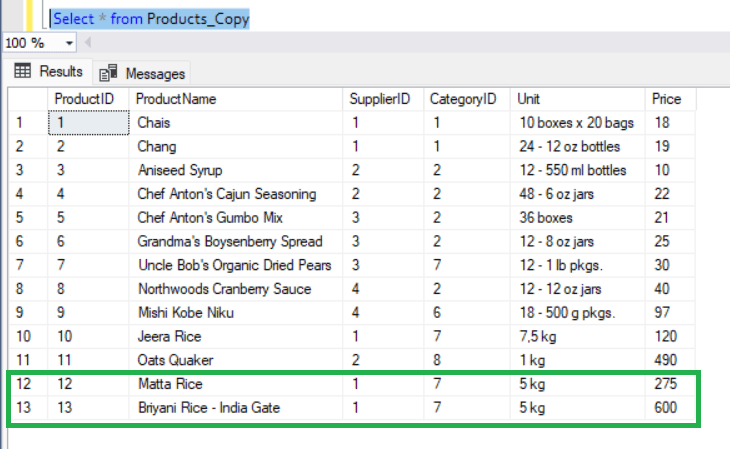
Products table IF NOT EXISTS - Example 2
**Explanation: Since there is no data present in **Products table for ****'Oats Quaker'**, this data will be inserted to the table. From the above output of data in **Products table, we can see that the two records from the above 2 examples are inserted after checking if same data already exists in the table. Data with product names ****'Jeera Rice' and 'Oats Quaker**' are the two new records added to Products table as shown above.
Method 2: INSERT ... WHERE NOT EXISTS
When we need to insert data into a table from another table to create a copy or back up purpose or to insert one or two columns of data into a table from another table, we can use the ****'NOT EXISTS' method** to insert data. A simple example is as below:
**Syntax:
INSERT INTO