PostgreSQL DROP TABLE (original) (raw)
Last Updated : 15 Jul, 2025
In **PostgreSQL, the DROP TABLE statement is a **powerful and **permanent command used to delete one or more tables from a **database. Since this operation cannot be undone, it is essential to understand how to use it safely and to be aware of its options to prevent **accidental data loss.
In this article, we will explain the **DROP TABLE statement in detail, its syntax, options, and examples for a better understanding.
What is the DROP TABLE Statement in PostgreSQL?
The **DROP TABLE command is used to **permanently delete tables from a PostgreSQL database. Once a table is removed using this command, all of its **data, **structure, and **relationships are lost. Use this command with caution, especially in **production environments, as the action cannot be reversed.
**Syntax
DROP TABLE [IF EXISTS] table_name [CASCADE | RESTRICT];
**Key Terms
'DROP TABLE': This keyword initiates the command to remove the table(s).'IF EXISTS': This optional clause prevents an error from occurring if the specified table does not exist. Instead of raising an error, PostgreSQL will issue a notice.'table_name': Replace this with the name of the table you wish to remove. Multiple tables can be specified, separated by commas.'CASCADE': Use this keyword to automatically remove any dependent objects (such as views or foreign key constraints) along with the table. This is useful when a table is referenced by other database objects.'RESTRICT': This is the default behavior. It prevents the table from being dropped if any dependent objects exist. PostgreSQL will not remove the table unless we explicitly resolve these dependencies.
PostgreSQL DROP TABLE Examples
Let us take a look at some of the examples of **DROP TABLE in PostgreSQL to better understand the concept. Each example demonstrates the **command's syntax and its **implications, helping us grasp how to effectively manage our **database tables.
**Example 1: Basic Table Removal
We will remove the '**author' **table from our database using the below statement:
DROP TABLE author;
PostgreSQL issues an error because the '**author' **table does not exist.

To avoid this error, we can use the **IF EXISTS parameter as follows:
DROP TABLE IF EXISTS author;
**Output

**Explanation:
PostgreSQL issues a notice instead of an **error if the **table does not exist, making the command safer for cases where we are unsure if the table is present.
**Example 2: Removing Multiple Tables
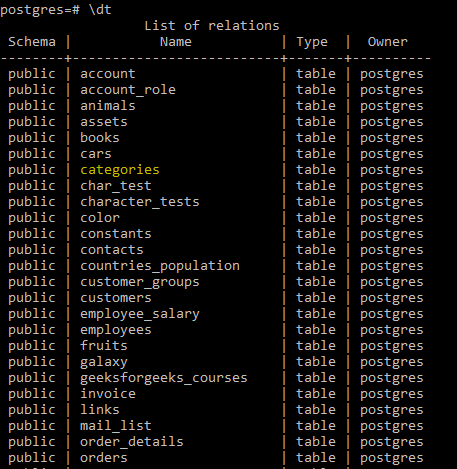
Here we will remove a table that already exists in our **database. To check for all **available tables in the database use the below command. It will list all existing table as below:
**Query:
\dt
Output
**Explanation:
This command deletes both categories and products tables if they exist. It will issue notices for any specified table that doesn’t exist, ensuring **no interruptions due to errors.
Example 3: Dropping a Table with Dependencies
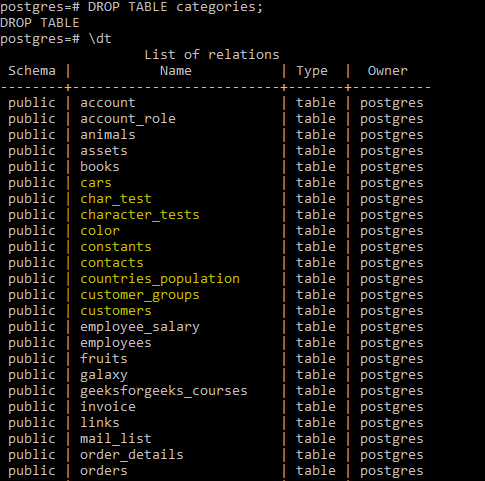
Suppose we have a table orders that references data from the customers table through a foreign key. To drop customers and **remove dependent objects automatically. Here we will remove the categories table using the below statement:
**Query:
DROP TABLE categories;
Now check the list of tables again to verify the removal using the below command:
**\dt
**Output
**Explanation:
Using the CASCADE option will ensure that any objects (like foreign keys) dependent on the customers table are also removed. This option is especially useful when we are **re-structuring a database with multiple **dependent relationships.
Important Points About PostgreSQL DROP TABLE Statement
- The **DROP TABLE command permanently removes a table and its data from the database. This action cannot be undone, so use it with caution.
- You can drop multiple tables in a single command by specifying their names separated by commas. Example: '**DROP TABLE table1, table2;'
- Only the owner of the table or a superuser can drop a table. Ensure you have the necessary permissions before attempting to drop a table.
- The **CASCADE **option automatically drops any dependent objects (such as views, foreign key constraints) along with the table.
Conclusion
The **DROP TABLE statement in PostgreSQL is a vital command for database management, enabling us to remove unwanted tables and free up storage. However, it should be used carefully, given the irreversible nature of the operation. Use **IF EXISTS to handle **non-existing tables gracefully, and employ **CASCADE when we need to remove dependent objects alongside the table. Understanding the **syntax, **options, and usage scenarios for DROP TABLE ensures that we can manage your **PostgreSQL database safely and effectively.