PostgreSQL Errors and Messages (original) (raw)
Last Updated : 15 Jul, 2025
When working with **PostgreSQL, handling errors effectively is important for ensuring the **stability and **reliability of database operations. PostgreSQL provides a strong **error-handling mechanism, allowing developers to diagnose and resolve issues efficiently.
In this article, we will explore **PostgreSQL error-handling mechanisms, including the **RAISE statement and **ASSERT statement, to help us manage and debug our **database operations. Additionally, we'll provide **practical examples and outputs to illustrate how to handle errors effectively, ensuring our **database processes are smooth and **error-free.
**Introduction to PostgreSQL Error Handling
In PostgreSQL, errors may arise due to various reasons, including **syntax errors, **invalid data operations, or **constraint violations. These errors can disrupt normal **database operations if not managed correctly. PostgreSQL offers a range of tools and statements for **error handling, allowing developers to **log, **debug, and resolve issues with ease.
Some common **PostgreSQL errors include:
- Syntax errors in SQL statements
- Constraint violations like **
unique_violation**orforeign_key_violation - Invalid column references
Key error-handling tools in PostgreSQL include:
- **RAISE Statement: For generating custom error messages.
- **ASSERT Statement: For debugging and validating conditions during development.
1. RAISE Statement in PostgreSQL
The RAISE statement in **PostgreSQL is a powerful tool used to **generate messages or **errors during the execution of PL/pgSQL code blocks. The RAISE statement offers a flexible way to control how messages are handled within our database environment.
**Syntax
To raise an error message user can implement the RAISE statement as follows:
RAISE level **format;
**level: Following the RAISE statement is the level option that specifies the error severity. PostgreSQL provides the following levels:
- **DEBUG: For detailed debugging information.
- **LOG: For logging purposes, typically used for recording events.
- **NOTICE: For messages that inform the user of something non-critical.
- **INFO: For informational messages that are typically less severe than warnings.
- **WARNING: For messages that indicate potential issues that do not halt execution.
- **EXCEPTION: For critical errors that stop the current transaction. This is the default level if none is specified.
If users don’t specify the level, by default, the **RAISE statement will use the **EXCEPTION level that raises an error and stops the current transaction.
- **format: The format is a string that specifies the message. The format uses **percentage ( %) placeholders that will be substituted by the next arguments.
- **expression: Values that replace placeholders in the format string.
The number of placeholders must match the number of arguments, otherwise, PostgreSQL will report the following error message:
[Err] ERROR: too many parameters specified for RAISE
Example 1: Basic RAISE Statementt
The following example illustrates the RAISE statement that reports different messages at the current time.
DO BEGINRAISEINFO′informationmessageRAISELOG′logmessageRAISEDEBUG′debugmessageRAISEWARNING′warningmessageRAISENOTICE′noticemessageENDBEGIN
RAISE INFO 'information message %', now() ;
RAISE LOG 'log message %', now();
RAISE DEBUG 'debug message %', now();
RAISE WARNING 'warning message %', now();
RAISE NOTICE 'notice message %', now();
ENDBEGINRAISEINFO′informationmessageRAISELOG′logmessageRAISEDEBUG′debugmessageRAISEWARNING′warningmessageRAISENOTICE′noticemessageEND;
**Output
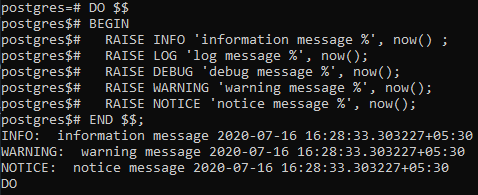
**Explanation
- **INFO, WARNING, and NOTICE level messages are reported back to the client.
- **DEBUG and LOG level messages are generally written to the server log and not sent to the client.
- This behavior can be controlled using the '**client_min_messages' and '**log_min_messages' configuration parameters, allowing us to fine-tune the verbosity of the messages sent to the **client versus those logged by the server.
Example 2: Raising Errors Using the EXCEPTION Level
To raise errors, we use the 'EXCEPTION****'** level after the RAISE statement. Note that the **RAISE statement uses the **EXCEPTION level by default. Besides raising an error, we can add more detailed information by using the following clause with the RAISE statement:
USING option = expression
The options can be any one of the below:
- **MESSAGE: set error message text
- **HINT: provide the hint message so that the root cause of the error is easier to be discovered.
- **DETAIL: give detailed information about the error.
- **ERRCODE: identify the error code, which can be either by condition name or directly five-character SQLSTATE code.
Example 3: Raising Errors with Additional Details
DO DECLAREemailvarchar(255):=′raju@geeksforgeeks.org′;BEGIN−−checkemailforduplicate−−...−−reportduplicateemailRAISEEXCEPTION′Duplicateemail:USINGHINT=′Checktheemailagain′;ENDDECLARE
email varchar(255) := 'raju@geeksforgeeks.org';
BEGIN
-- check email for duplicate
-- ...
-- report duplicate email
RAISE EXCEPTION 'Duplicate email: %', email
USING HINT = 'Check the email again';
ENDDECLAREemailvarchar(255):=′raju@geeksforgeeks.org′;BEGIN−−checkemailforduplicate−−...−−reportduplicateemailRAISEEXCEPTION′Duplicateemail:USINGHINT=′Checktheemailagain′;END;
**Output
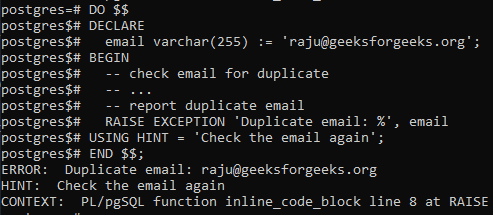
**Explanation:
This block raises an exception with a detailed hint to assist in identifying the issue.
**Example 4: Raising Specific SQLSTATE Errors
The following examples illustrate how to raise an SQLSTATE and its corresponding condition:
DO BEGIN−−...RAISESQLSTATE′2201B′;ENDBEGIN
--...
RAISE SQLSTATE '2201B';
ENDBEGIN−−...RAISESQLSTATE′2201B′;END;
DO BEGIN−−...RAISEinvalidregularexpression;ENDBEGIN
--...
RAISE invalid_regular_expression;
ENDBEGIN−−...RAISEinvalidregularexpression;END;
**Output
ERROR: custom error message
SQL state: 2201B
**Explanation:
SQLSTATE '2201B'corresponds to a specific error code in SQL standard. This is used to raise an exception with this particular error code.- We can also include a custom message using the
USING MESSAGE = 'Your message here'clause, though it’s not mandatory.
2. Using the ASSERT Statement for Debugging
The ASSERT statement in **PostgreSQL allows us to insert debugging checks into our **PL/pgSQL blocks. This is particularly useful during development to ensure that certain conditions hold true at specific points in our code.
**Syntax
ASSERT condition [, 'message'];
**Key Terms
- **condition: A boolean expression that we expect to be true.
- **message: (Optional) A custom error message displayed if the condition is false.
Example: Using ASSERT for Debugging
If any assertion fails, PostgreSQL will raise an error with the specified message, aiding in identifying logical issues during development.
DO BEGINASSERT1+1=2,′Mathisbroken!′;ASSERT(SELECTCOUNT(∗)FROMusers)>0,′Nousersfoundinthedatabase′;ENDBEGIN
ASSERT 1 + 1 = 2, 'Math is broken!';
ASSERT (SELECT COUNT(*) FROM users) > 0, 'No users found in the database';
ENDBEGINASSERT1+1=2,′Mathisbroken!′;ASSERT(SELECTCOUNT(∗)FROMusers)>0,′Nousersfoundinthedatabase′;END;
**3. Common PostgreSQL Errors
PostgreSQL provides detailed error messages in the **client console or **server logs. Developers can use the **RAISE statement in PL/pgSQL or query system views like **pg_stat_activity**for error tracking.
**What Are Common Errors in PostgreSQL?
- Syntax errors in SQL queries.
- Constraint violations (e.g.,
unique_violation,foreign_key_violation). - Invalid column or table references.
**How to Handle PostgreSQL Errors?
- **BEGIN...EXCEPTION...END blocks in PL/pgSQL for error handling.
- Logging errors using configuration parameters like
log_statement. - Monitoring logs for **troubleshooting.
Conclusion
In conclusion, effective **error handling is a cornerstone of powerful database management. PostgreSQL's error-handling mechanisms, such as the **RAISE statement and **ASSERT statement, offer powerful tools for **managing errors and **debugging code. Whether we're raising custom errors, providing detailed hints, or validating conditions during development, these tools empower developers to **handle errors efficiently.