PostgreSQL Trigger (original) (raw)
Last Updated : 15 Jul, 2025
A PostgreSQL trigger is a powerful tool that allows automatic invocation of a function whenever a specified event occurs on a table. Events that can trigger a function include**INSERT, **UPDATE****,** **DELETE, or **TRUNCATE. Triggers help maintain data integrity and automate complex database operations.
What is a PostgreSQL Trigger?
A trigger is a special user-defined function associated with a table. To create a new trigger, you must define a trigger function first, and then bind this trigger function to a table. The difference between a trigger and a user-defined function is that a trigger is automatically invoked when an event occurs.
Types of Triggers
PostgreSQL provides **two main types of triggers:
- *Row-Level Triggers: Invoked once for each row affected by the event. For example, an '*
UPDATE'**statement affecting 20 rows will invoke the row-level trigger 20 times. - **Statement-Level Triggers: Invoked once per SQL statement, regardless of the number of rows affected.
**Also Read: Difference between Row level and Statement level triggers.
Timing of Trigger Invocation
Triggers can be specified to fire before or after the event:
- **BEFORE Trigger: Invoked before the event occurs. Can be used to modify or skip the operation.
- **AFTER Trigger: Invoked after the event occurs. All changes made by the event are available to the trigger.
Advantages of Using Triggers
Triggers offer several benefits:
- **Automation: Automatically enforce business rules and data integrity.
- **Centralized Logic: Maintain cross-functionality within the database, ensuring consistent behavior across multiple applications.
- **Historical Data: Automatically log changes to maintain a history of data modifications.
Drawbacks of Using Triggers
While triggers are powerful, they also have some drawbacks:
- **Complexity: Triggers can add complexity to the database. Users must be aware of the triggers and understand their logic to predict data changes accurately.
- **Performance Overhead: Excessive use of triggers can lead to performance issues, especially with complex or nested triggers.
PostgreSQL-Specific Trigger Features
- **TRUNCATE Event: PostgreSQL supports triggers for the
TRUNCATEevent. - **Triggers on Views: PostgreSQL allows the definition of statement-level triggers on views.
- **User-Defined Functions: PostgreSQL requires a user-defined function for trigger actions, whereas the SQL standard permits any number of SQL commands.
**PostgreSQL Trigger Example
Let’s take a look at an example of creating a new trigger in PostgreSQL to better understand the concept.
Step 1: Create the Necessary Tables
In this example, we will create a new table named '**employees' as follows:
**CREATE TABLE COMPANY(
ID **INT PRIMARY KEY **NOT NULL,
NAME TEXT **NOT NULL,
AGE **INT NOT NULL,
ADDRESS CHAR(50),
SALARY **REAL
);
When the name of an employee changes, we log the changes in a separate table named '**employee_audits':
**CREATE TABLE AUDIT(
EMP_ID INT **NOT NULL,
ENTRY_DATE TEXT **NOT NULL
);
Step 2: Define the Trigger Function
First, define a new function called auditlog():
**CREATE OR REPLACE **FUNCTION auditlog() **RETURNS **TRIGGER AS ∗∗∗∗BEGIN∗∗∗∗∗∗INSERTINTO∗∗AUDIT(EMPID,ENTRYDATE)VALUES(NEW.ID,currenttimestamp);∗∗∗∗RETURNNEW∗∗;∗∗∗∗END∗∗;**BEGIN
**INSERT INTO AUDIT(EMP_ID, ENTRY_DATE) VALUES (NEW.ID, current_timestamp);
**RETURN NEW;
**END;∗∗∗∗BEGIN∗∗∗∗∗∗INSERTINTO∗∗AUDIT(EMPID,ENTRYDATE)VALUES(NEW.ID,currenttimestamp);∗∗∗∗RETURNNEW∗∗;∗∗∗∗END∗∗; **LANGUAGE plpgsql;
Step 3: Create and Bind the Trigger
We create a trigger named '**example_trigger'that fires after an 'INSERT'event on the 'COMPANY'**table:
**CREATE TRIGGER example_trigger
AFTER **INSERT ON COMPANY
**FOR EACH ROW
**EXECUTE FUNCTION auditlog();
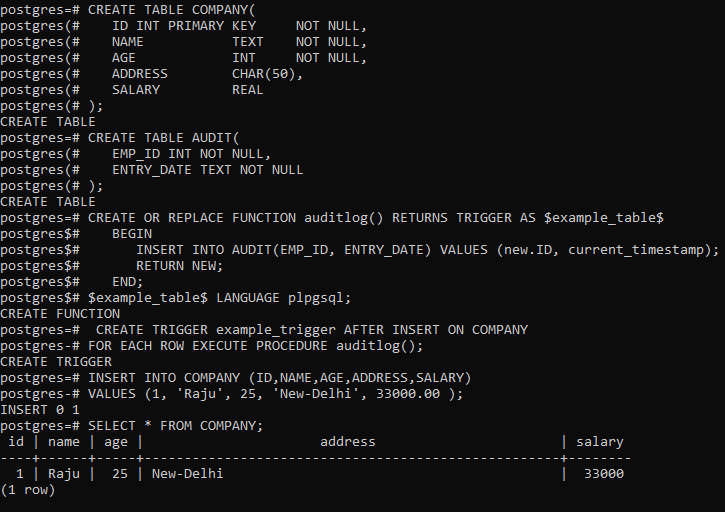
Step 4: Insert Sample Data and Verify
Insert some sample data for testing. We insert two rows into the employees table.
**INSERT INTO COMPANY (ID, NAME, AGE, ADDRESS, SALARY)
**VALUES (1, 'Raju', 25, 'New-Delhi', 33000.00 );
To examine the employees table use the below query:
**SELECT * FROM COMPANY;
**Output:
Important Points About PostgreSQL Trigger
- Unlike many other SQL databases, PostgreSQL supports triggers on the
TRUNCATEevent.- PostgreSQL allows you to define statement-level triggers on views, enabling complex data manipulations and validations even when using views.
- PostgreSQL allows multiple triggers on the same event. However, the execution order is not guaranteed unless explicitly set using the **
BEFORE**or **AFTER**keywords.- PostgreSQL has a powerful **rule system that can be used in conjunction with triggers. **Rules can transform incoming queries before they reach the execution phase, while **triggers act on data changes.