Data refresh in Power BI (original) (raw)
Last Updated : 23 Jul, 2025
Data refresh means to update your reports and dashboards with the latest data from your sources. When your data changes like new sales numbers, customer records or website visits you don't have to rebuild your reports. Instead Power BI can pull the new data for you automatically or whenever you need it. Keeping data fresh is important for mainly two reasons. These are:
- **Accuracy: Outdated data can led to incorrect analysis and decision-making. Data refresh ensures that data in Power BI is accurate and reliable.
- **Compliance: In some industries there are strict regulations that require data to be updated periodically such as daily or weekly. Data refresh ensures that companies stay compliant with these regulations and maintain the integrity of their data.
Types of Data refresh in Power BI
Refreshing data in Power BI can be done in a variety of ways depending on the type of data source and data refresh requirements. There are a few ways to refresh data in Power BI:
**1. Manual Refresh
- To refresh data in Power BI click the "Refresh" button in either the Power BI Service or the Power BI Desktop App. You can also use the "Ctrl + Alt + R" keyboard shortcut.
- Manual refresh is used when you know new data has been added and you want to see the changes right away. It gives you full control over when your reports get updated.

Manual Refresh in Power BI Desktop
**2. Scheduled Refresh
- In Power BI **Scheduled Refresh means your data gets updated automatically at set times without you needing to do anything. You can choose when and how often Power BI should pull the latest data like daily or multiple times a day.
- This helps to keep your reports and dashboards always updated with the new information. It’s very useful when you want to make sure everyone is seeing the most recent data without manually refresh it.
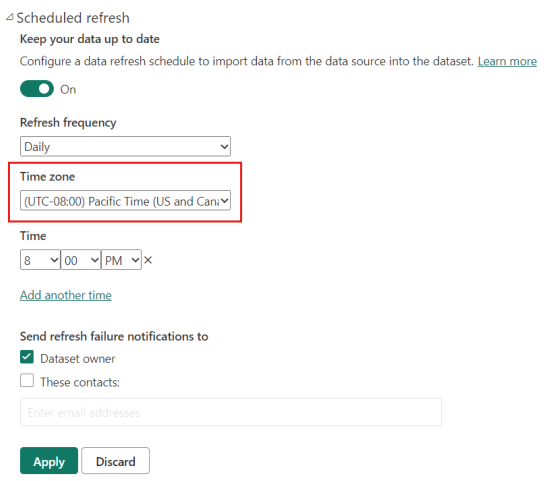
Scheduled Refresh in Power BI Service
**3. Real-time updates
Some data sources support real-time data refresh which allows you to view the most up to date information without manually refreshing the data. This is particularly useful when you need live updates for things like sales numbers, stock prices or sensor data. There are a few ways Power BI enable real-time updates:
- **Push Datasets: you can use Power BI's REST APIs or streaming datasets to send data directly to Power BI. As the data is pushed to the platform the visualizations update instantly without requiring a manual refresh.
- **Power BI Dataflows: Dataflows allow you to create ETL (Extract, Transform, Load) pipelines to continuously pull data from sources like Salesforce, SQL Server and Oracle. When the data is updated it flows into your Power BI report and keep your visuals fresh and real-time.
- **Power BI Streaming: This feature connects Power BI to web services or streaming sources and allow to build dashboards that update in real-time. It's perfect for monitoring fast-moving data such as social media feeds or data from IoT (Internet of Things) devices.
- **DirectQuery: It is another way to connect your report to a live data source. DirectQuery link your Power BI report directly to the data source and it pulls real-time data whenever you interact with the report.