Add User and Display Current Username in Flask (original) (raw)
Create a Flask authentication system with user registration, login functionality, session management, and MySQL database integration. After successful login, users are redirected to a profile page where their username is displayed dynamically and user data is stored in MySQL for easy management via phpMyAdmin.
Creating Templates for User Interface
We need three HTML files inside a templates folder:
- **register.html: User registration form
- **login.html: User login form
- **user.html: Displays the logged-in username
register.html
This page includes fields for username, email, and password. Once submitted, it stores the data in the MySQL database and flashes a success message.
HTML `
User Registration FormGFG User Registration
Note : fill following details !
{% if message is defined and message %}Already have an account? Login here
`
**Output:

User Registration page
login.html
This page allows registered users to log in using their email and password. Upon successful login, they will be redirected to the user profile page.
HTML `
User Login FormGFG User Login
{% if message is defined and message %}Don't have an account? Register here
`
**Output:
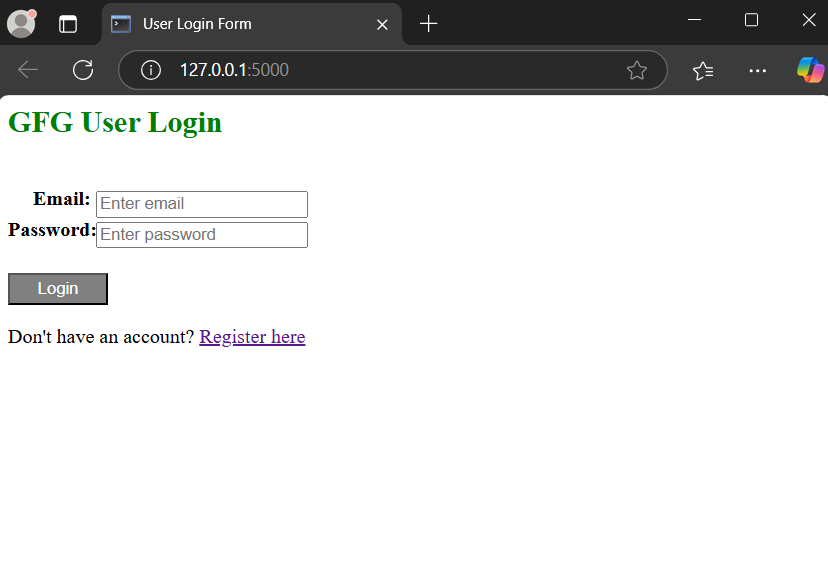
Login page
user.html
Displays the logged-in username and provides a logout button.
HTML `
User AccountUser Profile
    <h2>Welcome to the User profile page...</h2>
</div>
`
**Output:
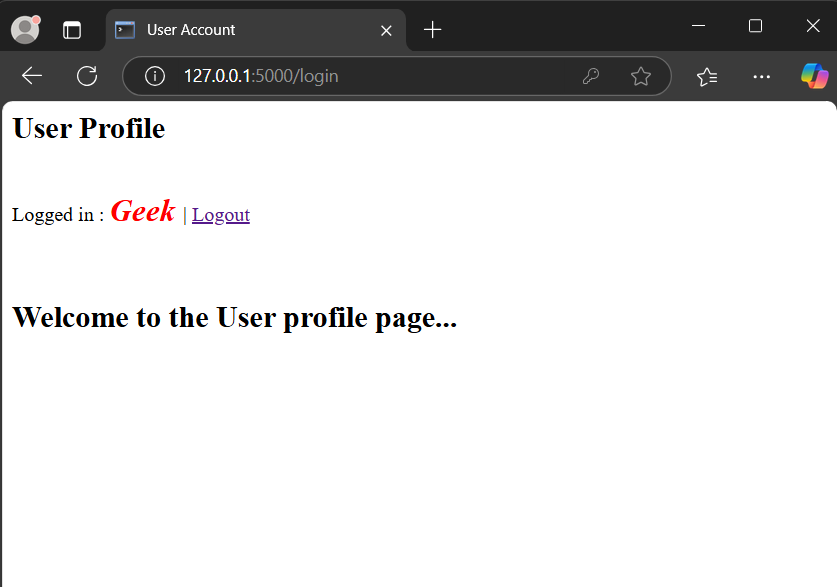
User Page
Creating Database
Make sure MySQL is installed on your system, if it is not, refer to Setting up MySQL. Log in to MYSQL server from terminal and create database "user_table" by using commmand:
CREATE DATABASE user_table;
This command will create the database and the user table will be created from the flask app code.
Implementing Flask Application
Step 1: Import all library
To set up a Flask application with MySQL for admin login, we start by writing the Python code in app.py. This file handles imports, database connections, and authentication. Here’s the process:
Python `
Import all important libraries
from flask import * from flask_mysqldb import MySQL import MySQLdb.cursors import re
initialize first flask
app = Flask(name) app.secret_key = 'GeeksForGeeks'
Set MySQL data
app.config['MYSQL_HOST'] = 'localhost' app.config['MYSQL_USER'] = 'root' app.config['MYSQL_PASSWORD'] = '' # Enter your password app.config['MYSQL_DB'] = 'user_table'
mysql = MySQL(app)
`
**Explanation:
- Import the necessary libraries for Flask, MySQL connection, and authentication.
- Import the re module for validating email format using regular expressions.
- Initialize the Flask app and generate a secret key.
- Set up the database configuration, including the database name, email, and password.
Step 2: Implement Login and Logout Functionality
Create a login() function to handle user authentication and session management. This function interacts with MySQL to verify user credentials. Here's how it works:
Python `
Make login function for login and also make
session for login and registration system
and also fetch the data from MySQL
@app.route('/') @app.route('/login', methods=['GET', 'POST']) def login(): message = '' if request.method == 'POST' and 'email' in request.form and 'password' in request.form: email = request.form['email'] password = request.form['password'] cursor = mysql.connection.cursor (MySQLdb.cursors.DictCursor) cursor.execute( 'SELECT * FROM user WHERE email = % s AND password = % s', (email, password, )) user = cursor.fetchone() if user: session['loggedin'] = True session['userid'] = user['userid'] session['name'] = user['name'] session['email'] = user['email'] message = 'Logged in successfully !' return render_template('user.html', message=message) else: message = 'Please enter correct email / password !' return render_template('login.html', message=message)
Make function for logout session
@app.route('/logout') def logout(): session.pop('loggedin', None) session.pop('userid', None) session.pop('email', None) session.pop('name', None) return redirect(url_for('login'))
`
**Explanation:
- Develop a session for login and registration.
- Display a success message on the login page after successful registration.
- Process the login form by capturing the entered email and password.
- Save the user data automatically in MySQL, accessible via phpMyAdmin.
Step 3: Implement User Registration
On the login screen, users can log in using their email and password. The system also includes flash messages for better user feedback. Here's how it works:
Python `
Make a register session for registration
session and also connect to Mysql to code for access
login and for completing our login
session and making some flashing massage for error
@app.route('/register', methods=['GET', 'POST']) def register(): message = '' if request.method == 'POST' and 'name' in request.form and 'password' in request.form and 'email' in request.form:
    userName = request.form['name']
    password = request.form['password']
    email = request.form['email']
    cursor = mysql.connection.cursor(MySQLdb.cursors.DictCursor)
    cursor.execute('SELECT * FROM user WHERE email = % s',
                   (email, ))
    account = cursor.fetchone()
    if account:
        message = 'Account already exists !'
    elif not re.match(r'[^@]+@[^@]+\.[^@]+', email):
        message = 'Invalid email address !'
    elif not userName or not password or not email:
        message = 'Please fill out the form !'
    else:
        cursor.execute(
            'INSERT INTO user VALUES (NULL, % s, % s, % s)',
          (userName, email, password, ))
        mysql.connection.commit()
        message = 'You have successfully registered !'
elif request.method == 'POST':
    message = 'Please fill out the form !'
return render_template('register.html', message=message)
`
**Explanation:
- Users log in by entering their email and password.
- If the email is already registered, a "User already exists" message appears.
- The system prevents duplicate email registration.
- After a successful login, the registered username is displayed on the profile page.
- For example, if "GFG" was registered, the message "Welcome GFG" will appear after login.
Complete Code
Python `
from flask import * from flask_mysqldb import MySQL import MySQLdb.cursors import re
initialize first flask
app = Flask(name) app.secret_key = 'GeeksForGeeks'
Set MySQL data
app.config['MYSQL_HOST'] = 'localhost' app.config['MYSQL_USER'] = 'root' app.config['MYSQL_PASSWORD'] = '________' # Use you mysql password app.config['MYSQL_DB'] = 'user_table'
mysql = MySQL(app)
def create_table(): cursor = mysql.connection.cursor() cursor.execute(""" CREATE TABLE IF NOT EXISTS user ( userid INT AUTO_INCREMENT PRIMARY KEY, name VARCHAR(100) NOT NULL, email VARCHAR(100) NOT NULL UNIQUE, password VARCHAR(255) NOT NULL ) """) mysql.connection.commit() cursor.close()
Call the function when the app starts
with app.app_context(): create_table()
@app.route('/') @app.route('/login', methods=['GET', 'POST']) def login(): message = '' if request.method == 'POST' and 'email' in request.form and 'password' in request.form: email = request.form['email'] password = request.form['password'] cursor = mysql.connection.cursor(MySQLdb.cursors.DictCursor) cursor.execute( 'SELECT * FROM user WHERE email = % s AND password = % s', (email, password, )) user = cursor.fetchone() if user: session['loggedin'] = True session['userid'] = user['userid'] session['name'] = user['name'] session['email'] = user['email'] message = 'Logged in successfully !' return render_template('user.html', message=message) else: message = 'Please enter correct email / password !' return render_template('login.html', message=message)
Make function for logout session
@app.route('/logout') def logout(): session.pop('loggedin', None) session.pop('userid', None) session.pop('email', None) session.pop('name', None) return redirect(url_for('login'))
@app.route('/register', methods=['GET', 'POST']) def register(): message = '' if request.method == 'POST' and 'name' in request.form and 'password' in request.form and 'email' in request.form: userName = request.form['name'] password = request.form['password'] email = request.form['email'] cursor = mysql.connection.cursor(MySQLdb.cursors.DictCursor) cursor.execute('SELECT * FROM user WHERE email = % s', (email, )) account = cursor.fetchone() if account: message = 'Account already exists !' elif not re.match(r'[^@]+@[^@]+.[^@]+', email): message = 'Invalid email address !' elif not userName or not password or not email: message = 'Please fill out the form !' else: cursor.execute( 'INSERT INTO user VALUES (NULL, % s, % s, % s)', (userName, email, password, )) mysql.connection.commit() message = 'You have successfully registered !' elif request.method == 'POST': message = 'Please fill out the form !' return render_template('register.html', message=message)
run code in debug mode
if name == "main": app.run(debug=True)
`
After writing the whole code open your terminal and run the following command
python app.py
Output
Run the flask app using "python app.py" command. The snapshot of the home page is already provided above, we will navigate to the register page and fill out the form, below is the snapshot:
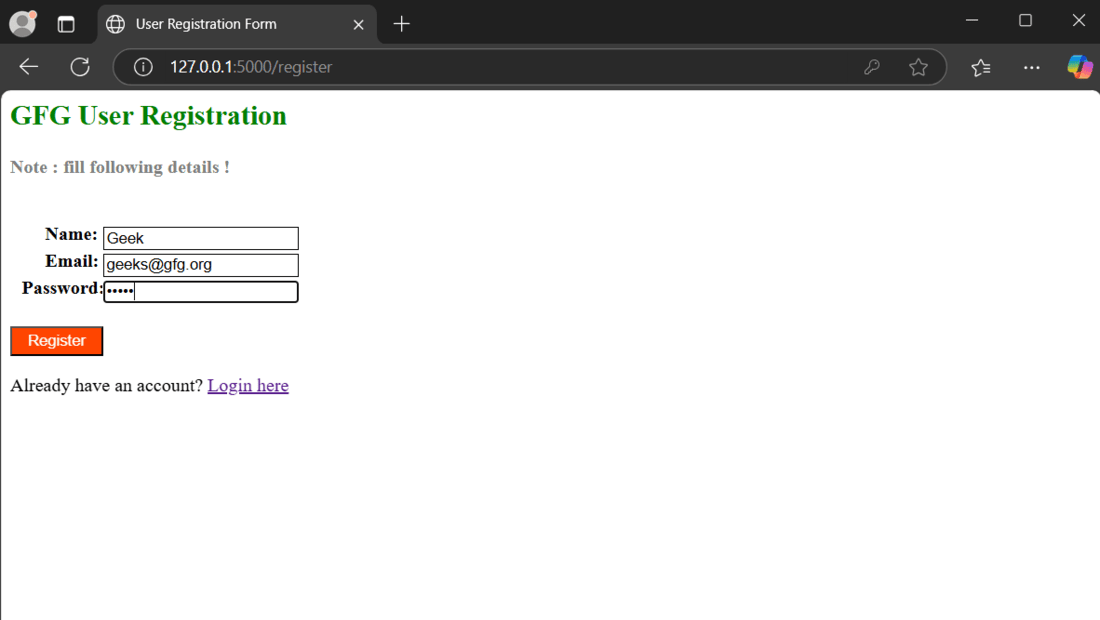
Registration page
After filling up the registration form and clicking the "Register" button, we will get a registration successfull page like below:
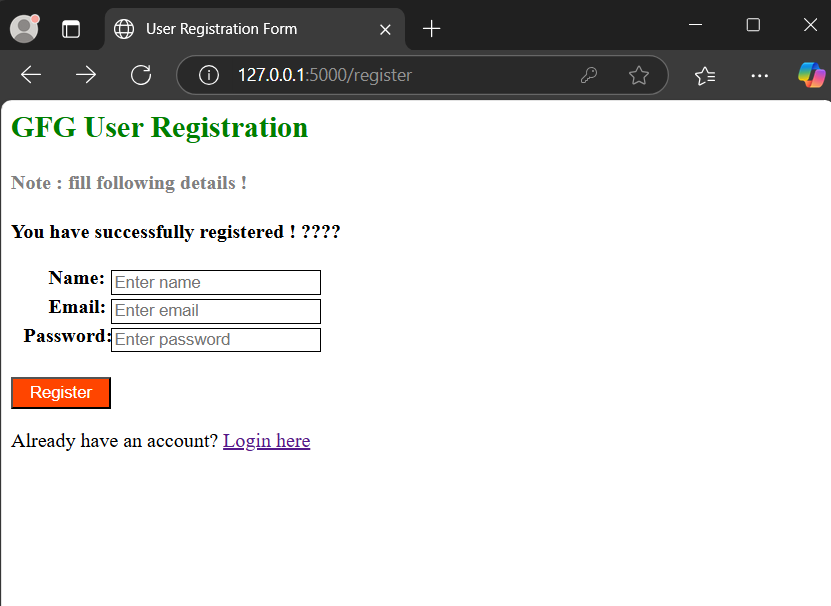
Registration Successfull
Let's try to log in using the credentials we just registered with:
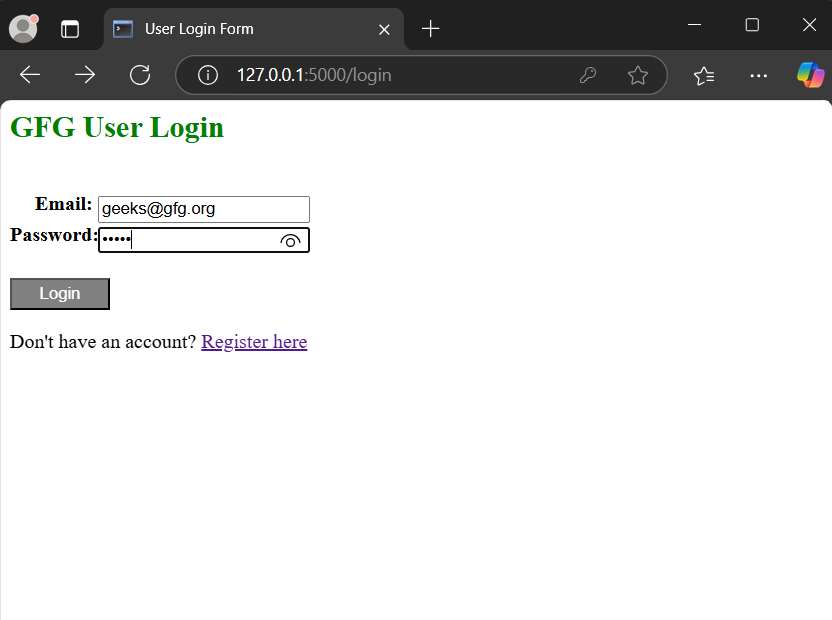
Login Page
After successfully logging in, we will see the username page:
User Page