Create a simple Animation using Turtle in Python (original) (raw)
Last Updated : 12 Jul, 2025
Turtle is a built-in Python module that provides a simple way to draw and create graphics using a virtual turtle on the screen. You can control the turtle using commands like forward() and right() to move it around and draw shapes. In this article, we'll use Turtle to create a fun animation where multiple turtles race on a track. Let's understand the steps to achieve this.
- **Import modules: from turtle import * and from random import randint
- Draw the race track using a classic turtle.
- Create four turtle racers – each with different colors and names.
- Place them at the starting line.
- Add a fun spin animation before the race begins.
- Start the race using a loop and random speeds for each turtle.
Below is the implementation:
Python `
from turtle import * from random import randint
Draw the racing track
speed(0) penup() goto(-140, 140)
for step in range(15): write(step, align='center') right(90) for dash in range(8): penup() forward(10) pendown() forward(10) penup() backward(160) left(90) forward(20)
Create turtle racers
colors = ['red', 'blue', 'green', 'orange'] y_positions = [100, 70, 40, 10] players = []
for i in range(4): racer = Turtle() racer.color(colors[i]) racer.shape('turtle') racer.penup() racer.goto(-160, y_positions[i]) racer.pendown() # Little spin before race for turn in range(36): racer.right(10) players.append(racer)
Start the race
for move in range(100): for turtle in players: turtle.forward(randint(1, 5))
`
**Output
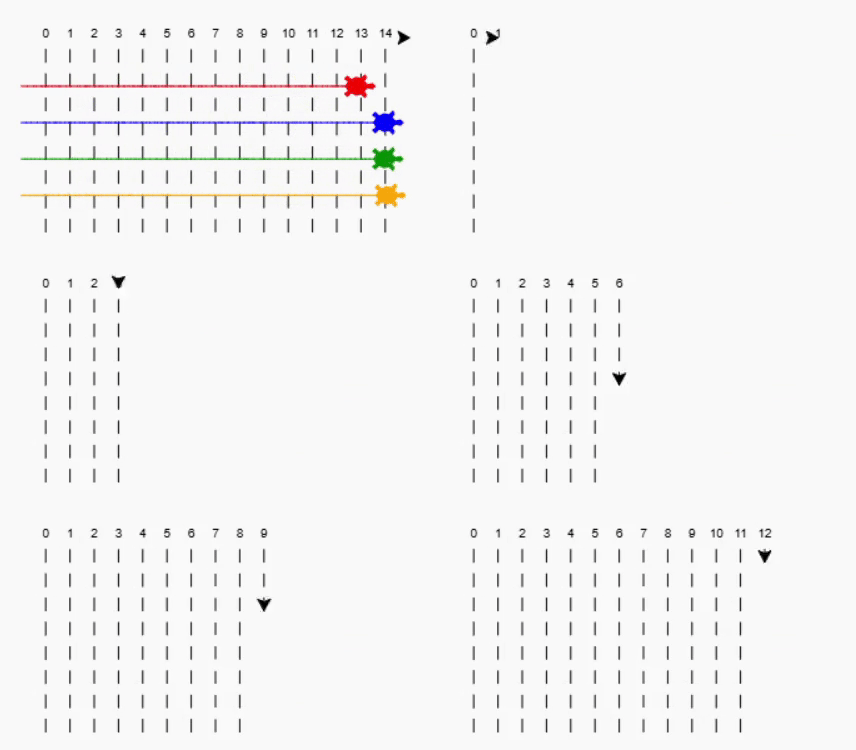
Output
**Explanation:
- Set the turtle's speed to the fastest so the race track draws quickly.
- Move the turtle to the top-left corner of the screen to start drawing.
- Draw 15 vertical lines to create the race track, numbering each one.
- Each line has dashed marks to look like lanes on a track.
- After drawing each line, the turtle shifts right to draw the next one.
- Make a list of four different colors for the racing turtles.
- Set different vertical positions so each turtle has its own track lane.
- Create four uniquely colored turtles, position them in separate lanes at the start and spin each once before the race.
- Start the race with 100 loops, moving each turtle forward randomly to make it unpredictable.
**Related Articles: