Django Project MVT Structure (original) (raw)
Last Updated : 11 Jun, 2026
Django organizes web applications using the MVT (Model-View-Template) architectural pattern. This structure separates data management, request handling and presentation logic into distinct components, making applications easier to develop, maintain, and scale.
MVC vs MVT Mapping
- Django Views handle request processing and business logic.
- Templates are responsible for presentation.
- Django itself acts as the controller by managing URL routing and request-response flow.
| MVC Component | Django Equivalent |
|---|---|
| Model | Model |
| View | Template |
| Controller | View |
1. Model
Model acts as the data layer of an application. It defines the structure of the database and handles data-related logic.
- Defines database tables using Python classes in models.py.
- Responsible for defining the database schema and interacting with the database using Django’s ORM for operations like querying, inserting, updating and deleting data.
- Supports creating, retrieving, updating, and deleting records.
- Generates database schema changes through migrations.
2. View
View handles request processing and controls the flow of data between models and templates. It may contain business logic, but logic can also reside in models or separate service layers.
- Interacts with models to retrieve or update data.
- Contains application logic and request-processing code.
- Passes the prepared data to templates for rendering.
- Implemented as Python functions or class-based views that return HTTP responses.
3. Template
Template is responsible for presenting data to the user. It combines static content with dynamic data using template syntax.
- Defines the structure and layout of web pages using HTML
- Uses Django Template Language (DTL) to insert dynamic data.
- Supports template tags, filters, loops, and conditional statements.
- Displays data passed from views in a structured format.
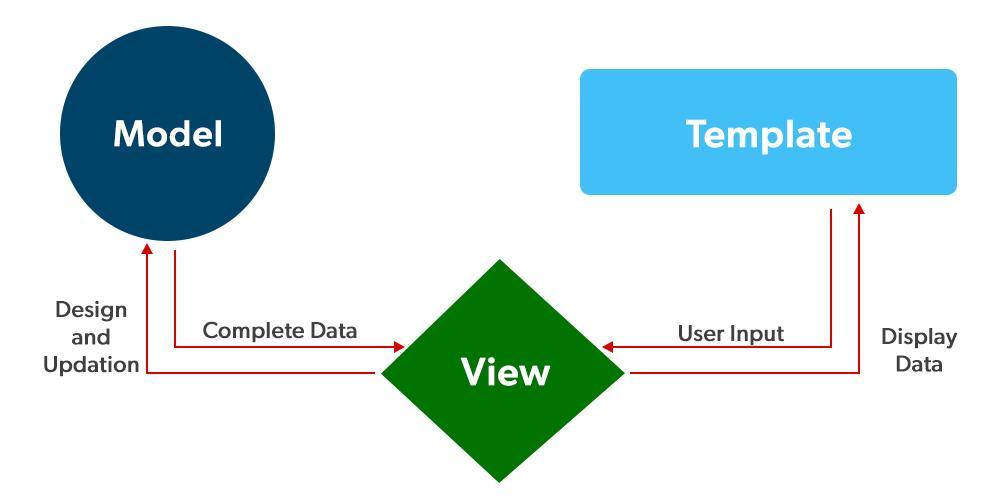
MVT-Structure
MVT Workflow
- A user sends a request through the browser.
- Django matches the request URL using urls.py.
- A view processes the request.
- The view interacts with models to retrieve or update data.
- The view passes data to a template.
- The template generates HTML.
- Django returns the rendered response to the browser.
Project Structure
A newly created Django project contains several files and directories that work together to implement the MVT architecture. Inside the project folder, the following major files are included:
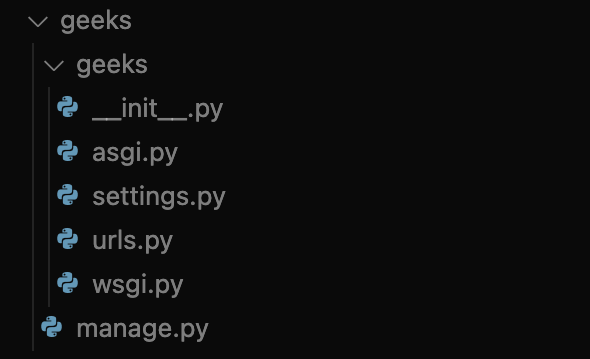
Snapshot of Project directory
Key Files and Folders
**1. manage.py: command-line tool to interact with the project. Used for starting the server, running migrations, creating apps and other project management tasks. To view all available commands:
python manage.py help
**2. Project Folder (geeks/geeks): This folder contains all project packages and main configuration files. Initially, it contains five files:
- **__init__.py: Marks a directory as a Python package and can execute package-level initialization code.
- **asgi.py: Entry point for ASGI-compatible servers. Supports asynchronous request handling and modern features like real-time communication (e.g., WebSockets).
- **settings.py: Contains all configuration settings for the project, including installed apps, middleware, databases, templates, static files and security options that define the project’s behavior and environment.
- **urls.py: Defines the URL routing configuration for the project, mapping URL patterns to corresponding views or other URL files to direct incoming requests to the appropriate part of the application.
- **wsgi.py: Entry point for WSGI-compatible servers. Used for serving Django applications in traditional synchronous environments.