Django Models (original) (raw)
Last Updated : 2 May, 2026
A Django model is a Python class that represents a database table. It helps manage data easily using Python instead of writing SQL.
- Django's ORM provides an easy way to connect Python code with the database.
- Models help create, update and delete data in a simple manner.
- It works smoothly with the Django admin panel for managing information.
- It supports data checks and table relationships using fields like ForeignKey and ManyToManyField.
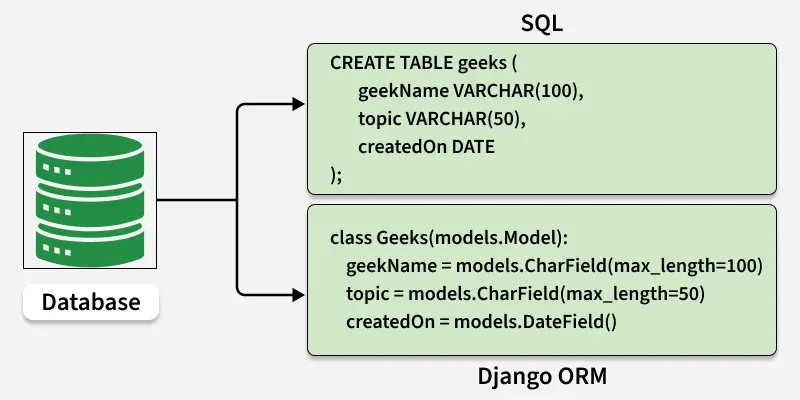
Django Models
Creating a Django Model
A Django project and app are needed before defining any models. After starting an app, models can be created in the file app_name/models.py.
In **models.py:
Python `
from django.db import models
class GeeksModel(models.Model): title = models.CharField(max_length=200) description = models.TextField() image = models.ImageField(upload_to='images/')
def __str__(self):
    return self.title
`
This defines a Django model called "GeeksModel" which has three fields:
- **title: A character field with a 200-character limit.
- **description: A text field for longer input.
- **image: An ImageField used to store the path or reference to an uploaded image file.
- **__str__ method is also defined to return the title of the instance of the model when the model is printed.
This model is converted into a database table through Django’s migration system, which tracks changes and applies them to the database. Django maps the fields defined in Django models into table fields of the database.
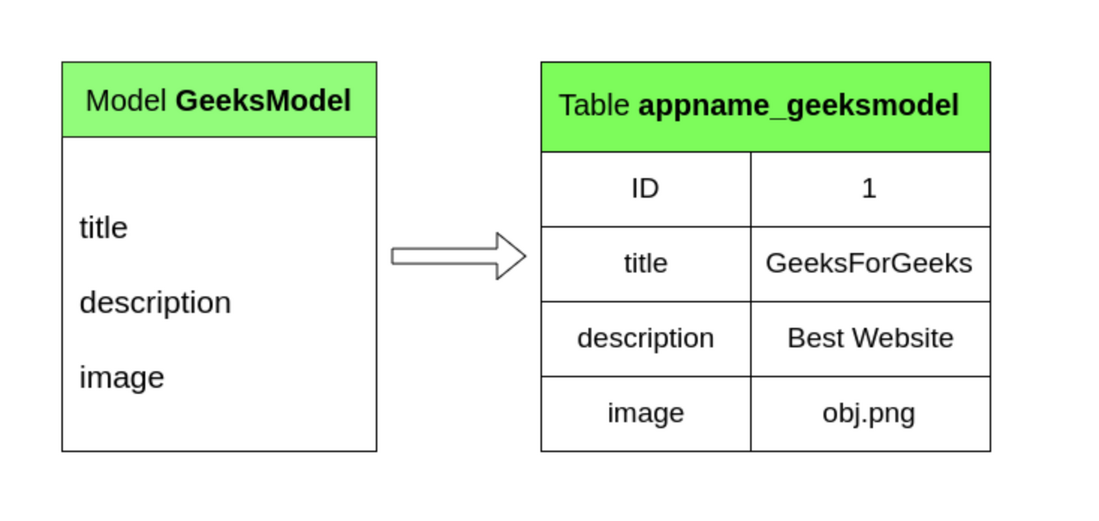
Database Table
Applying Migrations
Whenever a model is created, deleted or updated in the project’s models.py file, the following commands must be executed:
python manage.py makemigrations
python manage.py migrate
The migrations system in Django generates and applies the necessary SQL commands to update your database according to the changes in your models.
- **makemigrations creates migration files (Python code) that describe changes to your models
- **migrate applies these migrations by executing the corresponding SQL commands on the database.
Registering Models in Django Admin
To manage your model via the admin interface:
- Open admin.py in app directory.
- Register the model: Python `
from django.contrib import admin
Register your models here.
from .models import GeeksModel
admin.site.register(GeeksModel)
`
This code does not produce any output, it simply registers the "GeeksModel"with the admin site, so that it can be managed via the Django admin interface. The admin panel can now be used to create, update and delete model instances.
Model Field Types
Django models consist of fields that define the structure of database tables. Each field specifies:
- The type of data it stores (text, numbers, dates, files, etc.)
- Constraints and validations on the data
**Common field types include:
- **CharField: Stores short text (like names or titles)
- **TextField: Stores large amounts of text (like descriptions)
- **IntegerField: Stores integer values
- **BooleanField: Stores True/False values
- **DateTimeField: Stores date and time
- **ImageField/FileField: Stores images or files
Fields not only define how data is stored, but also automatically handle validation and form generation when used in Django forms.
Relationship Fields
Relationship fields are used when models are related to each other. It allow to represent one-to-one, one-to-many and many-to-many relationships in your database. Common relationship fields:
- **ForeignKey: Many-to-one relationship.
- **OneToOneField: One-to-one relationship.
- **ManyToManyField: Many-to-many relationship.
Relationship fields allow easy querying of related objects using Django ORM and automatically handle database constraints.
Field Options
Every field in Django models can have options (attributes) to control its behavior. Field options allow you to:
- Set constraints (null, blank, unique)
- Provide default values (default)
- Customize display names (verbose_name)
- Add help text for forms (help_text)
- Apply validators to enforce custom rules
These options make Django models highly flexible and ensure data integrity in the database and forms.
CRUD Operations Using Django ORM
Django's Object-Relational Mapper (ORM) allows interaction with the database using Python code instead of raw SQL. With the ORM, four basic operations on models are:
- **Create: Add new records to the database and save them.
- **Retrieve: Query and fetch existing records easily.
- **Update: Modify existing records and save the changes.
- **Delete: Remove records safely from the database.
The ORM abstracts away SQL commands, making database operations more readable, organized and consistent across different databases.