Draw Color Filled Shapes in Turtle Python (original) (raw)
Last Updated : 12 Jul, 2025
In Python's Turtle module, we can create visually appealing graphics by drawing shapes and filling them with colors. This allows us to design colorful patterns, logos, and illustrations. Let's explore how to draw and fill different shapes using Turtle in Python.
Steps to draw color-filled shapes in Python
**1. **Importing the Turtle Module
import turtle
**2. Creating the Screen and Turtle Object: We need to create a screen and a turtle object to start drawing.
screen = turtle.Screen()
t = turtle.Turtle()
**3. Choosing the Color: We can set the color for the shape’s outline and its fill using the color() method. For example:
t.color("blue", "yellow")
**4. Drawing Shapes: To draw shapes, we use methods like forward(), left(), right(), etc., to move the turtle around the screen. The begin_fill() method is called before the turtle starts drawing, and end_fill() is called when the shape is completed.
Examples of Color Filled Shapes in Python
1. Drawing Color Filled Square:
Python `
import turtle
t = turtle.Turtle()
s = int(input("side of the square: "))
col = input("color name or hex value of color(#RRGGBB): ")
t.fillcolor(col)
t.begin_fill()
drawing the square of side s
for _ in range(4): t.forward(s) t.right(90)
t.end_fill()
`
**Input
200
green
**Output
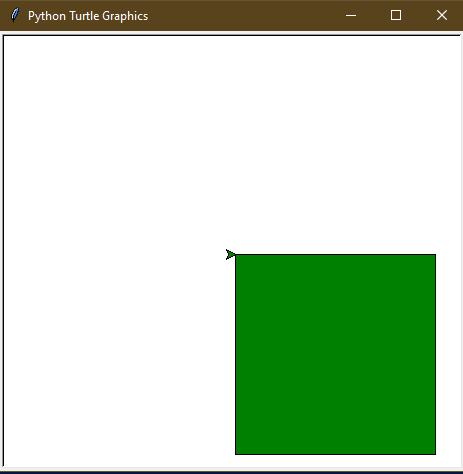
**Explanation:
- The t.fillcolor(col) method sets the fill color of the square based on the user's input (either a color name or hex code).
- The loop runs 4 times to draw the 4 sides of the square, each time moving forward by the side length s and turning 90 degrees to create right angles.
- begin_fill() and end_fill() are used to fill the square with the chosen color.
2. Drawing Color Filled Triangle:
Python `
import turtle
t = turtle.Turtle()
s = int(input("side of the triangle: "))
col = input("color name or hex value of color(#RRGGBB): ")
t.fillcolor(col)
t.begin_fill()
drawing the triangle of side s
for _ in range(3): t.forward(s) t.right(-120)
t.end_fill()
`
**Input
200
red
**Output
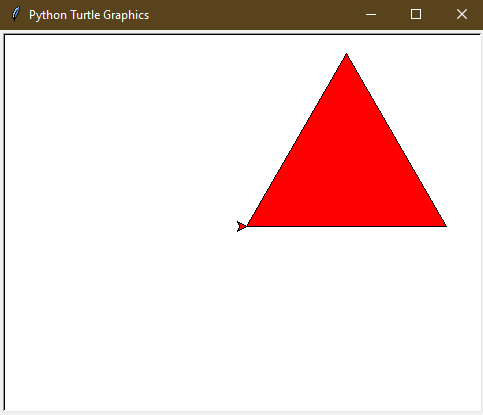
**Explanation:
- t.fillcolor(col) method sets the fill color based on the user's input.
- The loop runs 3 times to draw the 3 sides of the triangle, moving forward by s units and turning -120 degrees at each corner to create the angles.
- begin_fill() and end_fill() are used to fill the triangle with the chosen color.
3. Drawing Color Filled Hexagon:
Python `
import turtle
t = turtle.Turtle()
s = int(input("side of the hexagon: "))
col = input("color name or hex value of color(#RRGGBB): ")
t.fillcolor(col)
t.begin_fill()
drawing the hexagon of side s
for _ in range(6): t.forward(s) t.right(-60)
t.end_fill()
`
**Input
100
#113300
**Output
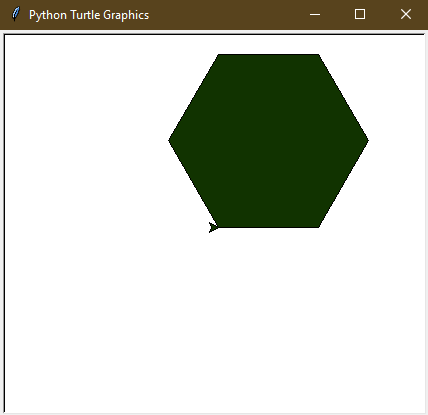
**Explanation:
- t.fillcolor(col) method sets the fill color based on the user's input.
- The loop runs 6 times to draw the 6 sides of the hexagon, moving forward by s units and turning -60 degrees at each corner to create the angles.
- begin_fill() and end_fill() are used to fill the hexagon with the chosen color.
4. Drawing Color Filled Star:
Python `
import turtle
t = turtle.Turtle()
s = int(input("side of the star: "))
col = input("color name or hex value of color(#RRGGBB): ")
t.fillcolor(col)
t.begin_fill()
drawing the star of side s
for _ in range(5): t.forward(s) t.right(144)
t.end_fill()
`
**Input
200
#551122
**Output

**Explanation:
- t.fillcolor(col) method sets the fill color based on the user's input.
- The loop runs 5 times to draw the 5 sides of the star, moving forward by s units and turning 144 degrees at each corner to create the star's angles.
- begin_fill() and end_fill() are used to fill the star with the chosen color.
5. Drawing Color Filled Circle:
Python `
import turtle
t = turtle.Turtle()
r = int(input("radius of the circle: "))
col = input("color name or hex value of color(# RRGGBB): ")
t.fillcolor(col)
t.begin_fill()
drawing the circle of radius r
t.circle(r)
t.end_fill()
`
**Input
100
blue
**Output

**Explanation:
- t.fillcolor(col) method sets the fill color based on the user's input.
- The t.circle(r) method draws a circle with the specified radius r. begin_fill() and end_fill() are used to fill the circle with the chosen color.
**Related Articles: