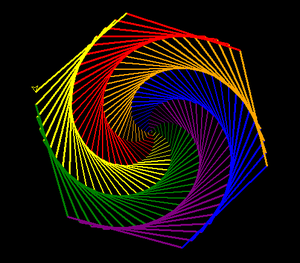
Draw Colorful Spiral Web Using Turtle Graphics in Python (original) (raw)
Last Updated : 15 Jul, 2025
“Turtle” is a Python feature like a drawing board, which lets us command a turtle to draw all over it. This comes packed with the standard Python package and need not be installed externally.
**Methods used:
- **forward(value): moves the turtle in the forward direction.
- **turtle.Pen(): setup the turtle pen
- **speed(value): changes the speed of the turtle
- **width(value): set the width
- **left(value): moves the turtle left.
- **bgcolor(color_name): changes background-color
**Approach:
- Import turtle.
- Define colors using the list data structure in python.
- Setup a turtle pen for drawing the Spiral Web.
- Start making the Spiral Web according to our logic.
Below is the implementation of the above approach.
Python `
import turtle
import turtle
defining colors
colors = ['red', 'yellow', 'green', 'purple', 'blue', 'orange']
setup turtle pen
t= turtle.Pen()
changes the speed of the turtle
t.speed(10)
changes the background color
turtle.bgcolor("black")
make spiral_web
for x in range(200): t.pencolor(colors[x%6]) # setting color t.width(x/100 + 1) # setting width t.forward(x) # moving forward t.left(59) # moving left
t.speed(10)
turtle.bgcolor("black") # changes the background color
make spiral_web
for x in range(200): t.pencolor(colors[x%6]) # setting color t.width(x/100 + 1) # setting width t.forward(x) # moving forward t.left(59) # moving left
turtle.done()
`
**Output: