Fast I/O for Competitive Programming in Python (original) (raw)
Last Updated : 23 Jul, 2025
In Competitive Programming, it is important to read input as fast as possible to save valuable time. Input/Output in Python can be sometimes time taking in cases when the input is huge or to output any numbers of lines or a huge number of arrays(lists) line after line.
**Fast Input
Normally, the input is taken from _STDIN in the form of String using input(). And this _STDIN is provided in the Judge's file. So try reading the input directly from the Judge's file using the Operating system(os) module, and input/output (io) module. This reading can be done in the form of bytes. By using this method, integer input works normally, but for string input, it will store the string as a byte like an object. For correcting this, the string can be decoded using the decode function.
Below is the implementation for Fast I/O in Python:
Python `
import io, os, time import sys
Function to take normal input
def normal_io(): # Stores the start time start = time.perf_counter()
# Take Input
s = input().strip()

# Stores the end time
end = time.perf_counter()

# Print the time taken
print("\nTime taken in Normal I / O:", end - start)
Function for Fast Input
def fast_io(): # Reinitialize the Input function to take input from the Byte Like objects input_buffer = io.BytesIO(sys.stdin.buffer.readline())
# Fast Input / Output
start = time.perf_counter()

# Taking input as string
s = map(int, input_buffer.read().decode().split())

# Stores the end time
end = time.perf_counter()

# Print the time taken
print("\nTime taken in Fast I / O:", end - start)
Driver Code
if name == "main": # Function Call normal_io() fast_io()
`
**Output:

**Fast Output
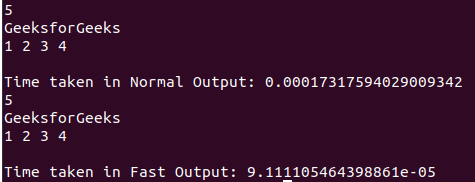
Instead of outputting to the _STDOUT, we can try writing to the Judge's system file. The code for that would be to use sys.stdout.write() instead of print() in Python. But remember we can only output strings using this, so convert the output to a string using str() or map().
Below is the implementation for the Fast Output:
Python `
Python program to illustrate the use
of fast Input / Output
import time, sys
Function to take normal input
def normal_out():
  # Stores the start time
start = time.perf_counter()

# Output Integer
n = 5
print(n)

# Output String
s = "GeeksforGeeks"
print(s)

# Output List
arr = [1, 2, 3, 4]
print(*arr)

  # Stores the end time
end = time.perf_counter()

# Print the time taken
print("\nTime taken in Normal Output:", \
                  end - start)
Function for Fast Output
def fast_out():
start = time.perf_counter()
# Output Integer
n = 5
sys.stdout.write(str(n)+"\n")

# Output String
s = "GeeksforGeeks\n"
sys.stdout.write(s)

# Output Array
arr = [1, 2, 3, 4]
sys.stdout.write(
    " ".join(map(str, arr)) + "\n"
)

# Stores the end time
end = time.perf_counter()

# Print the time taken
print("\nTime taken in Fast Output:", \
                  end - start)
Driver Code
if name == "main":
# Function Call
normal_out()

fast_out()
`
**Output: