Flask RESTFUL Extension (original) (raw)
Last Updated : 23 Jul, 2025
Flask-RESTful is an extension for Flask that simplifies the process of building REST APIs. It provides additional tools for creating APIs with minimal boilerplate code while following REST principles. With Flask-RESTful, defining API resources, handling requests, and formatting responses become more structured and efficient.
Features of Flask-RESTful:
- **Simplifies API Development – Provides a cleaner and more structured approach.
- **Automatic Request Parsing – Built-in support for handling request arguments.
- **Better Resource Management – Uses classes to define API resources.
- **Response Formatting – Automatically formats responses in JSON.
- **Integrated Error Handling – Provides built-in exception handling for common errors.
Installation and Setup
Create a project folder and then inside that folder create and activate a **virtual environment to install **Flask and other necessary **modules in it. Use these commands to create and activate a new virtual environment:
python -m venv venv
.venv\Scripts\activate
And after that install Flask and Flask-RESTful extension using these command:
pip install flask
pip install flask-restful
How Flask-RESTful Works
Flask-RESTful simplifies API development by introducing a **class-based approach. Instead of defining routes using ****@app.route(),** Flask-RESTful allows us to define API resources as Python classes, where each HTTP method (GET, POST, PUT, DELETE) is represented by a class method.
Resource Class
- Resource is a special class provided by Flask-RESTful.
- When a class (like GFG, in the example below) inherits from Resource, it automatically gains the ability to handle **HTTP methods (GET, POST, PUT, DELETE).
- We define these methods inside the class, and Flask-RESTful automatically maps them to the corresponding API requests.
Key concepts in Flask-RESTful:
- **Resource Class – Each **API resource is defined as a class that inherits from **Resource.
- *Methods for HTTP Requests – *get(), p**ost()**, **put(), and **delete() methods handle different **HTTP requests.
- **Adding Resources to API – The **add_resource() method links resource classes to specific URL endpoints.
Before we build a full-fledged API, let’s look at a basic example:
Python `
from flask import Flask from flask_restful import Api, Resource
app = Flask(name) api = Api(app)
Defining a simple resource
class GFG(Resource): def get(self): return {"message": "Hello, Flask-RESTful!"}
Adding resource to API
api.add_resource(GFG, '/')
if name == 'main': app.run(debug=True)
`
**Explanation:
- We create a **GFG class that inherits from **Resource.
- The **get() method returns a **JSON response when a **GET request is made.
- The **add_resource() method links the **GFG resource to the ****'/'** route.
Now if we run the app we can see the message:
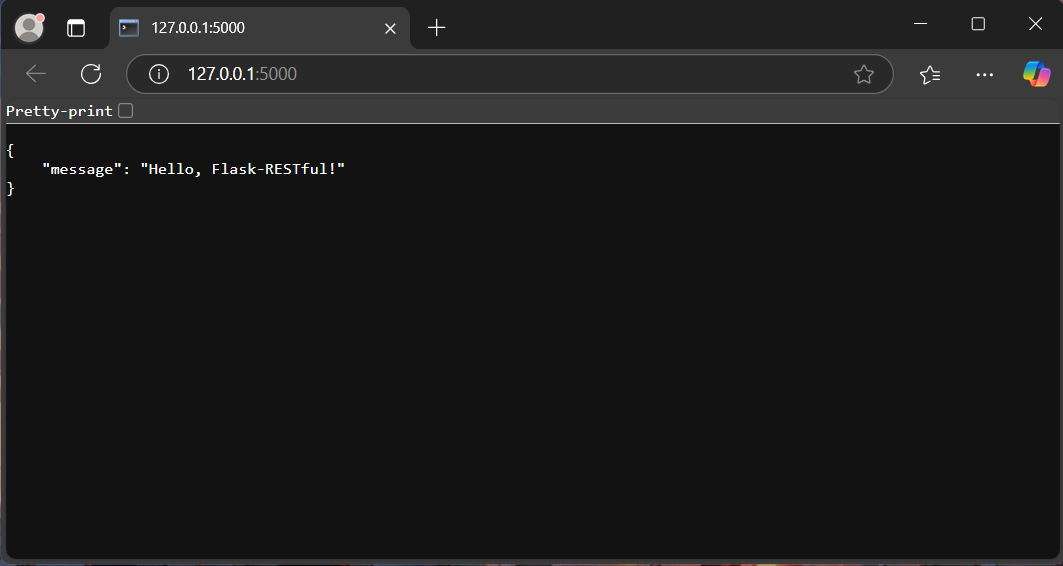
Restful API
Building a REST API with Flask-RESTful
Now that we understand the basics, let's move on to building a complete REST API that manages a collection of books. Our API will allow users to:
- Get all books
- Get a specific book by ID
- Add a new book
- Update an existing book
- Delete a book
Here is the implementation:
Python `
from flask import Flask, request from flask_restful import Api, Resource
app = Flask(name) api = Api(app)
Sample data
books = [ {"id": 1, "title": "Concept of Physics", "author": "H.C Verma"}, {"id": 2, "title": "Gunahon ka Devta", "author": "Dharamvir Bharti"}, {"id": 3, "title": "Problems in General Physics", "author": "I.E Irodov"} ]
API Resource Class
class BookResource(Resource): def get(self, book_id=None): if book_id is None: return books, 200 # Explicitly return status 200
    book = next((book for book in books if book["id"] == book_id), None)
    if book:
        return book, 200  # Explicitly return 200 OK
    return {"error": "Book not found"}, 404  # Return 404 only when not found

def post(self):
    new_book = request.json
    books.append(new_book)
    return new_book, 201  # Created status

def put(self, book_id):
    book = next((book for book in books if book["id"] == book_id), None)
    if not book:
        return {"error": "Book not found"}, 404  # Explicit 404

    data = request.json
    book.update(data)
    return book, 200  # Return updated book with 200 OK

def delete(self, book_id):
    global books
    books = [book for book in books if book["id"] != book_id]
    return {"message": "Book deleted"}, 200  # Explicitly return 200
Adding Resources to API
api.add_resource(BookResource, '/books', '/books/int:book_id')
if name == 'main': app.run(debug=True)
`
**Explanation:
**1. Flask-RESTful Setup
- **Api(app): Initializes the REST API.
- **api.add_resource(): Registers the resource class to specific endpoints.
**2. Understanding API Methods:
- **GET /books – Returns the complete list of books.
- **GET /books/<book_id> – Retrieves details of a single book by ID.
- **POST /books – Adds a new book to the list.
- **PUT /books/<book_id> – Updates an existing book’s information.
- **DELETE /books/<book_id> – Removes a book from the list
Running and Testing Application
Launch the Flask application using this command in termial:
python app.py
After the app is live on development server, open the Postman app to test the API Methods:
GET all Books:
Make a GET Request to URL- **http://127.0.0.1:5000/books:
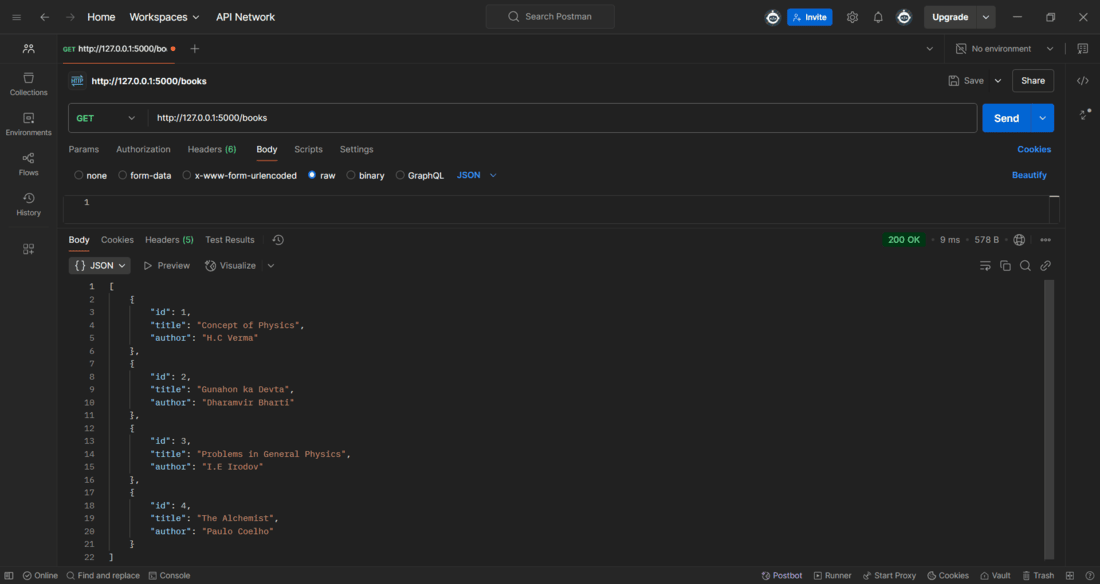
GET Method
GET a specific book:
Make a **GET Request to URL- http://127.0.0.1:5000/books/id , replace the id with the desired book id for example, to get the book with id=3, URL should be - http://127.0.0.1:5000/books/3.
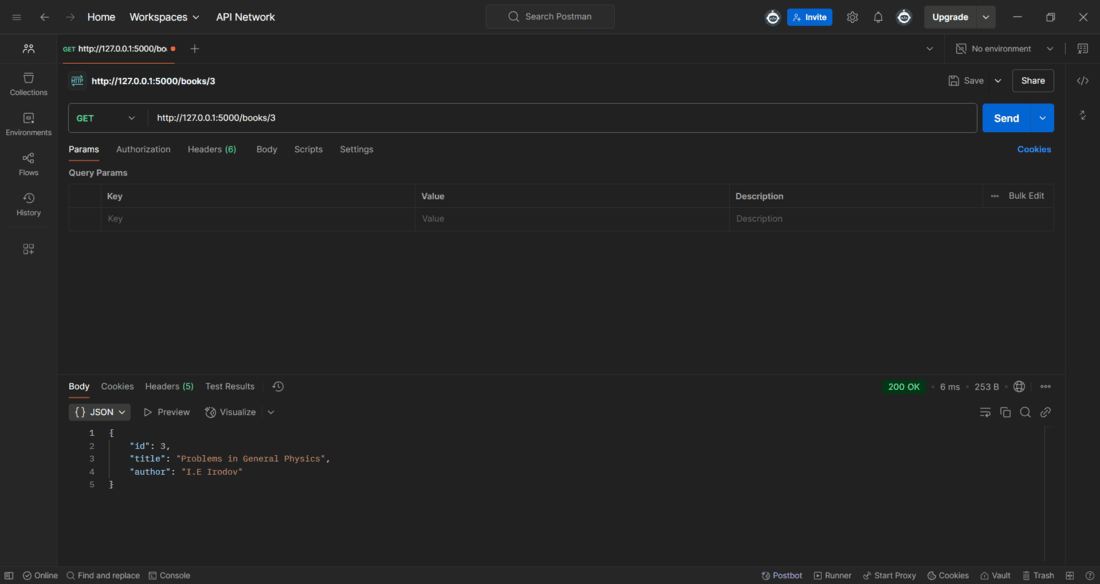
GET Method for a specific book
POST a New Book
Make a **POST Request to URL- **http://127.0.0.1:5000/books, and provide the book data in JSON format under the raw tab:
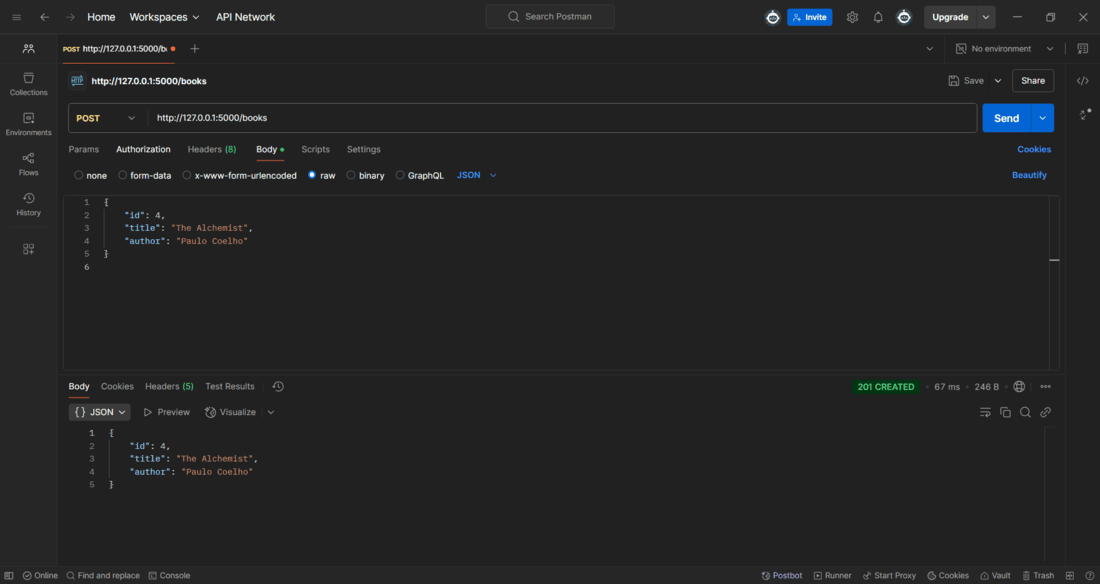
POST Method
DELETE a Book
To delete a book, a DELETE request with the book id should be made to the URL- **http://127.0.0.1:5000/books/id (replace the id with the specific book id).
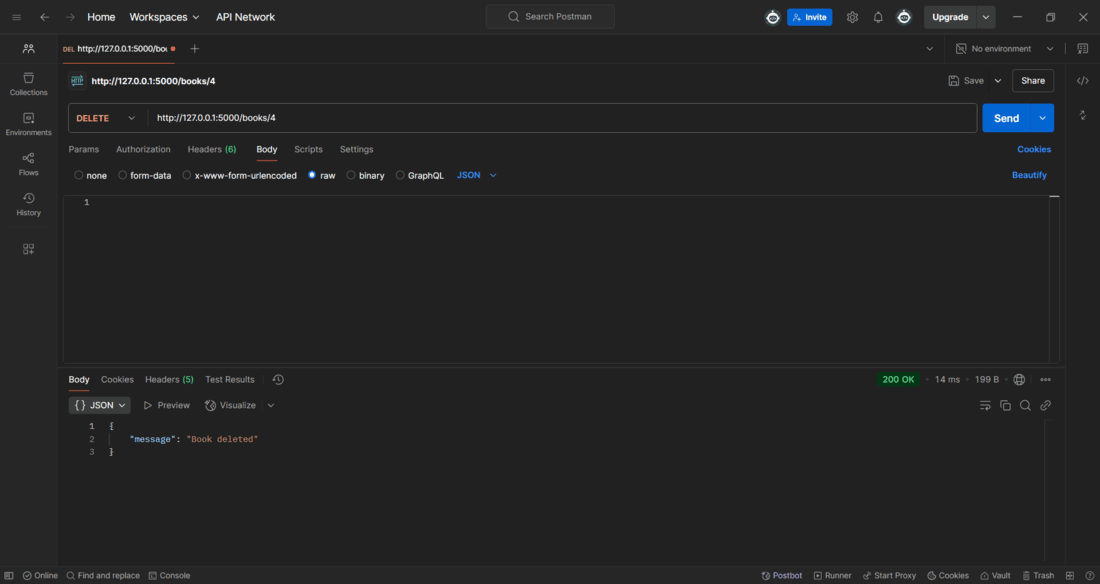
DELETE Method
Similary we can test all the different methods using Postman app, below is a table that summarizes how to make different request with their specific configurations.
| **Action | **Method | **URL | **Body (JSON) | **Response |
|---|---|---|---|---|
| Get all books | GET | /books | None | List of books |
| Get a book by ID | GET | /books/1 | None | Book details or 404 |
| Add a new book | POST | /books | { "id": 4, "title": "New", "author": "X" } | New book data |
| Update a book | PUT | /books/2 | { "title": "Updated" } | Updated book data or 404 |