How to create a COVID19 Data Representation GUI? (original) (raw)
Last Updated : 12 Jul, 2025
Prerequisites: Python Requests, Python GUI – tkinter
Sometimes we just want a quick fast tool to really tell whats the current update, we just need a bare minimum of data. Web scraping deals with taking some data from the web and then processing it and displaying the relevant content in a short and crisp manner.
What the code is doing ?
- First we are using Tkinter Library to make GUI required for our script
- We are using requests Library to get the data from the unofficial api
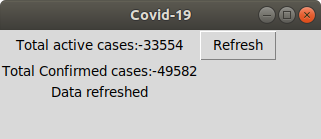
- Then we are displaying the data we need in this case its Total active cases: and confirmed cases
below is the implementation.
Python3 `
import requests import json from tkinter import *
window = Tk()
creating the Box
window.title("Covid-19")
Determining the size of the Box
window.geometry('220x70')
Including labels
lbl = Label(window, text ="Total active cases:-......") lbl1 = Label(window, text ="Total confirmed cases:-...")
lbl.grid(column = 1, row = 0) lbl1.grid(column = 1, row = 1) lbl2 = Label(window, text ="") lbl2.grid(column = 1, row = 3)
def clicked(): # Opening the url and loading the # json data using json Library url = "https://api.covid19india.org/ / data.json" page = requests.get(url) data = json.loads(page.text)
lbl.configure(text ="Total active cases:-"
              + data["statewise"][0]["active"])

lbl1.configure(text ="Total Confirmed cases:-"
               + data["statewise"][0]["confirmed"])

lbl2.configure(text ="Data refreshed")
btn = Button(window, text ="Refresh", command = clicked) btn.grid(column = 2, row = 0)
window.mainloop()
`
Output: