Python Requests (original) (raw)
Python Requests Library is a simple and powerful tool to send **HTTP requests and interact with web resources. It allows you to easily send **GET, **POST, **PUT, **DELETE, **PATCH, **HEAD requests to web servers, handle responses, and work with REST APIs and web scraping tasks.
Why do we need Requests Library
- **Simplifies HTTP Requests: Makes sending GET, POST, PUT, DELETE, etc., as easy as calling a function.
- **Manages Sessions & Auth: Handles cookies, sessions, headers, and various authentication methods.
- **Ideal for REST APIs: Perfect for consuming or testing RESTful services.
- **Supports All HTTP Methods: Full support for common and custom HTTP verbs.
- **Built-in SSL & Error Handling: Automatically manages SSL verification and error handling.
Installation
To install requests library via pip, use the following command:
pip install requests
Syntax
requests.get(url, params={key: value}, **kwargs)
**Parameter:
- **url: The URL you want to send the request to. (Required)
- **params: Dictionary or bytes to be sent in the query string for GET requests. (Optional)
- ****kwargs: Additional optional arguments such as headers, cookies, authentication, timeout, proxies, verify (SSL), stream, etc.
**Return Type: It returns a response object.
Making a Simple GET Request
Let's try making a **get request to **URL: "https://www.geeksforgeeks.org/".
Python `
import requests response = requests.get("https://www.geeksforgeeks.org/") print(response.status_code)
`
**Output
200
**Explanation:
- **requests.get() sends a GET request to the specified URL.
- **response.status_code returns the HTTP status code (200 means success).
Sending GET Requests with Parameters
Let's demonstrate how to make a GET request to an endpoint. The GET method sends encoded user information appended to the page request.
**Example: Let's try making a request to github's APIs for example purposes.
Python `
import requests response = requests.get("https://api.github.com/users/naveenkrnl") print(response.status_code) print(response.content)
`
**Output

Output of Sending GET request with parameter
For more, visit: GET method – Python requests
HTTP Request Methods
| Method | Description |
|---|---|
| GET | Retrieve information from the server |
| POST | Send data to the server to create/update resources |
| PUT | Replace the target resource with new data. |
| DELETE | The DELETE method deletes the specified resource |
| HEAD | Retrieve headers only (no body) |
| PATCH | Apply partial modifications to a resource |
Response object
Whenever you send a request, the server returns a Response object. It contains useful information like status code, headers, content, and more. Response object can be used to imply lots of features, methods, and functionalities.
**Example:
Python `
import requests response = requests.get('https://api.github.com/') print(response.url) print(response.status_code)
`
**Output

Output of Response object
**Explanation:
- **response.url returns the final URL after redirections.
- **response.status_code shows the HTTP status of the request.
- **Status code 200 indicates that request was made successfully.
Response Methods
| Method | Description |
|---|---|
| response.headers | response.headers returns a dictionary of response headers. |
| response.encoding | response.encoding returns the encoding used to decode response.content. |
| response.elapsed | response.elapsed returns a timedelta object with the time elapsed from sending the request to the arrival of the response. |
| response.close() | response.close() closes the connection to the server. |
| response.content | response.content returns the content of the response, in bytes. |
| response.cookies | response.cookies returns a CookieJar object with the cookies sent back from the server. |
| response.history | response.history returns a list of response objects holding the history of request (url). |
| response.is_permanent_redirect | response.is_permanent_redirect returns True if the response is the permanent redirected url, otherwise False. |
| response.is_redirect | response.is_redirect returns True if the response was redirected, otherwise False. |
| response.iter_content() | response.iter_content() iterates over the response.content. |
| response.json() | response.json() returns a JSON object of the result (if the result was written in JSON format, if not it raises an error). |
| response.url | response.url returns the URL of the response. |
| response.text | response.text returns the content of the response, in unicode. |
| response.status_code | response.status_code returns a number that indicates the status (200 is OK, 404 is Not Found). |
| response.request | response.request returns the request object that requested this response. |
| response.reason | response.reason returns a text corresponding to the status code. |
| response.raise_for_status() | response.raise_for_status() returns an HTTPError object if an error has occurred during the process. |
| response.ok | response.ok returns True if the status code is less than 400 and greater than or equal to 200; otherwise, it returns False |
| response.links | response.links returns the header links. |
POST Request Example
Python `
import requests payload = {'username': 'test', 'password': 'test123'} response = requests.post("https://httpbin.org/post", data=payload) print(response.text)
`
**Output
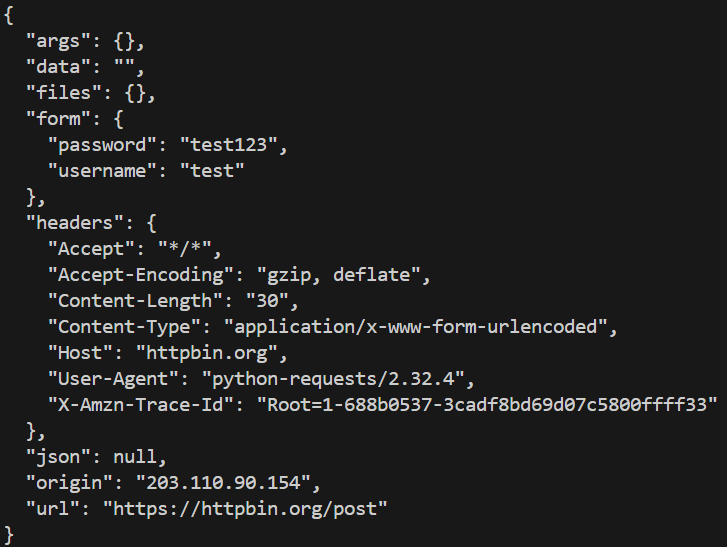
Output of POST request
**Explanation:
- Sends form data to the server.
- **data=payload sends the data in the request body.
- The server echoes back the data for testing.
Authentication using Python Requests
Authentication refers to giving a user permissions to access a particular resource. Since, everyone can't be allowed to access data from every URL, one would require authentication primarily. To achieve this authentication, typically one provides authentication data through Authorization header or a custom header defined by server.
Requests module makes this simple using **HTTPBasicAuth.
**Example:
Python `
import requests from requests.auth import HTTPBasicAuth response = requests.get('https://api.github.com/user', auth=HTTPBasicAuth('user', 'pass')) print(response.status_code)
`
**Output
401
**Explanation:
- Replace '**user' and '**pass' with your **credentials (username and password).
- Automatically handles HTTP Basic Authentication.
For more visit - Authentication using Python requests
SSL Certificate Verification
Requests verifies SSL certificates for HTTPS requests, just like a web browser. SSL Certificates are small data files that digitally bind a cryptographic key to an organization's details. Often, an website with a SSL certificate is termed as secure website. By default, SSL verification is enabled, and Requests will throw a SSLError if it’s unable to verify the certificate.
Accessing a site with invalid SSL:
Let us try to access a website with an invalid SSL certificate, using Python requests
Python `
import requests response = requests.get('https://expired.badssl.com/', verify=False) print(response.status_code)
`
**Output

Output of Accessing a site with valid SSL
**Explanation: Setting **verify=False disables SSL verification (not recommended for production).
Providing a custom certificate:
The above website doesn't have SSL setup so it raises this error, one can also pass the link to the certificate for validation via python requests only.
Python `
import requests response = requests.get('https://github.com/', verify='/path/to/certfile') print(response.status_code)
`
This would work in case the path provided is correct for SSL certificate for github.com.
For more visit- SSL Certificate Verification – Python requests
Session Objects
Session objects allow you to persist settings across multiple requests, such as headers, cookies, and connection pooling. So if several requests are being made to the same host, the underlying TCP connection will be reused, which can result in a significant performance increase. A session object all the methods as of requests.
Using Session Objects
Let us illustrate use of session objects by setting a cookie to a url and then making a request again to check if cookie is set.
Python `
import requests
Create a session object
session = requests.Session()
Set a cookie
session.get('https://httpbin.org/cookies')
Access the cookie in the next request
response = session.get('https://httpbin.org/cookies') print(response.text)
`
**Output
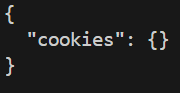
Output of Session objects
**Explanation:
- **Session() maintains cookies across requests.
- Connection pooling improves performance when making multiple requests to the same server.
For more, visit - Session Objects – Python requests
Error Handling with Requests
If this code doesn't print anything, it means request was successful and no errors occurred during the process.
Python `
import requests
try: response = requests.get("https://www.example.com/", timeout=5) response.raise_for_status() except requests.exceptions.HTTPError as errh: print("HTTP Error:", errh) except requests.exceptions.ConnectionError as errc: print("Connection Error:", errc) except requests.exceptions.Timeout as errt: print("Timeout Error:", errt) except requests.exceptions.RequestException as err: print("Something Else:", err)
`