How to use FlaskSession in Python Flask (original) (raw)
Last Updated : 23 Jul, 2025
**Sessions in Flask store user-specific data across requests, like **login status, using cookies. Data is stored on the client side but signed with a secret key to ensure security. They help maintain user sessions without requiring constant authentication.
This article demonstrates how to implement **server-side sessions in Flask using the **Flask-Session extension. We’ll create a simple app that remembers a user’s name between requests, enabling login and logout functionality.
Installation
To learn how to create and set-up flask app, refer to- Create Flask App
After creating a Flask app, we need to install modules required in this project, to install them execute this command in the terminal-
pip install flask flask-session
File Structure
In the end, our file structure of the app should look similar to this
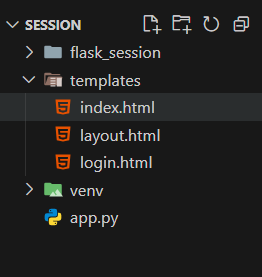
File Structure
Importing Modules and Configuring Flask-Session
In this section, we import the necessary modules and configure the Flask app to use server-side sessions. The configuration sets the session type (filesystem) and defines whether sessions are permanent.
Python `
from flask import Flask, render_template, redirect, request, session from flask_session import Session
app = Flask(name)
# Configuration app.config["SESSION_PERMANENT"] = False # Sessions expire when the browser is closed app.config["SESSION_TYPE"] = "filesystem" # Store session data in files
Initialize Flask-Session
Session(app)
`
**Explanation:
- **Module Imports: Import Flask, its built-in session, and the Flask-Session extension.
- **Configuration:
- **SESSION_PERMANENT is set to False so sessions expire when the browser closes.
- **SESSION_TYPE is set to "filesystem" so that session data is stored on the server's disk.
- **Initialization: Calling Session(app) configures the Flask app to use the server-side session mechanism.
Defining Routes for Session Handling
Now we define the routes for the app that will handle the session. This application includes three routes- home route, login route and logout route:
Python `
@app.route("/") def index(): # If no username in session, redirect to login if not session.get("name"): return redirect("/login") return render_template("index.html")
@app.route("/login", methods=["GET", "POST"]) def login(): if request.method == "POST": # Record the user name in session session["name"] = request.form.get("name") return redirect("/") return render_template("login.html")
@app.route("/logout") def logout(): # Clear the username from session session["name"] = None return redirect("/")
`
**Explanation:
- **Home Route (/): Checks if the session contains a "name". If not, it redirects to the login page.
- **Login Route (/login): Displays a login form on **GET, on **POST, it stores the username from the form in the session and redirects to the home page.
- **Logout Route (/logout): Sets the session "name" to **None (or you could clear it) and redirects back to the home page.
HTML Files
Create the following html files in the templates folder:
layout.html
Provides a basic HTML structure and a block for inserting page-specific content.
HTML `
Flask Session Demo {% block content %}{% endblock %}`
login.html
Contains a simple form to input a username. It extends layout.html.
HTML `
{% extends "layout.html" %}
{% block content %}
Register
{% endblock %}`
index.html
Displays the current session's username (if available) and a logout link.
HTML `
{% extends "layout.html" %}
{% block content %} {% if session.name %} You are registered as {{ session.name }}. Logout. {% else %} You are not registered. Login. {% endif %} {% endblock %}
`
Complete app.py Code
Below is the complete code for **app.py:
Python `
from flask import Flask, render_template, redirect, request, session from flask_session import Session
app = Flask(name)
---------------- Configuration ----------------
app.config["SESSION_PERMANENT"] = False # Sessions expire when browser closes app.config["SESSION_TYPE"] = "filesystem" # Store session data on the filesystem Session(app)
---------------- Routes ----------------
@app.route("/") def index(): if not session.get("name"): return redirect("/login") return render_template("index.html")
@app.route("/login", methods=["GET", "POST"]) def login(): if request.method == "POST": session["name"] = request.form.get("name") return redirect("/") return render_template("login.html")
@app.route("/logout") def logout(): session["name"] = None return redirect("/")
if name == "main": app.run(debug=True)
`
When using Flask-Session with a filesystem backend, session data is stored on the server instead of in the browser. However, a session cookie (usually named session) is still sent to identify your session.
Let's see how we can view our session.
How to Check the Session
**Step 1: First start the application using this command in terminal-
python app.py
**Step 2: Register by entering a username to create a session, below is the snapshot of the live app
login.html

index.html

Step 3: After running the app and creatng a session, perform these steps-
- **Open Developer Tools: Press F12 (or right-click → “Inspect”).
- **Locate Cookies: In the Application (or Storage) tab, expand Cookies under your site’s domain to find the session cookie.
Below is the snapshot of a session.
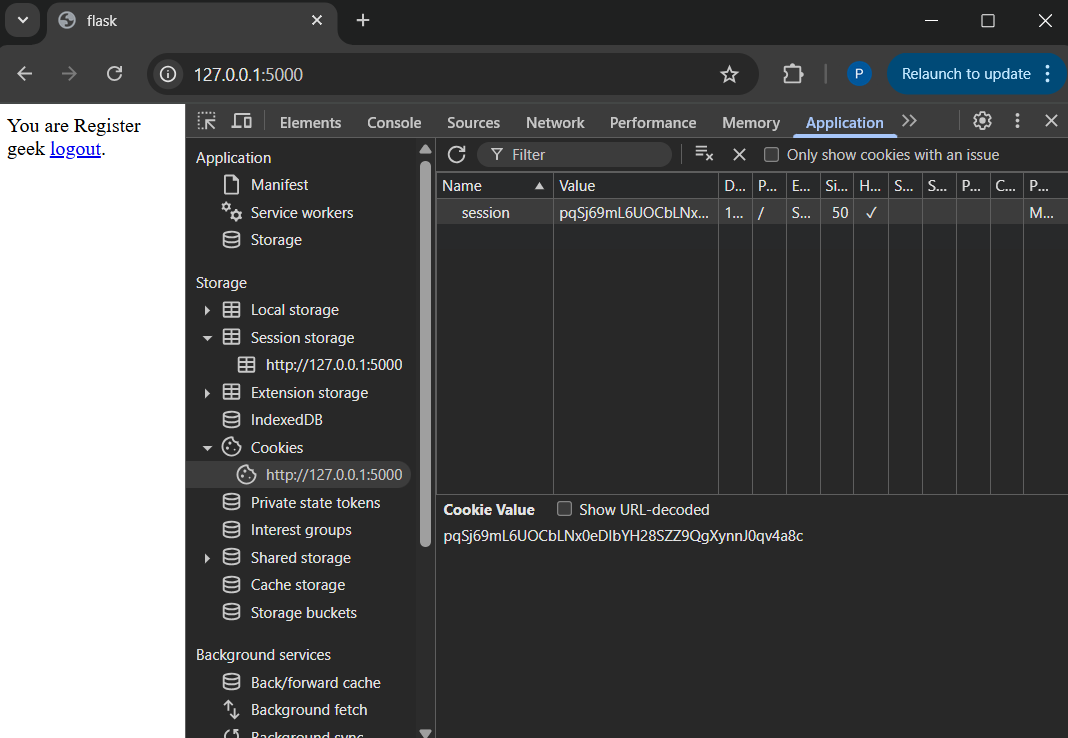
Session