Python Functions (original) (raw)
Python functions are reusable blocks of code used to perform a specific task. They help organize programs into smaller sections and execute the same logic whenever needed by calling the function.
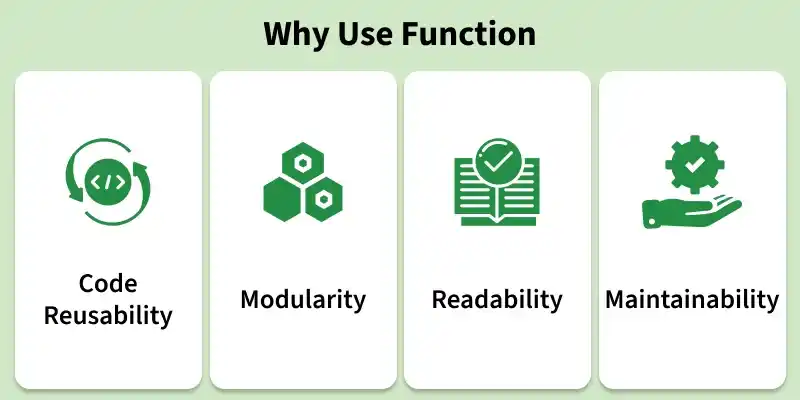
Features of a function
Defining a Function
A function can be defined using def keyword. Below is the syntax to define a function:
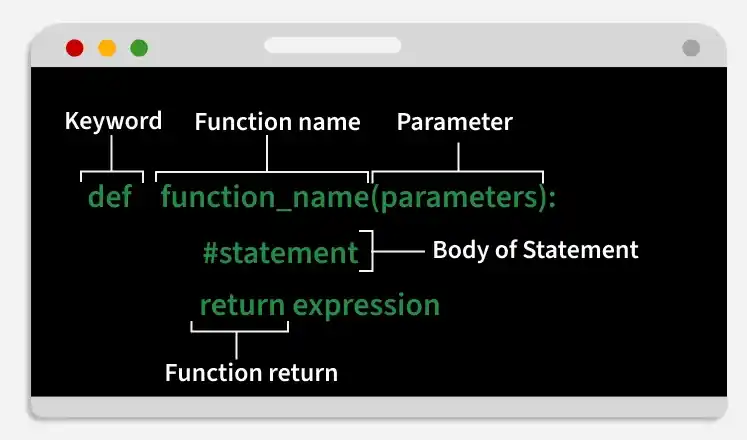
Syntax of Python Function Declaration
Here, we define a function using def that prints a welcome message when called.
Python `
def fun(): print("Welcome to GFG")
`
Calling a Function
After creating a function, call it by using the name of the functions followed by parenthesis containing parameters of that particular function.
Python `
def fun(): print("Welcome to GFG")
fun()
`
Function Arguments
Arguments are values passed to a function when it is called. They allow functions to receive input data and perform operations using those values.
Syntax
def function_name(arguments):
# function body
return value
- def function_name(arguments): defines a function with optional arguments.
- # function body contains the statements to be executed.
- return value returns a result from the function. If no return statement is used, it returns None by default.
Example: In this example, function checks whether the number passed as an argument is even or odd.
Python `
def evenOdd(x): if (x % 2 == 0): return "Even" else: return "Odd"
print(evenOdd(16)) print(evenOdd(7))
`
Types of Function Arguments
Python supports different types of arguments that can be passed during a function call.
1. Default argument: Default argument use a predefined value when no value is passed during the function call.
Python `
def myFun(x, y=50): print("x: ", x) print("y: ", y)
myFun(10)
`
Explanation:
- y=50 sets a default value for parameter y and myFun(10) passes only one argument.
- Since y is not provided, it uses the default value 50.
2. Keyword Arguments: pass values using parameter names, so argument order does not matter.
Python `
def student(fname, lname): print(fname, lname)
student(fname='Geeks', lname='Practice') student(lname='Practice', fname='Geeks')
`
Output
Geeks Practice Geeks Practice
Explanation: fname and lname are passed using parameter names and arguments can be provided in any order.
3. Positional Arguments: values are assigned to parameters based on their order in the function call.
Python `
def nameAge(name, age): print("Hi, I am", name) print("My age is ", age)
print("Case-1:") nameAge("Olivia", 27)
print("Case-2:") nameAge(27, "Olivia")
`
Output
Case-1: Hi, I am Olivia My age is 27 Case-2: Hi, I am 27 My age is Olivia
Explanation:
- In Case-1, values match the correct parameters.
- In Case-2, values are swapped because the order changed.
4. Arbitrary Arguments: allow functions to accept multiple values. This is done using two special symbols:
- *args collects extra positional arguments as a tuple.
- **kwargs collects extra keyword arguments as a dictionary. Python `
def myFun(*args, **kwargs): print("Non-Keyword Arguments (*args):") for arg in args: print(arg)
print("Keyword Arguments (**kwargs):")
for key, value in kwargs.items():
    print(f"{key} == {value}")
myFun('Hey', 'Welcome', first='Geeks', mid='for', last='Geeks')
`
Output
Non-Keyword Arguments (*args): Hey Welcome Keyword Arguments (**kwargs): first == Geeks mid == for last == Geeks
Explanation:
- *args stores extra positional arguments.
- **kwargs stores extra keyword arguments.
- loop prints all positional and keyword values separately.
Function within Functions
A function defined inside another function is called an inner function (or nested function). It is used to organize related logic and access variables from the outer function.
Python `
def f1(): s = 'I love GeeksforGeeks' def f2(): print(s)
f2()f1()
`
Output
I love GeeksforGeeks
Return Statement
Return is used to end a function and send a value back to the caller. It can return any data type, multiple values (packed into a tuple), or None if no value is given.
Syntax
return [expression]
Parameters: expression is the value returned by the function. If no value is returned, it returns None by default.
Python `
def sq_value(num): return num**2
print(sq_value(2)) print(sq_value(-4))
`
Explanation:
- sq_value(num) accepts a number as input.
- num**2 calculates the square of the number.
- return sends the result back to the caller.
Pass by Reference and Pass by Value
Variables refer to objects. Function behavior depends on whether the object is mutable or immutable.
- Mutable objects like lists can be modified inside functions.
- Immutable objects like integers and strings remain unchanged. Python `
def myFun(x): x[0] = 20
b = [10, 11, 12, 13] myFun(b) print(b)
def myFun2(x): x = 20
a = 10 myFun2(a) print(a)
`