Python Mongodb Delete_one() (original) (raw)
Last Updated : 12 Jul, 2025
Mongodb is a very popular cross-platform document-oriented, NoSQL(stands for "not only SQL") database program, written in C++. It stores data in JSON format(as key-value pairs), which makes it easy to use. MongoDB can run over multiple servers, balancing the load to keep the system up and run in case of hardware failure.
Connecting to a Database
Step 1 – Establishing Connection: Port number Default: 27017
conn = MongoClient(‘localhost’, port-number)
If using default port-number i.e. 27017. Alternate connection method:
conn = MongoClient()
Step 2 – Create Database or Switch to Existing Database:
db = conn.dabasename
Create a collection or Switch to an existing collection:
collection = db.collection_name
Deleting document from Collection or Database
In MongoDB, a single document can be deleted by the method delete_one(). The first parameter of the method would be a query object which defines the document to be deleted. If there are multiple documents matching the filter query, only the first appeared document would be deleted.
Note: Deleting a document is the same as deleting a record in the case of SQL.
Consider the sample database:
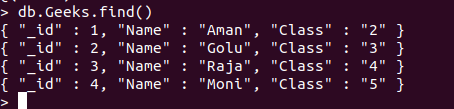
Examples:
Python `
Python program to demonstrate
delete_one
import pymongo
creating Mongoclient object to
create database with the specified
connection URL
students = pymongo.MongoClient('localhost', 27017)
connecting to a database with
name GFG
Db = students["GFG"]
connecting to a collection with
name Geeks
coll = Db["Geeks"]
creating query object
myQuery ={'Class':'2'} coll.delete_one(myQuery)
print collection after deletion:
for x in coll.find(): print(x)
`
Output :
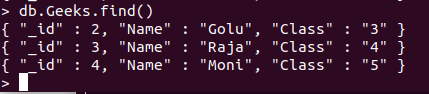
'_id': 2.0, 'Name': 'Golu', 'Class': '3'} {'_id': 3.0, 'Name': 'Raja', 'Class': '4'} {'_id': 4.0, 'Name': 'Moni', 'Class': '5'}
MongoDB Shell: