Python MySQL (original) (raw)
MySQL is a open-source relational database for managing structured data. Integrating it with Python enables efficient data storage, retrieval and manipulation within applications.
To work with MySQL, we use MySQL Connector, a driver that enables seamless integration between the two. It handles the conversion between Python and MySQL data types and is implemented in pure Python, requiring no third-party dependencies.
Why do we need MySQL
- **Store Large Data: MySQL helps store and manage large amounts of data efficiently.
- **Data Persistence: Data stays saved even after Python program ends.
- **Easy Data Access: Can easily fetch, insert, update or delete data from MySQL.
- **Supports Multiple Users: MySQL allows many users to access and work with data at the same time.
- **Works Well with Python Libraries: It integrates smoothly with tools like Pandas for data analysis.
Installation
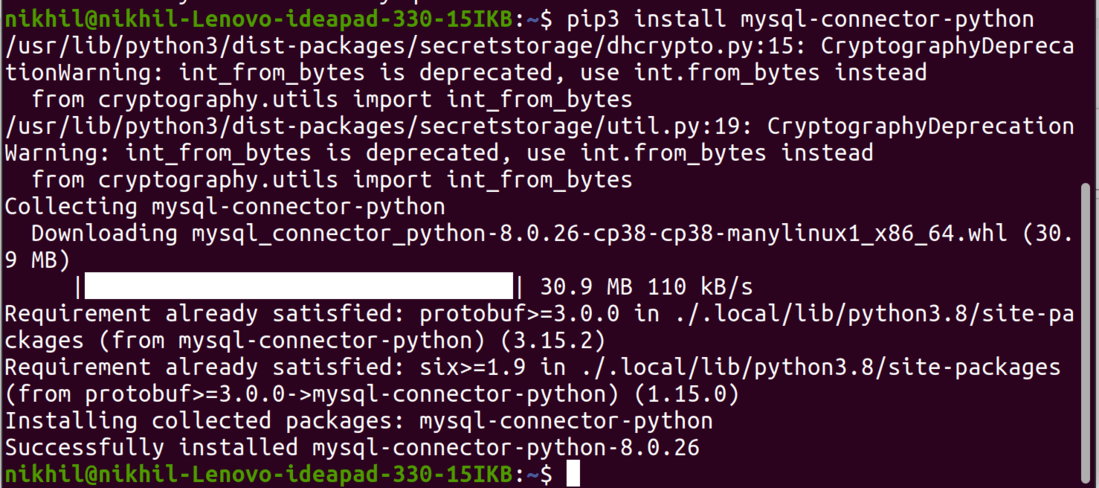
To install the **Python-mysql-connector module, one must have Python and PIP, preinstalled on their system. If Python and pip are already installed type the below command in the terminal.
pip3 install mysql-connector-python
**Note: If Python is not present, go through How to install Python on Windows and Linux? and follow the instructions provided.
Connecting to MySQL Server
We can connect to both **local and **cloud-based MySQL databases using the connect method of mysql-connector library.
**Example: Connecting to Local MySQL Database
Python `
import mysql.connector
dataBase = mysql.connector.connect( host ="localhost", # Localhost for local connection user ="user", passwd ="password" )
print(dataBase) dataBase.close()
`
**Output
<mysql.connector.connection_cext.CMySQLConnection object at 0x7f73f0191d00>
**Note: For more information, refer to Connect MySQL database using MySQL-Connector Python.
Creating Database
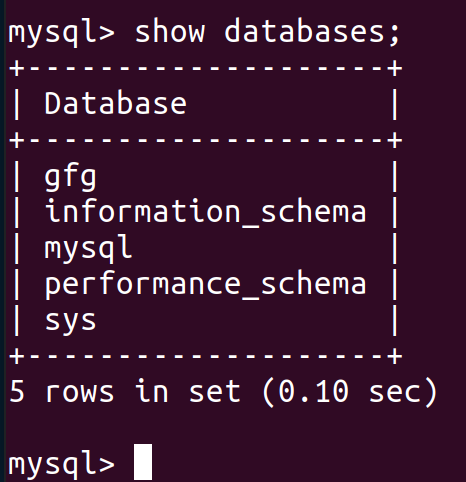
After connecting to the MySQL server let's see how to create a MySQL database. For this, we will first create a cursor() object and will then pass the SQL command as a string to the execute() method. The SQL command to create a database is -
CREATE DATABASE DATABASE_NAME
**Example: Creating MySQL database
Python `
import mysql.connector
dataBase = mysql.connector.connect( host ="localhost", user ="user", passwd ="password" )
preparing a cursor object
cursorObject = dataBase.cursor()
creating database
cursorObject.execute("CREATE DATABASE gfg")
`
**Output
Creating Tables
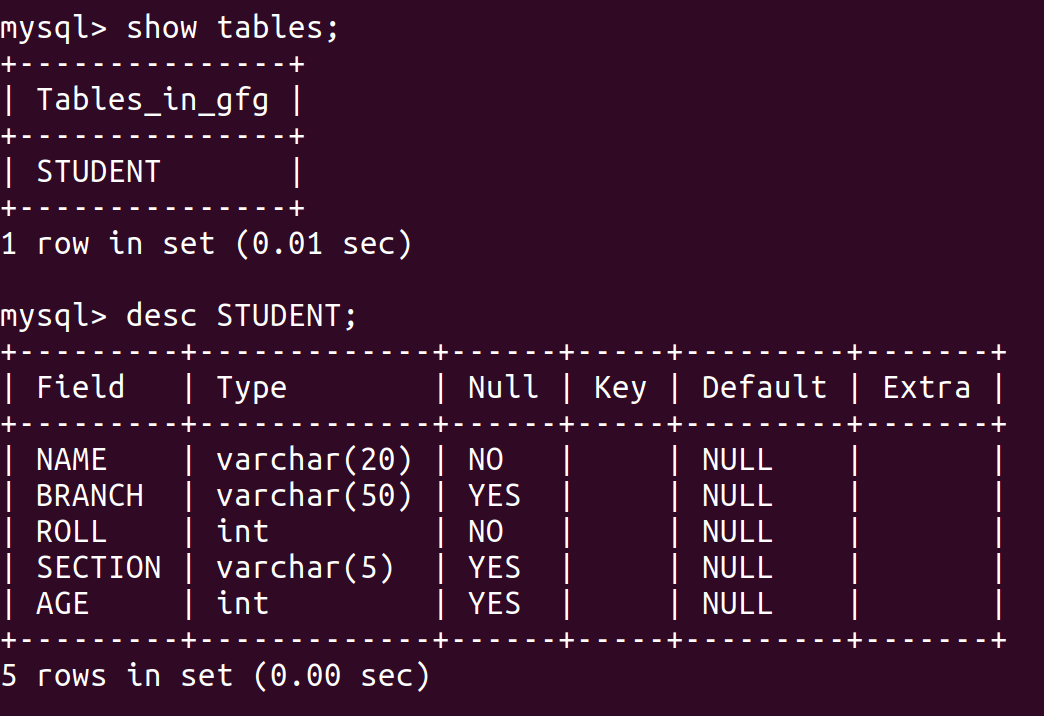
For creating tables we will follow writing the SQL commands as strings and then passing it to the execute() method of the cursor object. SQL command for creating a table is -
CREATE TABLE
(
column_name_1 column_Data_type,
column_name_2 column_Data_type,
:
:
column_name_n column_Data_type
);
**Example: Creating MySQL table
Python `
import mysql.connector
dataBase = mysql.connector.connect( host ="localhost", user ="user", passwd ="password", database = "gfg" )
preparing a cursor object
cursorObject = dataBase.cursor()
creating table
studentRecord = """CREATE TABLE STUDENT ( NAME VARCHAR(20) NOT NULL, BRANCH VARCHAR(50), ROLL INT NOT NULL, SECTION VARCHAR(5), AGE INT )"""
table created
cursorObject.execute(studentRecord) dataBase.close()
`
**Output
Insert Data into Tables
To insert data into the MySQL table **Insert into query is used.
**Syntax:
INSERT INTO table_name (column_names) VALUES (data)
**Example 1: Inserting Single Row
Python `
import mysql.connector
dataBase = mysql.connector.connect( host ="localhost", user ="user", passwd ="password", database = "gfg" )
preparing a cursor object
cursorObject = dataBase.cursor()
sql = "INSERT INTO STUDENT (NAME, BRANCH, ROLL, SECTION, AGE)
VALUES (%s, %s, %s, %s, %s)"
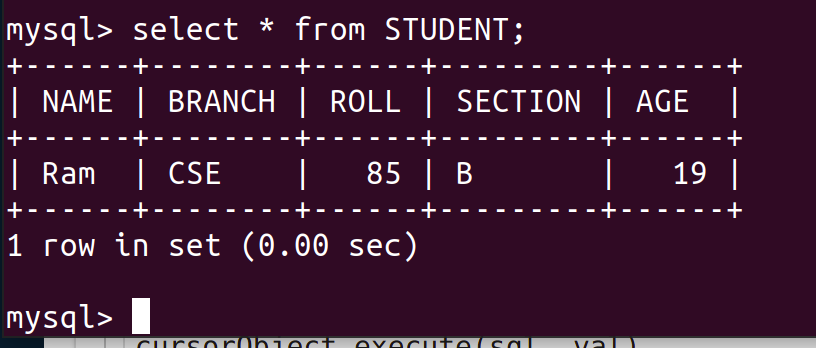
val = ("Ram", "CSE", 85, "B", 19)
cursorObject.execute(sql, val) dataBase.commit() dataBase.close()
`
**Output
**Example 2: Inserting Multiple Rows
To insert multiple values at once, executemany() method is used. This method iterates through the sequence of parameters, passing the current parameter to the execute method.
Python `
import mysql.connector
dataBase = mysql.connector.connect( host ="localhost", user ="user", passwd ="password", database = "gfg" )
preparing a cursor object
cursorObject = dataBase.cursor()
sql = "INSERT INTO STUDENT (NAME, BRANCH, ROLL, SECTION, AGE)
VALUES (%s, %s, %s, %s, %s)"
val = [("Nikhil", "CSE", 98, "A", 18),
("Nisha", "CSE", 99, "A", 18),
("Rohan", "MAE", 43, "B", 20),
("Amit", "ECE", 24, "A", 21),
("Anil", "MAE", 45, "B", 20),
("Megha", "ECE", 55, "A", 22),
("Sita", "CSE", 95, "A", 19)]
cursorObject.executemany(sql, val) dataBase.commit() dataBase.close()
`
**Output

Fetching Data
We can use the select query on the MySQL tables in the following ways -
In order to select particular attribute columns from a table, we write the attribute names.
SELECT attr1, attr2 FROM table_name
In order to select all the attribute columns from a table, we use the asterisk ‘*’ symbol.
SELECT * FROM table_name
**Example: Select data from MySQL table
Python `
import mysql.connector
dataBase = mysql.connector.connect( host ="localhost", user ="user", passwd ="password", database = "gfg" )
preparing a cursor object
cursorObject = dataBase.cursor()
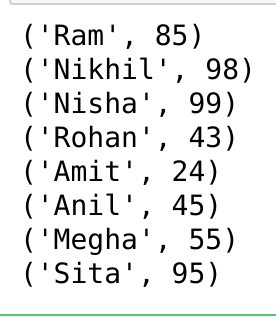
query = "SELECT NAME, ROLL FROM STUDENT" cursorObject.execute(query)
myresult = cursorObject.fetchall()
for x in myresult: print(x)
dataBase.close()
`
**Output
Where Clause
Where clause is used in MySQL database to filter the data as per the condition required. You can fetch, delete or update a particular set of data in MySQL database by using where clause.
**Syntax:
SELECT column1, column2, …. columnN FROM [TABLE NAME] WHERE [CONDITION];
**Example: Where clause in MySQL
Python `
import mysql.connector
dataBase = mysql.connector.connect( host ="localhost", user ="user", passwd ="password", database = "gfg" )
preparing a cursor object
cursorObject = dataBase.cursor()
query = "SELECT * FROM STUDENT where AGE >=20" cursorObject.execute(query) myresult = cursorObject.fetchall()
for x in myresult: print(x)
dataBase.close()
`
**Output
('Rohan', 'MAE', 43, 'B', 20)
('Amit', 'ECE', 24, 'A', 21)
('Anil', 'MAE', 45, 'B', 20)
('Megha', 'ECE', 55, 'A', 22)
Order By Clause
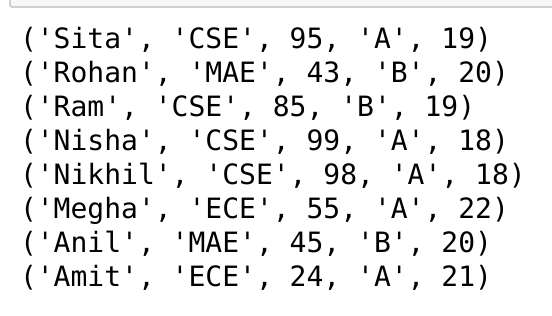
OrderBy is used to arrange the result set in either ascending or descending order. By default, it is always in ascending order unless “DESC” is mentioned, which arranges it in descending order. “ASC” can also be used to explicitly arrange it in ascending order. But, it is generally not done this way since default already does that.
**Syntax:
SELECT column1, column2
FROM table_name
ORDER BY column_name ASC|DESC;
**Example: Order By clause in MySQL
Python `
import mysql.connector
dataBase = mysql.connector.connect( host ="localhost", user ="user", passwd ="password", database = "gfg" )
preparing a cursor object
cursorObject = dataBase.cursor()
query = "SELECT * FROM STUDENT ORDER BY NAME DESC" cursorObject.execute(query) myresult = cursorObject.fetchall()
for x in myresult: print(x)
dataBase.close()
`
**Output
Limit Clause
Limit clause is used to control or limit the number of records in the result set returned from the query generated. By default, it gives out the required number of records starting from the top but it allows the use of OFFSET keyword. OFFSET allows to start from a custom row and get the required number of result rows.
**Syntax:
SELECT * FROM tablename LIMIT limit;
SELECT * FROM tablename LIMIT limit OFFSET offset;
**Example: Limit Clause in MySQL
Python `
import mysql.connector
dataBase = mysql.connector.connect( host ="localhost", user ="user", passwd ="password", database = "gfg" )
preparing a cursor object
cursorObject = dataBase.cursor()
query = "SELECT * FROM STUDENT LIMIT 2 OFFSET 1" cursorObject.execute(query) myresult = cursorObject.fetchall()
for x in myresult: print(x)
dataBase.close()
`
**Output
('Nikhil', 'CSE', 98, 'A', 18)
('Nisha', 'CSE', 99, 'A', 18)
Update Data
Update query is used to change the existing values in a database. By using update a specific value can be corrected or updated. It only affects the data and not the structure of the table.
**Syntax:
UPDATE table_name
SET column1 = new_value1, column2 = new_value2, ...
WHERE condition_column = condition_valu
**Example: Update MySQL table
Python `
import mysql.connector
dataBase = mysql.connector.connect( host ="localhost", user ="user", passwd ="password", database = "gfg" )
preparing a cursor object
cursorObject = dataBase.cursor()
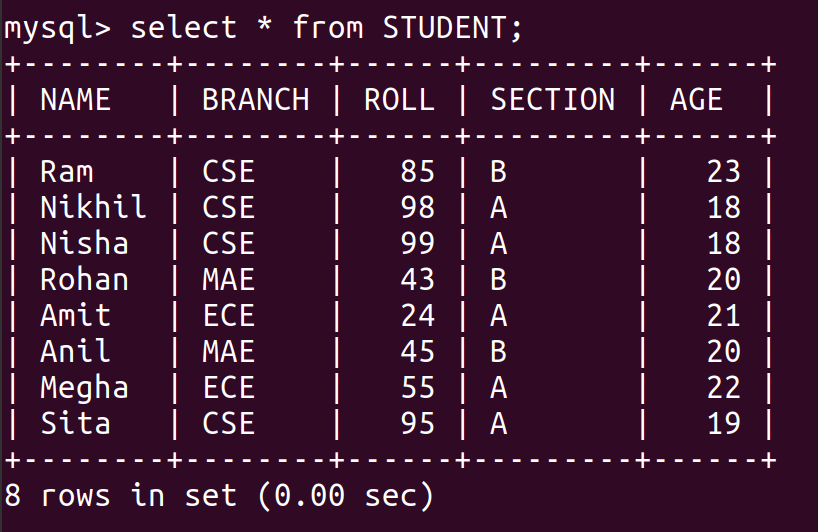
query = "UPDATE STUDENT SET AGE = 23 WHERE Name ='Ram'" cursorObject.execute(query) dataBase.commit() dataBase.close()
`
**Output
Delete Data from Table
We can use the Delete query to delete data from the table in MySQL.
**Syntax:
DELETE FROM TABLE_NAME WHERE ATTRIBUTE_NAME = ATTRIBUTE_VALUE
**Example: Delete Data from MySQL table
Python `
import mysql.connector
dataBase = mysql.connector.connect( host ="localhost", user ="user", passwd ="password", database = "gfg" )
preparing a cursor object
cursorObject = dataBase.cursor()
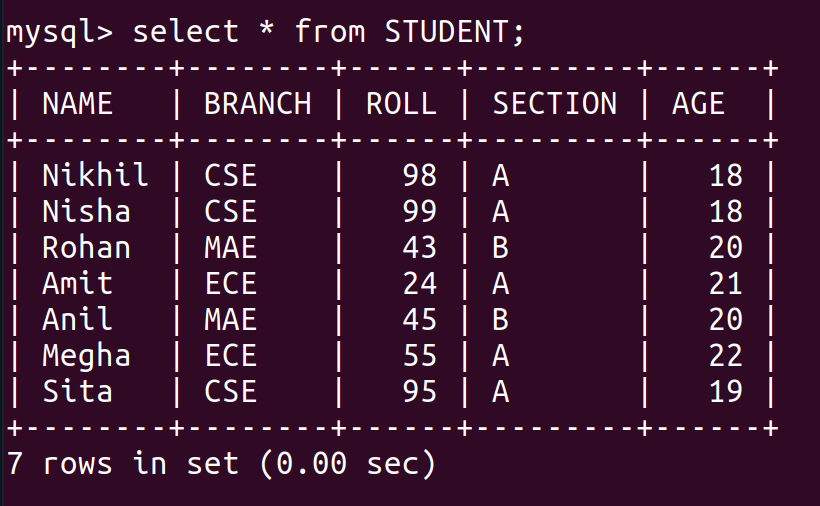
query = "DELETE FROM STUDENT WHERE NAME = 'Ram'" cursorObject.execute(query) dataBase.commit() dataBase.close()
`
**Output
Drop Tables
Drop command affects the structure of the table and not data. It is used to delete an already existing table. For cases where you are not sure if the table to be dropped exists or not DROP TABLE IF EXISTS command is used.
**Syntax:
DROP TABLE tablename;
DROP TABLE IF EXISTS tablename;
At first, let's see the list of tables in our database.
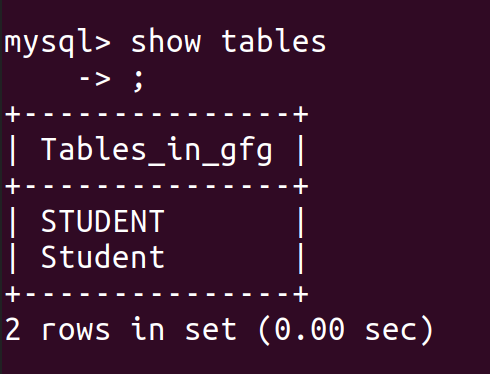
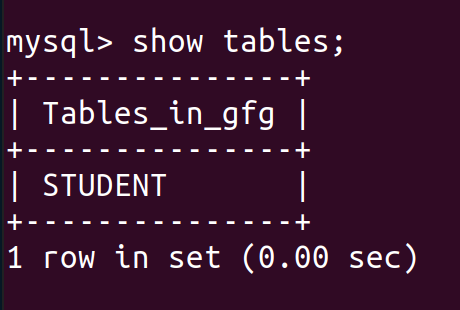
We can see that there are two tables for students, so let's drop the second table.
**Example 1: Drop Table in MySQL
Python `
import mysql.connector
dataBase = mysql.connector.connect( host ="localhost", user ="user", passwd ="password", database = "gfg" )
preparing a cursor object
cursorObject = dataBase.cursor()
query ="DROP TABLE Student;"
cursorObject.execute(query) dataBase.commit() dataBase.close()
`
**Output
**Example 2: Drop Table if exists
Python `
import mysql.connector
dataBase = mysql.connector.connect( host ="localhost", user ="user", passwd ="password", database = "gfg" )
preparing a cursor object
cursorObject = dataBase.cursor() query ="Drop Table if exists Employee;"
cursorObject.execute(query) dataBase.commit() dataBase.close()
`