Python Program to Reverse the Content of a File using Stack (original) (raw)
Last Updated : 20 Jan, 2026
Given a text file, the task is to reverse the order of its lines using a stack. A stack follows the LIFO (Last In, First Out) principle, meaning the last item added is the first to be removed.
**Example: ****(file.txt)**
This is a World of Geeks.
Welcome to GeeksforGeeks.
**Output:
Welcome to GeeksforGeeks.
This is a World of Geeks.
**Approach
- Create an empty stack.
- Read each line of the file and push it onto the stack.
- Pop each line from the stack and write it back to the file.
- The file now contains lines in reverse order.
**Sample Input File:
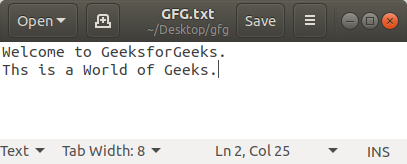
Python `
class Stack: def init(self): self._arr = []
def push(self, val):
    self._arr.append(val)

def pop(self):
    if self.is_empty():
        return None
    return self._arr.pop()

def is_empty(self):
    return len(self._arr) == 0
def reverse_file(filename): S = Stack()
with open(filename, 'r') as original:
    for line in original:
        S.push(line.rstrip("\n"))

with open(filename, 'w') as output:
    while not S.is_empty():
        output.write(S.pop() + "\n")
filename = "file.txt" reverse_file(filename)
with open(filename) as file: for f in file.readlines(): print(f, end="")
`
**Output
This is a World of Geeks.
Welcome to GeeksforGeeks.
**Explanation:
- **S = Stack(): Creates the stack for storing lines.
- for line in original: Iterates over lines in the file.
- **S.push(line.rstrip("\n")): Pushes lines onto the stack, stripping newline characters.
- **open(filename, 'w'): Opens the file to overwrite with reversed content.
- **while not S.is_empty(): Continues until all lines are popped.
- **output.write(S.pop() + "\n"): Pops each line and writes it back in reverse order.
- **for f in file.readlines(): Reads all lines to print them.