Web Scraping IMDB movie rating using Python (original) (raw)
Last Updated : 7 Nov, 2025
We can scrape the IMDb movie ratings and their details with the help of the BeautifulSoup library of Python.
Modules Needed
Below is the list of modules required to scrape from IMDB.
- requests: Requests library is an integral part of Python for making HTTP requests to a specified URL. Whether it be REST APIs or Web Scraping, requests must be learned for proceeding further with these technologies. When one makes a request to a URI, it returns a response.
- html5lib: A pure-python library for parsing HTML. It is designed to conform to the WHATWG HTML specification, as is implemented by all major web browsers.
- bs4: BeautifulSoup object is provided by Beautiful Soup which is a web scraping framework for Python. Web scraping is the process of extracting data from the website using automated tools to make the process faster.
- pandas: Pandas is a library made over the NumPy library which provides various data structures and operators to manipulate the numerical data.
Step by Step Implementation
Steps to implement web scraping in python to extract IMDb movie ratings and its ratings:
1. Import the required modules.
Python `
from bs4 import BeautifulSoup import requests import pandas as pd
`
2. Access the HTML content from the IMDb Top 250 movies page
Python `
url = 'https://www.imdb.com/chart/top/' response = requests.get(url) soup = BeautifulSoup(response.text, "html.parser")
`
3. Extract movie details using HTML tags, each li tag represents a movie block containing title, year, and rating details.
Python `
movies = soup.select("li.ipc-metadata-list-summary-item")
`
4. Create a list to store movie data
Python `
movie_data = []
for movie in movies: title = movie.select_one("h3.ipc-title__text").text.strip() year = movie.select_one("span.cli-title-metadata-item").text.strip() rating_tag = movie.select_one("span.ipc-rating-star--rating") rating = rating_tag.text.strip() if rating_tag else "N/A"
movie_data.append({
    "Title": title,
    "Year": year,
    "Rating": rating
})
`
5. Display the extracted data
Python `
for movie in movie_data: print(f"{movie['Title']} ({movie['Year']}) - Rating: {movie['Rating']}")
`
6. Save the data into a CSV file
Python `
df = pd.DataFrame(movie_data) df.to_csv("imdb_top_250_movies.csv", index=False) print("IMDb data saved successfully to imdb_top_250_movies.csv!")
`
Complete Code Implementation
Python `
from bs4 import BeautifulSoup import requests import pandas as pd
Downloading IMDb Top 250 movie data
url = 'https://www.imdb.com/chart/top/' response = requests.get(url) soup = BeautifulSoup(response.text, "html.parser")
Extract all movie containers
movies = soup.select("li.ipc-metadata-list-summary-item")
Create a list to store movie details
movie_data = []
Loop through each movie block and extract info
for movie in movies: title = movie.select_one("h3.ipc-title__text").text.strip() year = movie.select_one("span.cli-title-metadata-item").text.strip() rating_tag = movie.select_one("span.ipc-rating-star--rating") rating = rating_tag.text.strip() if rating_tag else "N/A"
movie_data.append({
    "Title": title,
    "Year": year,
    "Rating": rating
})
Print movie data in terminal
for movie in movie_data: print(f"{movie['Title']} ({movie['Year']}) - Rating: {movie['Rating']}")
Save the list as a DataFrame and export to CSV
df = pd.DataFrame(movie_data) df.to_csv("imdb_top_250_movies.csv", index=False) print("IMDb data saved successfully to imdb_top_250_movies.csv!")
`
**Output
Title Year Rating
1. The Shawshank Redemption N/A 9.3 (3.1M)
2. The Godfather N/A 9.2 (2.2M)
3. The Dark Knight N/A 9.1 (3.1M)
4. The Godfather: Part II N/A 9.0 (1.5M)
5. 12 Angry Men N/A 9.0 (955K)
IMDb data saved successfully to imdb_top_250_movies.csv!
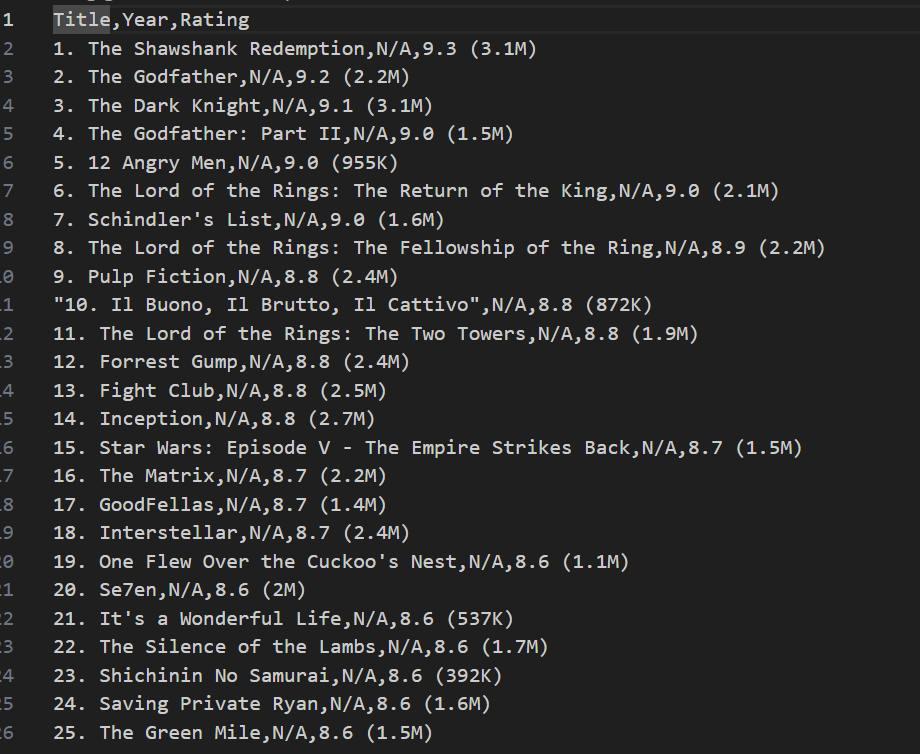
Along with this in the terminal, a .csv file with a given name is saved in the same file and the data in the .csv file will be as shown in the following image.