Scraping Indeed Job Data Using Python (original) (raw)
Last Updated : 23 Jul, 2025
In this article, we are going to see how to scrape Indeed job data using python. Here we will use Beautiful Soup and the request module to scrape the data.
Module needed
- bs4: Beautiful Soup(bs4) is a Python library for pulling data out of HTML and XML files. This module does not come built-in with Python. To install this type the below command in the terminal.
pip install bs4
- requests: Request allows you to send HTTP/1.1 requests extremely easily. This module also does not come built-in with Python. To install this type the below command in the terminal.
pip install requests
Approach:
- Import all the required modules.
- Pass the URL in the getdata() function(User Defined Function) to that will request to a URL, it returns a response. We are using get method to retrieve information from the given server using a given URL.
Syntax:
requests.get(url, args)
- Convert that data into HTML code.
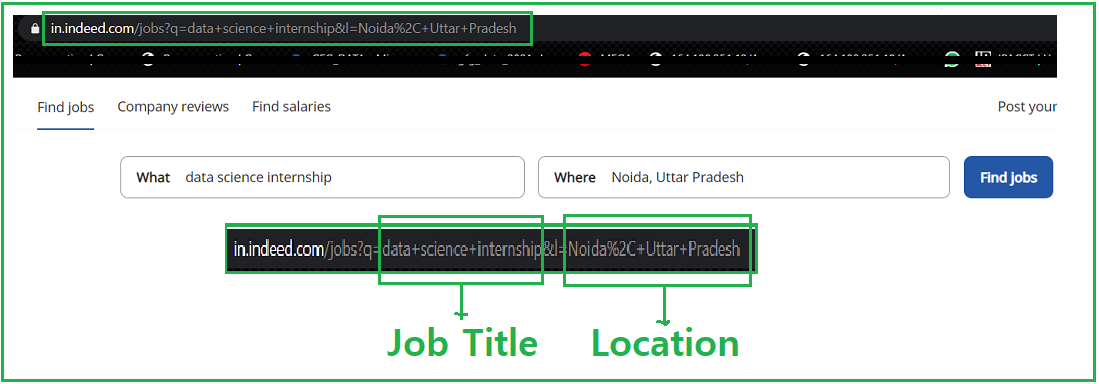
In the given image we see the link, where we search the job and its location then the URL becomes something like this https://in.indeed.com/jobs?q="+job+"&l="+Location, Hence we will format our string into this format.
- Now Parse the HTML content using bs4.
Syntax: soup = BeautifulSoup(r.content, 'html5lib')
Parameters:
- r.content : It is the raw HTML content.
- html.parser : Specifying the HTML parser we want to use.
- Now filter the required data using soup.Find_all function.
- Now find the list with a tag where class_ = jobtitle turnstileLink. You can open the webpage in the browser and inspect the relevant element by pressing right-click as shown in the figure.
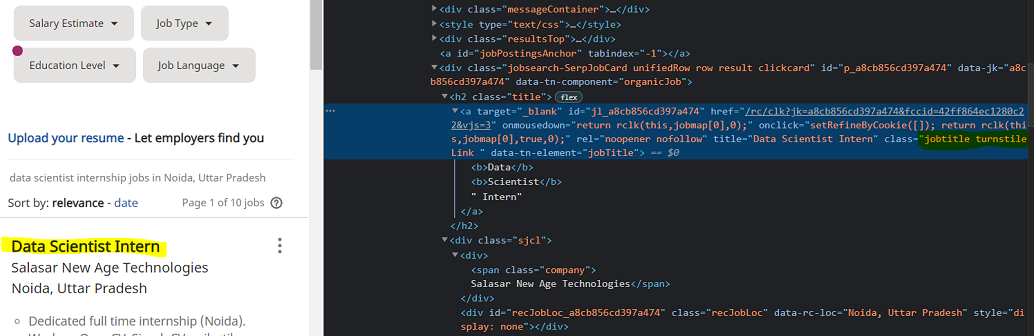
- Find the Company name and address with the same as the above methods.
Functions used:
The code for this implementation is divided into user defined functions to increase the readability of the code and add ease of use.
- geturl(): gets the URL from which data is to be scraped
- html_code(): get HTML code of the URL provided
- job_data(): filter out job data
- Company_data(): filter company data
Program:
Python3 `
import module
import requests from bs4 import BeautifulSoup
user define function
Scrape the data
and get in string
def getdata(url): r = requests.get(url) return r.text
Get Html code using parse
def html_code(url):
# pass the url
# into getdata function
htmldata = getdata(url)
soup = BeautifulSoup(htmldata, 'html.parser')

# return html code
return(soup)
filter job data using
find_all function
def job_data(soup):
# find the Html tag
# with find()
# and convert into string
data_str = ""
for item in soup.find_all("a", class_="jobtitle turnstileLink"):
    data_str = data_str + item.get_text()
result_1 = data_str.split("\n")
return(result_1)
filter company_data using
find_all function
def company_data(soup):
# find the Html tag
# with find()
# and convert into string
data_str = ""
result = ""
for item in soup.find_all("div", class_="sjcl"):
    data_str = data_str + item.get_text()
result_1 = data_str.split("\n")

res = []
for i in range(1, len(result_1)):
    if len(result_1[i]) > 1:
        res.append(result_1[i])
return(res)
driver nodes/main function
if name == "main":
# Data for URL
job = "data+science+internship"
Location = "Noida%2C+Uttar+Pradesh"
url = "https://in.indeed.com/jobs?q="+job+"&l="+Location

# Pass this URL into the soup
# which will return
# html string
soup = html_code(url)

# call job and company data
# and store into it var
job_res = job_data(soup)
com_res = company_data(soup)

# Traverse the both data
temp = 0
for i in range(1, len(job_res)):
    j = temp
    for j in range(temp, 2+temp):
        print("Company Name and Address : " + com_res[j])

    temp = j
    print("Job : " + job_res[i])
    print("-----------------------------")
`
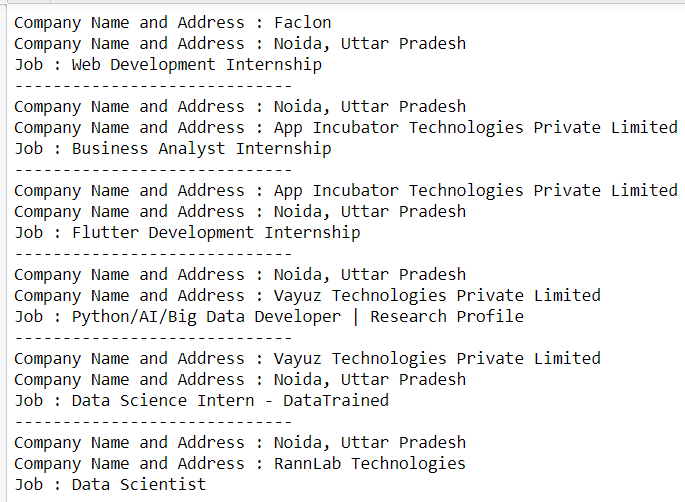
Output: