Single Page Portfolio using Flask (original) (raw)
Last Updated : 23 Jul, 2025
In this article, we’ll discuss how to create a single-page portfolio webpage using the Flask framework. This project demonstrates how to build an impressive portfolio to showcase your skills and experience to HR professionals, colleagues, or potential employers.
Key features of this portfolio are-
- **Download CV button: allowing visitors to download your CV.
- **Contact Me: its a form that sends messages directly to your Gmail account.
Prerequisites
Installation and Setting Up Flask
Create a project folder and then inside that folder create and activate a **virtual environment to install **flask and other necessary **modules in it. Use these commands to create and activate a new virtual environment-
python -m venv venv
.venv\Scripts\activate
And after that install flask using this command-
pip install Flask
Create two folders- templates and static in our app folder. They both serve a specific purpose in flask-
- **static: Store images, **CSS files, and other **static assets here.
- **templates: Store **HTML files (e.g., index.html) .
To know more about creating flask apps, refer to- Creating Flask Applicaions
File Structure
After completing the project, our file system should look like this-
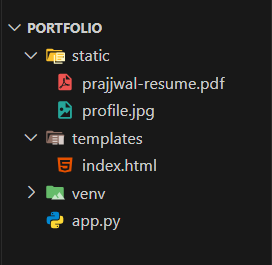
File structure
Creating HTML
Inside the **templates folder create index.html file, it is the main page of the portfolio website, designed with Bootstrap to look great on any device.
**Key Features:
- **Navbar: Easy navigation.
- **Carousel: Highlights your profile.
- **Sections: About, Education, Skills, and Contact form. HTML `
<!-- Bootstrap CSS -->
<link href="https://cdn.jsdelivr.net/npm/bootstrap@5.0.2/dist/css/bootstrap.min.css" rel="stylesheet" integrity="sha384-EVSTQN3/azprG1Anm3QDgpJLIm9Nao0Yz1ztcQTwFspd3yD65VohhpuuCOmLASjC" crossorigin="anonymous">
<title>Portfolio</title>
<!-- Navbar Section -->
<nav class="navbar navbar-expand-sm bg-success navbar-light">
    <a class="navbar-brand" href="#">
        <img src="https://www.geeksforgeeks.org/wp-content/uploads/gfg_transparent_white_small.png" alt="Logo" style="width: 40px;">
    </a>
    <button class="navbar-toggler" type="button" data-bs-toggle="collapse" data-bs-target="#collapse_Navbar">
        <span class="navbar-toggler-icon"></span>
    </button>
    <div class="collapse navbar-collapse" id="collapse_Navbar">
        <ul class="navbar-nav">
            <li class="nav-item">
                <a class="nav-link text-white" href="#educational-info">Education</a>
            </li>
            <li class="nav-item">
                <a class="nav-link text-white" href="#prof-skill">Professional Skills</a>
            </li>
            <li class="nav-item">
                <a class="nav-link text-white" href="#contact-us">Contact Us</a>
            </li>
        </ul>
    </div>
</nav>

<!-- Carousel Section -->
<div id="carouselExampleControls" class="carousel slide text-center carousel-dark" data-bs-ride="carousel">
    <div class="carousel-inner">
        <div class="carousel-item active">
            <img class="rounded-circle shadow-1-strong mb-4" src="../static/images/profile.jpg" alt="Profile" style="width: 150px;">
            <div class="row d-flex justify-content-center">
                <div class="col-lg-8">
                    <h5 class="mb-3">Suraj Kr. Gupta</h5>
                    <p>Python - Technical Content Engineer</p>
                    <p class="text-muted">
                        <i class="fas fa-quote-left pe-2"></i>
                        A Technical Content Engineer ensures that products are presented effectively to clients by creating clear, technical, and business-focused content.
                    </p>
                </div>
            </div>
        </div>
    </div>
</div>

<!-- About Section -->
<div class="section" id="about">
    <div class="container">
        <div class="card">
            <div class="row">
                <div class="col-lg-6 col-md-12">
                    <div class="card-body">
                        <div class="h4 mt-0 title">About</div>
                        <p>Recent graduate with an MS in Computer Science, eager to leverage my experience in building responsive and scalable web applications. Skilled in full-stack software development with a passion for creating impactful solutions.</p>
                    </div>
                </div>
                <div class="col-lg-6 col-md-12">
                    <div class="card-body">
                        <div class="h4 mt-0 title">Basic Information</div>
                        <div class="row">
                            <div class="col-sm-4"><strong class="text-uppercase">Age:</strong></div>
                            <div class="col-sm-8">25</div>
                        </div>
                        <div class="row mt-3">
                            <div class="col-sm-4"><strong class="text-uppercase">Email:</strong></div>
                            <div class="col-sm-8">suraj@example.com</div>
                        </div>
                        <div class="row mt-3">
                            <div class="col-sm-4"><strong class="text-uppercase">Phone:</strong></div>
                            <div class="col-sm-8">+91 123-456-7890</div>
                        </div>
                        <div class="row mt-3">
                            <div class="col-sm-4"><strong class="text-uppercase">Address:</strong></div>
                            <div class="col-sm-8">Patna, Bihar, India</div>
                        </div>
                        <div class="row mt-3">
                            <div class="col-sm-4"><strong class="text-uppercase">Language:</strong></div>
                            <div class="col-sm-8">English, Hindi</div>
                        </div>
                    </div>
                </div>
            </div>
        </div>
    </div>
</div>

<!-- Education Section -->
<div class="section" id="skill">
    <div class="container my-2">
        <div class="h4 text-center mb-4 title" id="educational-info">Education</div>
        <div class="card">
            <div class="card-body">
                <div class="h5">Master in Computer Application</div>
                <p class="category">LNMI Institute of Technology</p>
                <p>Completed a comprehensive program focusing on software development and system design.</p>
                <p><b>Projects:</b></p>
                <ul>
                    <li>Developed a responsive web application using Flask and Bootstrap.</li>
                    <li>Built a data analysis tool with Python and Pandas.</li>
                </ul>
            </div>
        </div>
    </div>
</div>

<!-- Professional Skills Section -->
<div class="section" id="skill">
    <div class="container my-2">
        <div class="h4 text-center mb-4 title" id="prof-skill">Professional Skills</div>
        <div class="card">
            <div class="card-body">
                <b>Programming Languages:</b> Python, SQL, GoLang<br><br>
                <b>Tools:</b> NumPy, Pandas, Matplotlib, MS Excel, OpenCV<br><br>
                <b>Database Management Systems:</b> MySQL, PostgreSQL, MongoDB, SQLite<br><br>
                <b>Internet Technologies:</b> Flask, HTML5, CSS, Django
            </div>
        </div>
    </div>
</div>

<!-- Contact Section -->
<div class="container">
    <div class="section" id="contact">
        <div class="h4 text-center title" id="contact-us">Contact Us</div>
        <div class="card mb-0">
            <div class="row">
                <div class="col-md-6">
                    <div class="card-body">
                        <form action="/sendemail/" method="POST">
                            <div class="p pb-3"><strong>Feel free to contact me</strong></div>
                            <div class="row mb-3">
                                <div class="col">
                                    <input class="form-control" type="text" name="name" placeholder="Name" required>
                                </div>
                            </div>
                            <div class="row mb-3">
                                <div class="col">
                                    <input class="form-control" type="text" name="Subject" placeholder="Subject" required>
                                </div>
                            </div>
                            <div class="row mb-3">
                                <div class="col">
                                    <input class="form-control" type="email" name="_replyto" placeholder="E-mail" required>
                                </div>
                            </div>
                            <div class="row mb-3">
                                <div class="col">
                                    <textarea class="form-control" name="message" placeholder="Your Message" required></textarea>
                                </div>
                            </div>
                            <div class="row">
                                <div class="col">
                                    <button class="btn btn-primary" type="submit">Send</button>
                                    <a class="btn btn-primary" href="{{ url_for('static', filename='Suraj.pdf') }}" target="_blank">Download CV</a>
                                </div>
                            </div>
                        </form>
                    </div>
                </div>
                <div class="col-md-6">
                    <div class="card-body">
                        <p class="mb-0"><strong>Address</strong></p>
                        <p class="pb-2">136, Royal Kapson, Noida, India, 800123</p>
                        <p class="mb-0"><strong>Phone</strong></p>
                        <p class="pb-2">+91 345-567-8346</p>
                        <p class="mb-0"><strong>Email</strong></p>
                        <p>suraj@example.com</p>
                    </div>
                </div>
            </div>
        </div>
    </div>
</div>

<!-- Bootstrap JS -->
<script src="https://cdn.jsdelivr.net/npm/bootstrap@5.0.2/dist/js/bootstrap.bundle.min.js" integrity="sha384-MrcW6ZMFYlzcLA8Nl+NtUVF0sA7MsXsP1UyJoMp4YLEuNSfAP+JcXn/tWtIaxVXM" crossorigin="anonymous"></script>
`
**Code Breakdown:
- **Head Section: Sets up the page with meta tags for responsiveness and links to Bootstrap CSS for styling.
- **Body Sections:
- **Header: Shows a logo or image at the top.
- **Navbar: A green menu bar with links to Education, Skills, and Contact sections (collapsible on small screens).
- **Carousel: Displays a profile picture, name, job title, and a quote (can slide if more items are added).
- **About: Shares a short bio and personal details like age, email, and address.
- **Education: Lists your degree, school, and projects.
- **Skills: Shows your programming languages, tools, and tech skills.
- **Contact: Includes a form to send you messages and a button to download your CV, plus contact info.
- **Bootstrap JS: Added at the end to make interactive features (like the navbar toggle) work.
Below is the snapshot of the live **index.html page.
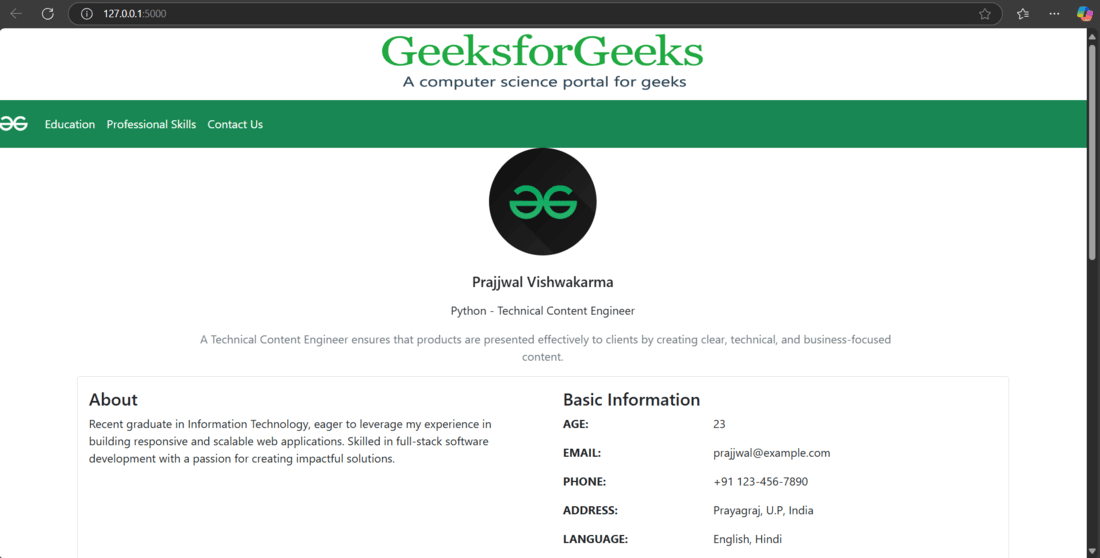
Index.html

index.html
Creating app.py
The **app.py file contains our main flask app. It connects the front-end with the back-end, handling tasks like displaying the portfolio and managing the contact form. This **script makes the site **dynamic and interactive by processing user input and sending emails.
Other than basic flask libraries, we are going to use these libraries in this project-
- **EmailMessage: A Python class from the **email.message module used to create structured email messages with headers (e.g., To, From, Subject) and content.
- **smtplib: A Python library that enables sending emails via the Simple Mail Transfer Protocol (**SMTP), connecting to email servers like Gmail’s. Python `
from flask import Flask, render_template, request, redirect, url_for from email.message import EmailMessage import smtplib
app = Flask(name)
@app.route("/") def index(): return render_template("index.html")
@app.route("/sendemail/", methods=["POST"]) def sendemail(): if request.method == "POST": name = request.form["name"] subject = request.form["Subject"] email = request.form["_replyto"] message = request.form["message"]
    # Replace with your Gmail credentials
    your_email = "your_email@gmail.com"
    your_password = "your_app_password"  # Use an App Password if 2FA is enabled

    # Set up the SMTP server
    server = smtplib.SMTP("smtp.gmail.com", 587)
    server.ehlo()
    server.starttls()
    server.login(your_email, your_password)

    # Compose the email
    msg = EmailMessage()
    msg.set_content(f"Name: {name}\nEmail: {email}\nSubject: {subject}\nMessage: {message}")
    msg["To"] = your_email  # Send the email to yourself
    msg["From"] = your_email
    msg["Subject"] = subject

    # Send the email
    try:
        server.send_message(msg)
        print("Email sent successfully!")
    except Exception as e:
        print(f"Failed to send email: {e}")

    server.quit()
    return redirect("/")
if name == "main": app.run(debug=True)
`
**Code Explanation:
- **Route for Home Page: The root route ("/") renders an HTML template (index.html) to display the main page.
- **Route to Send Email: The ****/sendemail/** route handles **POST requests. It extracts form data (name, subject, email, message) and uses the SMTP protocol (with Gmail settings) to send an email containing this information.
- **SMTP Configuration and Email Sending: It sets up the **SMTP server with Gmail credentials, creates an email message using **EmailMessage, and attempts to send the message. Any errors during sending are caught and printed.
- **App Execution: Finally, the Flask app runs in debug mode when executed directly.
**Note: Before running your code please set your Gmail to receive Incoming messages by your portfolio. You can go directly by clicking here, and turn it ON otherwise you will show an SMTP authentication error.

Browser Setting
Running The Application
To run the flask app, use this command in the terminal-
python app.py
This will start the flask app and then visit the development url- "**http://127.0.0.1:5000" in a browser.

Terminal Outpur after running the app