turtle.color() method in Python (original) (raw)
Last Updated : 15 Jul, 2025
**turtle.color() method is a function of the turtle module in Python used to change the color of the turtle’s pen and fill. It allows us to customize the appearance of shapes drawn by the turtle by specifying colors using color names, RGB values, or hex codes.
Syntax
turtle.color(*args)
The *args allows the method to accept different combinations of arguments, such as a single color string, a tuple of RGB values, or separate RGB values.
**Parameters:
- **turtle.color(colorstring): colorstring is a string representing a color name (e.g., 'red', 'green', 'blue'). You can also use hex codes (e.g., '#FF5733').
- **turtle.color((r, g, b)): (r, g, b) is a tuple containing three values r, g, b representing the RGB color code, where each value is between 0 and 255. Example: (255, 0, 0) for red.
- **turtle.color(r, g, b): Three separate integer values representing the RGB color code. Example: 255, 0, 0 for red.
**Return Value: The color() method does not return a value. It modifies the color properties of the turtle object.
Examples of turtle.color() method
1. Dynamic Color Change with turtle.color()
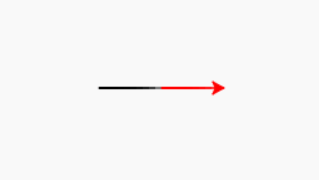
In this code, we will use the turtle module in Python to move the turtle forward and change its color. Initially, the turtle moves in the default color (black), then the color is changed to red, and the turtle moves again in red.
Python `
import turtle
use forward by 50 (default = black)
turtle.forward(50)
change the color of turtle
turtle.color("red")
use forward by 50 (color = red)
turtle.forward(50)
`
**Output
turtleArrow
**Explanation:
- Code starts by using **turtle.forward(50), which moves the turtle 50 units forward in the default color (black).
- **turtle.color("red") command changes the turtle’s drawing color to red.
- **turtle.forward(50) command moves the turtle 50 units forward again, but this time it draws a red line.
- turtle's movement is controlled with the forward() function, while the drawing color is controlled by the color() method, allowing us to dynamically change the turtle’s pen color for subsequent movements.
2. Drawing a Colored Square with turtle.color()
In this code, we will use the turtle module to move the turtle and change its color dynamically. The turtle moves forward in different colors (red, blue, green) while turning by 90 degrees after each move, creating a square with different colored sides.
Python `
import turtle
turtle.forward(100)
turtle.color("red")
use forward by 100 in 90 degrees right (color = red)
turtle.right(90) turtle.forward(100)
change the color of turtle
turtle.color((41,41,253))
use forward by 100 in 90 degrees right (color = blue)
turtle.right(90) turtle.forward(100)
change the color of turtle
turtle.color(41,253,41)
use forward by 100 in 90 degrees right (color = green)
turtle.right(90) turtle.forward(100)
`
**Output :

**Explanation:
- Code begins by moving the turtle 100 units forward in the default color (black).
- **turtle.color("red") changes the pen color to red, and the turtle turns 90 degrees right using **turtle.right(90), then moves forward 100 units, drawing a red line.
- Color is then changed to blue using **turtle.color((41,41,253)) (RGB format), and the turtle moves forward again, drawing a blue line.
- Color is changed to green using **turtle.color(41,253,41), and the turtle moves forward to complete the final side of the square in green.