Web Scraping for Stock Prices in Python (original) (raw)
Web scraping is a data extraction method that collects data only from websites. It is often used for data mining and gathering valuable insights from large websites. Web scraping is also useful for personal use. Python includes a nice library called BeautifulSoup that enables web scraping. In this article, we will extract current stock prices using web scraping and save them in an excel file using Python.
Required Modules
In this article, we'll look at how to work with the **Requests, **Beautiful Soup and **Pandas Python packages to consume data from websites.
- **Requestsmodule allows you to integrate your Python programs with web services.
- **Beautiful Soup module is designed to make screen scraping a snap. Using Python's interactive console and these two libraries, we'll walk through how to assemble a web page and work with the textual information available on it.
- **Pandasmodule is designed to provide high-performance data manipulation in Python. It is used for data analysis that requires lots of processing, such as **restructuring, **cleaning or **merging, etc.
**Approach
- Initially, we are going to import our required libraries.
- Then we take the URL stored in our list.
- We will feed the URL to our soup object which will then extract relevant information from the given URL based on the class id we provide it.
- Store all the data in the Pandas Dataframe and save it to a CSV file.
**Note: The HTML structure of stock data websites may change frequently.
- Before running this script, inspect the webpage and update the element **IDs, **classes or **XPath selectors accordingly.
- Use browser developer tools (**F12 - Inspect Element) to find the correct elements for price, change and volume.
Step 1: Import Libraries
We import the modules for Pandas, Requests and Beautiful soup. Add a user agent and a header declaration. This makes sure that the target website for web scraping won't automatically classify the traffic as spam and end up being blacklisted. Many user agents are available at https://developers.whatismybrowser.com/
Python `
import requests from bs4 import BeautifulSoup import pandas as pd import time
headers = {'user-agent':'Mozilla/5.0
(Windows NT 10.0; Win64; x64)
AppleWebKit/537.36 (KHTML, like Gecko)
Chrome/84.0.4147.105 Safari/537.36'}
`
Step 2: Collect URLs to Scrap
We’ll assign the URL of the required stock web pages, www.groww.com in the list of URLs:
urls = [
'https://groww.in/us-stocks/nke',
'https://groww.in/us-stocks/ko',
'https://groww.in/us-stocks/msft',
'https://groww.in/stocks/m-india-ltd',
'https://groww.in/us-stocks/axp',
'https://groww.in/us-stocks/amgn',
'https://groww.in/us-stocks/aapl',
'https://groww.in/us-stocks/ba',
'https://groww.in/us-stocks/csco',
'https://groww.in/us-stocks/gs',
'https://groww.in/us-stocks/ibm',
'https://groww.in/us-stocks/intc',
'https://groww.in/us-stocks/jpm',
'https://groww.in/us-stocks/mcd',
'https://groww.in/us-stocks/crm',
'https://groww.in/us-stocks/vz',
'https://groww.in/us-stocks/v',
'https://groww.in/us-stocks/wmt',
'https://groww.in/us-stocks/dis'
]
Step 3: Retrieving Element Ids
We identify the element by looking at the rendered web page, but it's impossible for a script to determine that. To find the target element, get its element ID and enter it into the script. Getting the ID of an item is pretty easy. Let's say you want the item id for the **stock name. All we have to do is go to the URL and see the text in the console. Get the text next to the class

Element ID
Let's iterate through the list of stocks we need and use soup.find() to find the tag with the specified id and print the company, current stock price, change in percentage of stocks and volume of stocks.
company = soup.find('h1', {'class': 'usph14Head displaySmall'}).text
price = soup.find('span', {'class': 'uht141Pri contentPrimary displayBase'}).text
change = soup.find('div', {'class': 'uht141Day bodyBaseHeavy contentNegative'}).text
volume=soup.find('table', {'class': 'tb10Table col l5'}).find_all('td')[1].text
As we can see the price and change has the same Class Id. So let's fund all the span tags and use the **find_all('span')[tag number] and extract the text.

Class ID
Step 4: Try Data Extraction
Basically, during the extraction of data from a web page, we can expect AttributeError (When we try to access the Tag using BeautifulSoup from a website and that tag is not present on that website then BeautifulSoup always gives an AttributeError). To handle this error let's use Try and except the concept. Also, you can use the code in **Google collabas it has all the updated versions.
**How does try() work?
- First, the try clause is executed i.e. the code between the try and except clause.
- If there is no exception, then only the try clause will run, except the clause is finished.
- If any exception occurs, the try clause will be skipped and except clause will run.
- If any exception occurs, but the except clause within the code doesn’t handle it, it is passed on to the outer try statements. If the exception is left unhandled, then the execution stops.
- A try statement can have more than one except clause.
When the try block is executed we are going to extract data from the individual stock and store the data in the variables
- Company(name of the stock)
- Price (current price)
- Change(change of stock value +ve increase or -ve decrease)
- Volume(stock volume)
We will use a list and store the company name, price of a stock, change in stock and volume of each stock and store them in a list that consists of the stock data of all individual stocks.
Python `
all=[] for url in urls: page = requests.get(url,headers=headers) try: soup = BeautifulSoup(page.text, 'html.parser') company = soup.find('h1', {'class': 'usph14Head displaySmall'}).text price = soup.find('span', {'class': 'uht141Pri contentPrimary displayBase'}).text change = soup.find('div', {'class': 'uht141Day bodyBaseHeavy contentNegative'}).text volume=soup.find('table', {'class': 'tb10Table col l5'}).find_all('td')[1].text x=[company,price,change,volume] all.append(x)
except AttributeError:
  print("Change the Element id")
# Wait for a short time to avoid rate limiting
time.sleep(10)
This code is modified by Susobhan Akhuli
`
Step 5: Storing Data to Data Frame
Let's declare the column names and using pandas create a Dataframe with columns: Company, Price, Change and Volume.
**Syntax:
Column_names = [list of column names]
dataframe = pd.DataFrame(columns = column_names)
Next, we will iterate through the list and fill each data frame's each row with the details of each company by using built-in functions loc( ). The loc() function is label based data selecting method which means that we have to pass the name of the row or column which we want to select. The **df.loc[index] = i, assigning the data to that row after that we will update the index in the Data Frame. The reset_index() is used to reset the index of the Data Frame from 0.
Python `
column_names = ["Company", "Price", "Change", "Volume"] df = pd.DataFrame(columns=column_names) for i in all: index = 0 df.loc[index] = i df.index = df.index + 1 df = df.reset_index(drop=True) df
`
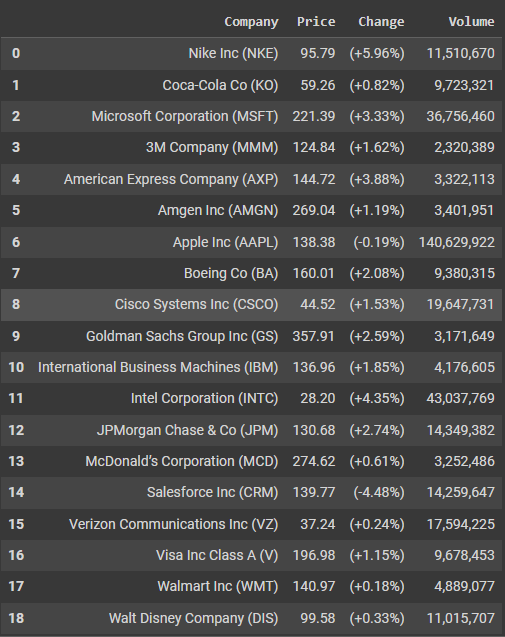
Storing Dataframe
Step 6: Save it to Excel
To save the data as a CSV file we can use the built-in Function to_excel.
Python `
df.to_excel('stocks.xlsx')
`
Complete code
Here is the entire code:
Python `
import requests from bs4 import BeautifulSoup import pandas as pd import time
headers = {'user-agent':'Mozilla/5.0
(Windows NT 10.0; Win64; x64)
AppleWebKit/537.36 (KHTML, like Gecko)
Chrome/84.0.4147.105 Safari/537.36'}
urls = [
'https://groww.in/us-stocks/nke',
'https://groww.in/us-stocks/ko',
'https://groww.in/us-stocks/msft',
'https://groww.in/stocks/m-india-ltd',
'https://groww.in/us-stocks/axp',
'https://groww.in/us-stocks/amgn',
'https://groww.in/us-stocks/aapl',
'https://groww.in/us-stocks/ba',
'https://groww.in/us-stocks/csco',
'https://groww.in/us-stocks/gs',
'https://groww.in/us-stocks/ibm',
'https://groww.in/us-stocks/intc',
'https://groww.in/us-stocks/jpm',
'https://groww.in/us-stocks/mcd',
'https://groww.in/us-stocks/crm',
'https://groww.in/us-stocks/vz',
'https://groww.in/us-stocks/v',
'https://groww.in/us-stocks/wmt',
'https://groww.in/us-stocks/dis'
]
all=[] for url in urls: page = requests.get(url,headers=headers) try: soup = BeautifulSoup(page.text, 'html.parser') company = soup.find('h1', {'class': 'usph14Head displaySmall'}).text price = soup.find('span', {'class': 'uht141Pri contentPrimary displayBase'}).text change = soup.find('div', {'class': 'uht141Day bodyBaseHeavy contentNegative'}).text volume=soup.find('table', {'class': 'tb10Table col l5'}).find_all('td')[1].text x=[company,price,change,volume] all.append(x)
except AttributeError:
  print("Change the Element id")
# Wait for a short time to avoid rate limiting
time.sleep(10)
column_names = ["Company", "Price", "Change","Volume"] df = pd.DataFrame(columns = column_names) for i in all: index=0 df.loc[index] = i df.index = df.index + 1 df=df.reset_index(drop=True) df.to_excel('stocks.xlsx')
This code is modified by Susobhan Akhuli
`